

n8n'de yapay zekayla PDF okuyun, verileri gönderene onaylatın
Bu workflow'u içe aktarın ve olduğu gibi çalıştırın. Örnek bir faturayı indirir, bir yapay zeka modeliyle okur ve her değeri doldurulmuş bir Formstep formu gönderir. Workflow sonra gönderenin onaylamasını bekler ve düzelttiği değerleri listeler.
Yayınlandı · Güncellendi
Bir yapay zeka modeli faturayı saniyeler içinde okur ve iki rakamı yer değiştirmiş bir toplam dahil her değerden aynı kesinlikle emin görünür. Bu workflow’un deneme çalıştırmasında 27 325’i 27 235 diye okudu.
Bu yüzden workflow faturayı bilen tek kişiye, göndericiye sorar. Formstep ona bir istek yollar: yapay zekanın okuduklarının önceden doldurulduğu, özel bağlantılı bir form. Gönderen her değeri onaylar ya da düzeltir.
Kısaca: Bir yapay zeka modeli PDF’i okur, bir Formstep formu göndericiden okunanları onaylamasını ister ve workflow kontrol edilmiş değerlerle, bir de göndericinin neleri değiştirdiğinin listesiyle devam eder. Workflow JSON’unu alın.
Neye ihtiyacınız var
- Formstep topluluk düğümünün kurulu ve bağlı olduğu, kendi sunucunuzda çalışan bir n8n.
- Çalışma alanınızda yayınlanmış Confirm Invoice Details şablonu.
- Gerçek faturalar için bir Anthropic API anahtarı. Örnek çalıştırma sabitlenmiş bir sonuç kullanır ve anahtar gerektirmez.
Diğer belgeler
Siparişler, talepler ya da irsaliyeler için o belgeye uygun bir form oluşturun ve yapay zeka adımının her özniteliğini alan anahtarlarından biriyle adlandırın. n8n ile yapay zekayla PDF çıkarma, göndericinin onayıyla yazısı her düğümü ve tam deneme çalıştırmasını anlatır.
n8n iş akışı adım adım nasıl çalışır
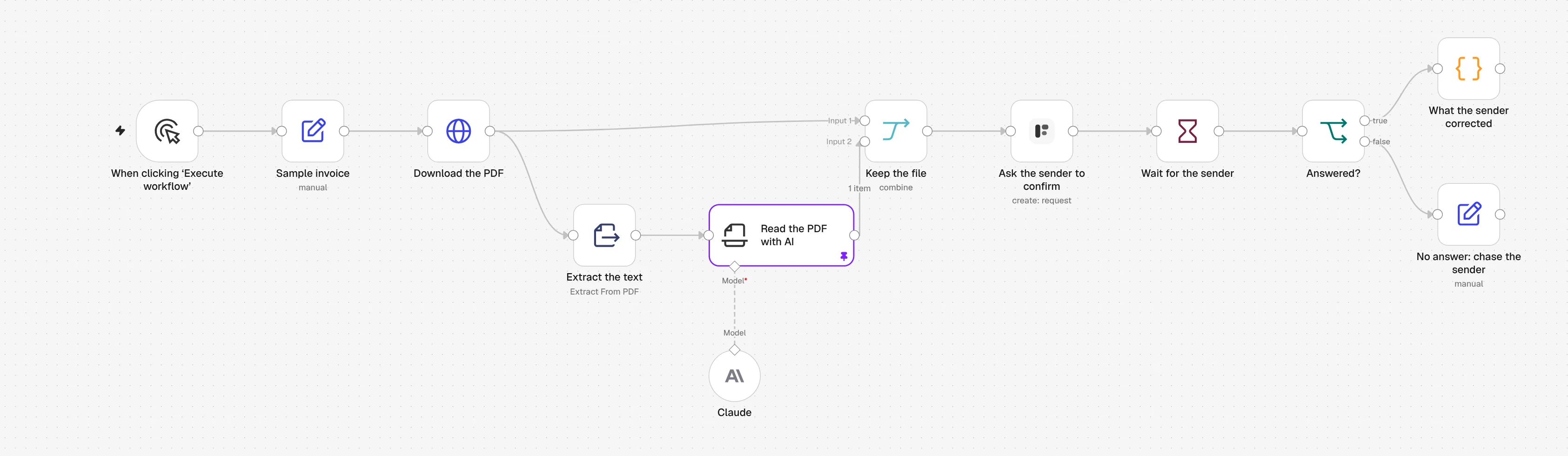
1. Download the PDF
Örnek bir fatura HTTP ile iner. Gerçek faturalar için bir Gmail, Outlook ya da Google Drive tetikleyicisi koyun.
2. Extract the text
Extract from File, PDF'in metnini çıkarır. Taranmış PDF'te metin yoktur; aşağıdaki sorulara bakın.
3. Read the PDF with AI
Claude modelli bir Information Extractor, form sorusu başına bir değer döndürür: tedarikçi, fatura numarası, tarihler ve toplam.
4. Ask the sender to confirm
Formstep düğümü Confirm Invoice Details formunu göndericiye yollar; her değer doldurulmuş, kendi PDF'i de formun üstünde gösterilmiştir.
5. Wait for the sender
Bir Wait düğümü, gönderen formu gönderene ya da istek beş gün sonra sona erene kadar workflow'u bekletir.
6. What the sender corrected
Bir Code düğümü yapay zekanın değerlerini onaylananlarla karşılaştırır ve değişenleri listeler; böylece düzeltilen faturalar bir kişiye gider.
n8n iş akışını içe aktarın
Ctrl+V (Mac'te Cmd+V) ile bir n8n tuvaline yapıştırın ya da dosyayı indirip Import from File seçeneğini kullanın. Sonra uyarı işaretli düğümlerde kimlik bilgilerinizi ve formlarınızı seçin.
JSON'u göster
{
  "name": "Formstep: read a PDF with AI, then have the sender confirm it",
  "nodes": [
    {
      "parameters": {
        "content": "## Read a PDF with AI, then have the sender confirm it\n\nRuns as it is on a sample invoice, with a pinned AI result.\n\n1. **Ask the sender to confirm**: pick your Formstep credential and the published Confirm Invoice Details form.\n2. **Claude**: pick a model credential, or swap in any chat model. Unpin **Read the PDF with AI** once it is connected.\n3. Swap **Sample invoice** and **Download the PDF** for your Gmail, Outlook or Google Drive trigger.\n\nTest Mode is on, so nothing is emailed. Delivery is Email the Invitation, which needs Formstep Pro or Business.",
        "height": 360,
        "width": 640,
        "color": 5
      },
      "type": "n8n-nodes-base.stickyNote",
      "typeVersion": 1,
      "position": [
        -40,
        -420
      ],
      "id": "7c4d1e2a-2000-4000-8000-000000000001",
      "name": "How to set it up"
    },
    {
      "parameters": {},
      "type": "n8n-nodes-base.manualTrigger",
      "typeVersion": 1,
      "position": [
        0,
        0
      ],
      "id": "7c4d1e2a-2000-4000-8000-000000000002",
      "name": "When clicking ‘Execute workflow’"
    },
    {
      "parameters": {
        "assignments": {
          "assignments": [
            {
              "id": "7c4d1e2a-2000-4000-8000-000000000003",
              "name": "pdfUrl",
              "value": "https://formstep.io/docs/guides/n8n/samples/invoice.pdf",
              "type": "string"
            },
            {
              "id": "7c4d1e2a-2000-4000-8000-000000000004",
              "name": "senderEmail",
              "value": "billing@fjord-office.example",
              "type": "string"
            }
          ]
        },
        "options": {}
      },
      "type": "n8n-nodes-base.set",
      "typeVersion": 3.4,
      "position": [
        220,
        0
      ],
      "id": "7c4d1e2a-2000-4000-8000-000000000005",
      "name": "Sample invoice"
    },
    {
      "parameters": {
        "url": "={{ $json.pdfUrl }}",
        "options": {
          "response": {
            "response": {
              "responseFormat": "file"
            }
          }
        }
      },
      "type": "n8n-nodes-base.httpRequest",
      "typeVersion": 4.2,
      "position": [
        440,
        0
      ],
      "id": "7c4d1e2a-2000-4000-8000-000000000006",
      "name": "Download the PDF"
    },
    {
      "parameters": {
        "operation": "pdf",
        "options": {}
      },
      "type": "n8n-nodes-base.extractFromFile",
      "typeVersion": 1.1,
      "position": [
        660,
        160
      ],
      "id": "7c4d1e2a-2000-4000-8000-000000000007",
      "name": "Extract the text"
    },
    {
      "parameters": {
        "text": "={{ $json.text }}",
        "attributes": {
          "attributes": [
            {
              "name": "supplier_name",
              "type": "string",
              "description": "The company that issued the invoice",
              "required": true
            },
            {
              "name": "invoice_number",
              "type": "string",
              "description": "The invoice number, as printed",
              "required": true
            },
            {
              "name": "invoice_date",
              "type": "date",
              "description": "The invoice date, as YYYY-MM-DD",
              "required": true
            },
            {
              "name": "due_date",
              "type": "date",
              "description": "The payment due date, as YYYY-MM-DD",
              "required": true
            },
            {
              "name": "total_amount",
              "type": "number",
              "description": "The total to pay, including VAT, as a number without currency",
              "required": true
            }
          ]
        },
        "options": {}
      },
      "type": "@n8n/n8n-nodes-langchain.informationExtractor",
      "typeVersion": 1.2,
      "position": [
        880,
        160
      ],
      "id": "7c4d1e2a-2000-4000-8000-000000000008",
      "name": "Read the PDF with AI"
    },
    {
      "parameters": {
        "model": {
          "__rl": true,
          "mode": "list",
          "value": "claude-sonnet-5-5",
          "cachedResultName": "Claude Sonnet 5.5"
        },
        "options": {}
      },
      "type": "@n8n/n8n-nodes-langchain.lmChatAnthropic",
      "typeVersion": 1.6,
      "position": [
        880,
        380
      ],
      "id": "7c4d1e2a-2000-4000-8000-000000000009",
      "name": "Claude"
    },
    {
      "parameters": {
        "mode": "combine",
        "combineBy": "combineByPosition",
        "options": {}
      },
      "type": "n8n-nodes-base.merge",
      "typeVersion": 3.2,
      "position": [
        1120,
        0
      ],
      "id": "7c4d1e2a-2000-4000-8000-000000000010",
      "name": "Keep the file"
    },
    {
      "parameters": {
        "resource": "request",
        "operation": "create",
        "formId": {
          "__rl": true,
          "mode": "list",
          "value": ""
        },
        "recipientEmail": "={{ $('Sample invoice').item.json.senderEmail }}",
        "fields": {
          "mappingMode": "defineBelow",
          "value": {
            "supplier_name": "={{ $json.output.supplier_name }}",
            "invoice_number": "={{ $json.output.invoice_number }}",
            "invoice_date": "={{ $json.output.invoice_date }}",
            "due_date": "={{ $json.output.due_date }}",
            "total_amount": "={{ $json.output.total_amount }}"
          },
          "matchingColumns": [],
          "schema": [
            {
              "id": "supplier_name",
              "displayName": "Supplier (supplier_name)",
              "required": false,
              "defaultMatch": false,
              "canBeUsedToMatch": false,
              "display": true,
              "type": "string"
            },
            {
              "id": "invoice_number",
              "displayName": "Invoice Number (invoice_number)",
              "required": false,
              "defaultMatch": false,
              "canBeUsedToMatch": false,
              "display": true,
              "type": "string"
            },
            {
              "id": "invoice_date",
              "displayName": "Invoice Date (invoice_date)",
              "required": false,
              "defaultMatch": false,
              "canBeUsedToMatch": false,
              "display": true,
              "type": "dateTime"
            },
            {
              "id": "due_date",
              "displayName": "Due Date (due_date)",
              "required": false,
              "defaultMatch": false,
              "canBeUsedToMatch": false,
              "display": true,
              "type": "dateTime"
            },
            {
              "id": "total_amount",
              "displayName": "Total Amount (total_amount)",
              "required": false,
              "defaultMatch": false,
              "canBeUsedToMatch": false,
              "display": true,
              "type": "number"
            },
            {
              "id": "confirmed",
              "displayName": "I confirm these details are correct (confirmed)",
              "required": false,
              "defaultMatch": false,
              "canBeUsedToMatch": false,
              "display": true,
              "type": "boolean",
              "removed": true
            },
            {
              "id": "notes",
              "displayName": "Notes (notes)",
              "required": false,
              "defaultMatch": false,
              "canBeUsedToMatch": false,
              "display": true,
              "type": "string",
              "removed": true
            }
          ],
          "attemptToConvertTypes": false,
          "convertFieldsToString": false
        },
        "readonly": [],
        "documents": {
          "values": [
            {
              "binaryProperty": "data",
              "name": "=Invoice {{ $json.output.invoice_number }}",
              "field": ""
            }
          ]
        },
        "waitForOutcome": true,
        "additionalFields": {
          "delivery": "email",
          "externalId": "=invoice-{{ $json.output.invoice_number }}-{{ $execution.id }}",
          "expiresAt": "={{ $now.plus({ days: 5 }).toISO() }}",
          "test": true
        }
      },
      "type": "n8n-nodes-formstep.formstep",
      "typeVersion": 5,
      "position": [
        1340,
        0
      ],
      "id": "7c4d1e2a-2000-4000-8000-000000000011",
      "name": "Ask the sender to confirm"
    },
    {
      "parameters": {
        "resume": "webhook",
        "httpMethod": "POST",
        "options": {}
      },
      "type": "n8n-nodes-base.wait",
      "typeVersion": 1.1,
      "position": [
        1560,
        0
      ],
      "id": "7c4d1e2a-2000-4000-8000-000000000012",
      "name": "Wait for the sender",
      "webhookId": "7c4d1e2a-2000-4000-8000-000000000013"
    },
    {
      "parameters": {
        "conditions": {
          "options": {
            "caseSensitive": true,
            "leftValue": "",
            "typeValidation": "strict",
            "version": 2
          },
          "conditions": [
            {
              "id": "7c4d1e2a-2000-4000-8000-000000000014",
              "leftValue": "={{ $json.body.type }}",
              "rightValue": "request.completed",
              "operator": {
                "type": "string",
                "operation": "equals"
              }
            }
          ],
          "combinator": "and"
        },
        "options": {}
      },
      "type": "n8n-nodes-base.if",
      "typeVersion": 2.2,
      "position": [
        1780,
        0
      ],
      "id": "7c4d1e2a-2000-4000-8000-000000000015",
      "name": "Answered?"
    },
    {
      "parameters": {
        "mode": "runOnceForEachItem",
        "jsCode": "// Compare what the AI read with what the sender confirmed.\nconst read = $('Read the PDF with AI').item.json.output\nconst confirmed = $json.body.data.answers\nconst corrected = Object.keys(read).filter((key) => String(read[key]) !== String(confirmed[key]))\nreturn { json: { invoice: confirmed, corrected, notes: confirmed.notes ?? null } }"
      },
      "type": "n8n-nodes-base.code",
      "typeVersion": 2,
      "position": [
        2000,
        -100
      ],
      "id": "7c4d1e2a-2000-4000-8000-000000000016",
      "name": "What the sender corrected"
    },
    {
      "parameters": {
        "assignments": {
          "assignments": [
            {
              "id": "7c4d1e2a-2000-4000-8000-000000000017",
              "name": "to",
              "value": "={{ $('Sample invoice').item.json.senderEmail }}",
              "type": "string"
            },
            {
              "id": "7c4d1e2a-2000-4000-8000-000000000018",
              "name": "message",
              "value": "=We still need you to confirm invoice {{ $('Read the PDF with AI').item.json.output.invoice_number }} ({{ $json.body.type }}).",
              "type": "string"
            }
          ]
        },
        "options": {}
      },
      "type": "n8n-nodes-base.set",
      "typeVersion": 3.4,
      "position": [
        2000,
        120
      ],
      "id": "7c4d1e2a-2000-4000-8000-000000000019",
      "name": "No answer: chase the sender"
    }
  ],
  "pinData": {
    "Read the PDF with AI": [
      {
        "json": {
          "output": {
            "supplier_name": "Fjord Office Supplies AS",
            "invoice_number": "INV-2026-0187",
            "invoice_date": "2026-10-20",
            "due_date": "2026-11-03",
            "total_amount": 27235
          }
        }
      }
    ]
  },
  "connections": {
    "When clicking ‘Execute workflow’": {
      "main": [
        [
          {
            "node": "Sample invoice",
            "type": "main",
            "index": 0
          }
        ]
      ]
    },
    "Sample invoice": {
      "main": [
        [
          {
            "node": "Download the PDF",
            "type": "main",
            "index": 0
          }
        ]
      ]
    },
    "Download the PDF": {
      "main": [
        [
          {
            "node": "Extract the text",
            "type": "main",
            "index": 0
          },
          {
            "node": "Keep the file",
            "type": "main",
            "index": 0
          }
        ]
      ]
    },
    "Extract the text": {
      "main": [
        [
          {
            "node": "Read the PDF with AI",
            "type": "main",
            "index": 0
          }
        ]
      ]
    },
    "Read the PDF with AI": {
      "main": [
        [
          {
            "node": "Keep the file",
            "type": "main",
            "index": 1
          }
        ]
      ]
    },
    "Claude": {
      "ai_languageModel": [
        [
          {
            "node": "Read the PDF with AI",
            "type": "ai_languageModel",
            "index": 0
          }
        ]
      ]
    },
    "Keep the file": {
      "main": [
        [
          {
            "node": "Ask the sender to confirm",
            "type": "main",
            "index": 0
          }
        ]
      ]
    },
    "Ask the sender to confirm": {
      "main": [
        [
          {
            "node": "Wait for the sender",
            "type": "main",
            "index": 0
          }
        ]
      ]
    },
    "Wait for the sender": {
      "main": [
        [
          {
            "node": "Answered?",
            "type": "main",
            "index": 0
          }
        ]
      ]
    },
    "Answered?": {
      "main": [
        [
          {
            "node": "What the sender corrected",
            "type": "main",
            "index": 0
          }
        ],
        [
          {
            "node": "No answer: chase the sender",
            "type": "main",
            "index": 0
          }
        ]
      ]
    }
  },
  "active": false,
  "settings": {
    "executionOrder": "v1"
  },
  "meta": {
    "templateCredsSetupCompleted": false
  },
  "tags": []
}
Formstep'in HTTPS üzerinden erişebildiği, kendi barındırdığınız bir n8n üzerinde n8n-nodes-formstep topluluk düğümü gerekir: kurun ve bağlayın. n8n 2.46 ve düğümün 0.15.0 sürümüyle denetlendi.
Bu adımda neden Formstep
- PDF'ten kontrol edilmiş veriye tek çalıştırma. Yapay zekanın okuduğu ile gönderenin onayladığı, araya veritabanı girmeden tek bir workflow çalıştırmasında buluşur.
- Gönderen aslıyla karşılaştırarak kontrol eder. PDF formun en üstünde, önceden doldurulmuş her değerin yanında durur.
- Yapay zekanın nerede hata yaptığını öğrenirsiniz.
correctedlistesi, fatura fatura modelin hangi alanları yanlış okuduğunu gösterir.