

Ein PDF in n8n mit KI lesen und die Daten vom Absender bestätigen lassen
Importieren Sie diesen Workflow und führen Sie ihn unverändert aus. Er lädt eine Beispielrechnung herunter, liest sie mit einem KI-Modell und sendet ein Formstep-Formular mit allen ausgefüllten Werten. Danach wartet der Workflow auf die Bestätigung des Absenders und listet alle Werte auf, die dieser korrigiert hat.
Veröffentlicht · Aktualisiert
Ein KI-Modell liest eine Rechnung in Sekunden und wirkt bei jedem Wert gleich sicher, auch bei einem Gesamtbetrag mit zwei vertauschten Ziffern. Im Testlauf für diesen Workflow las es 27 325 als 27 235.
Deshalb fragt der Workflow die eine Person, die die Rechnung kennt: den Absender. Formstep sendet ihm eine Anfrage, ein Formular auf einem privaten Link, in dem das, was die KI gelesen hat, schon eingetragen ist, und er bestätigt oder korrigiert jeden Wert.
Kurz gesagt: Ein KI-Modell liest das PDF, ein Formstep-Formular bittet den Absender, das Gelesene zu bestätigen, und der Workflow macht mit geprüften Werten und einer Liste der Änderungen des Absenders weiter. Workflow-JSON herunterladen.
Was Sie brauchen
- Ein selbst gehostetes n8n mit dem Formstep Community Node, installiert und verbunden.
- Die Vorlage Confirm Invoice Details, veröffentlicht in Ihrem Arbeitsbereich.
- Einen Anthropic-API-Schlüssel für echte Rechnungen. Der Beispieldurchlauf nutzt ein angeheftetes Ergebnis und braucht keinen.
Andere Dokumente
Für Bestellungen, Schadensmeldungen oder Lieferscheine bauen Sie ein Formular für das jeweilige Dokument und benennen jedes Attribut des KI-Schritts nach einem seiner Feldschlüssel. n8n-PDF-Extraktion mit KI, vom Absender bestätigt erklärt jeden Node und den vollständigen Testlauf.
So funktioniert der n8n-Workflow, Schritt für Schritt
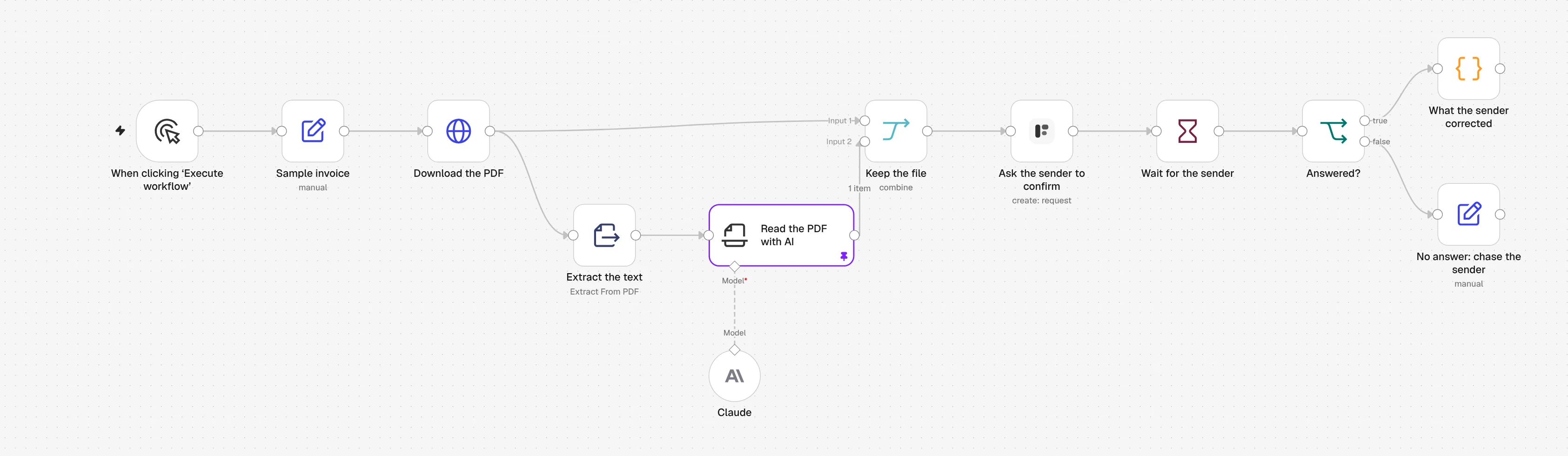
1. Download the PDF
Eine Beispielrechnung wird per HTTP heruntergeladen. Für echte Rechnungen setzen Sie einen Gmail-, Outlook- oder Google-Drive-Trigger ein.
2. Extract the text
Extract from File holt den Text aus dem PDF. Ein gescanntes PDF enthält keinen Text, siehe dazu die Fragen unten.
3. Read the PDF with AI
Ein Information Extractor mit einem Claude-Modell liefert einen Wert pro Formularfrage: Lieferant, Rechnungsnummer, Datumsangaben und Gesamtbetrag.
4. Ask the sender to confirm
Der Formstep-Node sendet dem Absender das Formular Confirm Invoice Details mit allen ausgefüllten Werten und seinem PDF darüber.
5. Wait for the sender
Ein Wait-Node hält den Workflow an, bis der Absender das Formular absendet oder die Anfrage nach fünf Tagen abläuft.
6. What the sender corrected
Ein Code-Node vergleicht die Werte der KI mit den bestätigten und listet auf, was sich geändert hat, damit korrigierte Rechnungen an eine Person gehen.
Den n8n-Workflow importieren
Fügen Sie ihn mit Strg+V (Cmd+V auf dem Mac) in eine n8n-Arbeitsfläche ein, oder laden Sie die Datei herunter und nutzen Sie Import from File. Wählen Sie dann in den mit einer Warnung markierten Nodes Ihre Zugangsdaten und Formulare.
JSON anzeigen
{
  "name": "Formstep: read a PDF with AI, then have the sender confirm it",
  "nodes": [
    {
      "parameters": {
        "content": "## Read a PDF with AI, then have the sender confirm it\n\nRuns as it is on a sample invoice, with a pinned AI result.\n\n1. **Ask the sender to confirm**: pick your Formstep credential and the published Confirm Invoice Details form.\n2. **Claude**: pick a model credential, or swap in any chat model. Unpin **Read the PDF with AI** once it is connected.\n3. Swap **Sample invoice** and **Download the PDF** for your Gmail, Outlook or Google Drive trigger.\n\nTest Mode is on, so nothing is emailed. Delivery is Email the Invitation, which needs Formstep Pro or Business.",
        "height": 360,
        "width": 640,
        "color": 5
      },
      "type": "n8n-nodes-base.stickyNote",
      "typeVersion": 1,
      "position": [
        -40,
        -420
      ],
      "id": "7c4d1e2a-2000-4000-8000-000000000001",
      "name": "How to set it up"
    },
    {
      "parameters": {},
      "type": "n8n-nodes-base.manualTrigger",
      "typeVersion": 1,
      "position": [
        0,
        0
      ],
      "id": "7c4d1e2a-2000-4000-8000-000000000002",
      "name": "When clicking ‘Execute workflow’"
    },
    {
      "parameters": {
        "assignments": {
          "assignments": [
            {
              "id": "7c4d1e2a-2000-4000-8000-000000000003",
              "name": "pdfUrl",
              "value": "https://formstep.io/docs/guides/n8n/samples/invoice.pdf",
              "type": "string"
            },
            {
              "id": "7c4d1e2a-2000-4000-8000-000000000004",
              "name": "senderEmail",
              "value": "billing@fjord-office.example",
              "type": "string"
            }
          ]
        },
        "options": {}
      },
      "type": "n8n-nodes-base.set",
      "typeVersion": 3.4,
      "position": [
        220,
        0
      ],
      "id": "7c4d1e2a-2000-4000-8000-000000000005",
      "name": "Sample invoice"
    },
    {
      "parameters": {
        "url": "={{ $json.pdfUrl }}",
        "options": {
          "response": {
            "response": {
              "responseFormat": "file"
            }
          }
        }
      },
      "type": "n8n-nodes-base.httpRequest",
      "typeVersion": 4.2,
      "position": [
        440,
        0
      ],
      "id": "7c4d1e2a-2000-4000-8000-000000000006",
      "name": "Download the PDF"
    },
    {
      "parameters": {
        "operation": "pdf",
        "options": {}
      },
      "type": "n8n-nodes-base.extractFromFile",
      "typeVersion": 1.1,
      "position": [
        660,
        160
      ],
      "id": "7c4d1e2a-2000-4000-8000-000000000007",
      "name": "Extract the text"
    },
    {
      "parameters": {
        "text": "={{ $json.text }}",
        "attributes": {
          "attributes": [
            {
              "name": "supplier_name",
              "type": "string",
              "description": "The company that issued the invoice",
              "required": true
            },
            {
              "name": "invoice_number",
              "type": "string",
              "description": "The invoice number, as printed",
              "required": true
            },
            {
              "name": "invoice_date",
              "type": "date",
              "description": "The invoice date, as YYYY-MM-DD",
              "required": true
            },
            {
              "name": "due_date",
              "type": "date",
              "description": "The payment due date, as YYYY-MM-DD",
              "required": true
            },
            {
              "name": "total_amount",
              "type": "number",
              "description": "The total to pay, including VAT, as a number without currency",
              "required": true
            }
          ]
        },
        "options": {}
      },
      "type": "@n8n/n8n-nodes-langchain.informationExtractor",
      "typeVersion": 1.2,
      "position": [
        880,
        160
      ],
      "id": "7c4d1e2a-2000-4000-8000-000000000008",
      "name": "Read the PDF with AI"
    },
    {
      "parameters": {
        "model": {
          "__rl": true,
          "mode": "list",
          "value": "claude-sonnet-5-5",
          "cachedResultName": "Claude Sonnet 5.5"
        },
        "options": {}
      },
      "type": "@n8n/n8n-nodes-langchain.lmChatAnthropic",
      "typeVersion": 1.6,
      "position": [
        880,
        380
      ],
      "id": "7c4d1e2a-2000-4000-8000-000000000009",
      "name": "Claude"
    },
    {
      "parameters": {
        "mode": "combine",
        "combineBy": "combineByPosition",
        "options": {}
      },
      "type": "n8n-nodes-base.merge",
      "typeVersion": 3.2,
      "position": [
        1120,
        0
      ],
      "id": "7c4d1e2a-2000-4000-8000-000000000010",
      "name": "Keep the file"
    },
    {
      "parameters": {
        "resource": "request",
        "operation": "create",
        "formId": {
          "__rl": true,
          "mode": "list",
          "value": ""
        },
        "recipientEmail": "={{ $('Sample invoice').item.json.senderEmail }}",
        "fields": {
          "mappingMode": "defineBelow",
          "value": {
            "supplier_name": "={{ $json.output.supplier_name }}",
            "invoice_number": "={{ $json.output.invoice_number }}",
            "invoice_date": "={{ $json.output.invoice_date }}",
            "due_date": "={{ $json.output.due_date }}",
            "total_amount": "={{ $json.output.total_amount }}"
          },
          "matchingColumns": [],
          "schema": [
            {
              "id": "supplier_name",
              "displayName": "Supplier (supplier_name)",
              "required": false,
              "defaultMatch": false,
              "canBeUsedToMatch": false,
              "display": true,
              "type": "string"
            },
            {
              "id": "invoice_number",
              "displayName": "Invoice Number (invoice_number)",
              "required": false,
              "defaultMatch": false,
              "canBeUsedToMatch": false,
              "display": true,
              "type": "string"
            },
            {
              "id": "invoice_date",
              "displayName": "Invoice Date (invoice_date)",
              "required": false,
              "defaultMatch": false,
              "canBeUsedToMatch": false,
              "display": true,
              "type": "dateTime"
            },
            {
              "id": "due_date",
              "displayName": "Due Date (due_date)",
              "required": false,
              "defaultMatch": false,
              "canBeUsedToMatch": false,
              "display": true,
              "type": "dateTime"
            },
            {
              "id": "total_amount",
              "displayName": "Total Amount (total_amount)",
              "required": false,
              "defaultMatch": false,
              "canBeUsedToMatch": false,
              "display": true,
              "type": "number"
            },
            {
              "id": "confirmed",
              "displayName": "I confirm these details are correct (confirmed)",
              "required": false,
              "defaultMatch": false,
              "canBeUsedToMatch": false,
              "display": true,
              "type": "boolean",
              "removed": true
            },
            {
              "id": "notes",
              "displayName": "Notes (notes)",
              "required": false,
              "defaultMatch": false,
              "canBeUsedToMatch": false,
              "display": true,
              "type": "string",
              "removed": true
            }
          ],
          "attemptToConvertTypes": false,
          "convertFieldsToString": false
        },
        "readonly": [],
        "documents": {
          "values": [
            {
              "binaryProperty": "data",
              "name": "=Invoice {{ $json.output.invoice_number }}",
              "field": ""
            }
          ]
        },
        "waitForOutcome": true,
        "additionalFields": {
          "delivery": "email",
          "externalId": "=invoice-{{ $json.output.invoice_number }}-{{ $execution.id }}",
          "expiresAt": "={{ $now.plus({ days: 5 }).toISO() }}",
          "test": true
        }
      },
      "type": "n8n-nodes-formstep.formstep",
      "typeVersion": 5,
      "position": [
        1340,
        0
      ],
      "id": "7c4d1e2a-2000-4000-8000-000000000011",
      "name": "Ask the sender to confirm"
    },
    {
      "parameters": {
        "resume": "webhook",
        "httpMethod": "POST",
        "options": {}
      },
      "type": "n8n-nodes-base.wait",
      "typeVersion": 1.1,
      "position": [
        1560,
        0
      ],
      "id": "7c4d1e2a-2000-4000-8000-000000000012",
      "name": "Wait for the sender",
      "webhookId": "7c4d1e2a-2000-4000-8000-000000000013"
    },
    {
      "parameters": {
        "conditions": {
          "options": {
            "caseSensitive": true,
            "leftValue": "",
            "typeValidation": "strict",
            "version": 2
          },
          "conditions": [
            {
              "id": "7c4d1e2a-2000-4000-8000-000000000014",
              "leftValue": "={{ $json.body.type }}",
              "rightValue": "request.completed",
              "operator": {
                "type": "string",
                "operation": "equals"
              }
            }
          ],
          "combinator": "and"
        },
        "options": {}
      },
      "type": "n8n-nodes-base.if",
      "typeVersion": 2.2,
      "position": [
        1780,
        0
      ],
      "id": "7c4d1e2a-2000-4000-8000-000000000015",
      "name": "Answered?"
    },
    {
      "parameters": {
        "mode": "runOnceForEachItem",
        "jsCode": "// Compare what the AI read with what the sender confirmed.\nconst read = $('Read the PDF with AI').item.json.output\nconst confirmed = $json.body.data.answers\nconst corrected = Object.keys(read).filter((key) => String(read[key]) !== String(confirmed[key]))\nreturn { json: { invoice: confirmed, corrected, notes: confirmed.notes ?? null } }"
      },
      "type": "n8n-nodes-base.code",
      "typeVersion": 2,
      "position": [
        2000,
        -100
      ],
      "id": "7c4d1e2a-2000-4000-8000-000000000016",
      "name": "What the sender corrected"
    },
    {
      "parameters": {
        "assignments": {
          "assignments": [
            {
              "id": "7c4d1e2a-2000-4000-8000-000000000017",
              "name": "to",
              "value": "={{ $('Sample invoice').item.json.senderEmail }}",
              "type": "string"
            },
            {
              "id": "7c4d1e2a-2000-4000-8000-000000000018",
              "name": "message",
              "value": "=We still need you to confirm invoice {{ $('Read the PDF with AI').item.json.output.invoice_number }} ({{ $json.body.type }}).",
              "type": "string"
            }
          ]
        },
        "options": {}
      },
      "type": "n8n-nodes-base.set",
      "typeVersion": 3.4,
      "position": [
        2000,
        120
      ],
      "id": "7c4d1e2a-2000-4000-8000-000000000019",
      "name": "No answer: chase the sender"
    }
  ],
  "pinData": {
    "Read the PDF with AI": [
      {
        "json": {
          "output": {
            "supplier_name": "Fjord Office Supplies AS",
            "invoice_number": "INV-2026-0187",
            "invoice_date": "2026-10-20",
            "due_date": "2026-11-03",
            "total_amount": 27235
          }
        }
      }
    ]
  },
  "connections": {
    "When clicking ‘Execute workflow’": {
      "main": [
        [
          {
            "node": "Sample invoice",
            "type": "main",
            "index": 0
          }
        ]
      ]
    },
    "Sample invoice": {
      "main": [
        [
          {
            "node": "Download the PDF",
            "type": "main",
            "index": 0
          }
        ]
      ]
    },
    "Download the PDF": {
      "main": [
        [
          {
            "node": "Extract the text",
            "type": "main",
            "index": 0
          },
          {
            "node": "Keep the file",
            "type": "main",
            "index": 0
          }
        ]
      ]
    },
    "Extract the text": {
      "main": [
        [
          {
            "node": "Read the PDF with AI",
            "type": "main",
            "index": 0
          }
        ]
      ]
    },
    "Read the PDF with AI": {
      "main": [
        [
          {
            "node": "Keep the file",
            "type": "main",
            "index": 1
          }
        ]
      ]
    },
    "Claude": {
      "ai_languageModel": [
        [
          {
            "node": "Read the PDF with AI",
            "type": "ai_languageModel",
            "index": 0
          }
        ]
      ]
    },
    "Keep the file": {
      "main": [
        [
          {
            "node": "Ask the sender to confirm",
            "type": "main",
            "index": 0
          }
        ]
      ]
    },
    "Ask the sender to confirm": {
      "main": [
        [
          {
            "node": "Wait for the sender",
            "type": "main",
            "index": 0
          }
        ]
      ]
    },
    "Wait for the sender": {
      "main": [
        [
          {
            "node": "Answered?",
            "type": "main",
            "index": 0
          }
        ]
      ]
    },
    "Answered?": {
      "main": [
        [
          {
            "node": "What the sender corrected",
            "type": "main",
            "index": 0
          }
        ],
        [
          {
            "node": "No answer: chase the sender",
            "type": "main",
            "index": 0
          }
        ]
      ]
    }
  },
  "active": false,
  "settings": {
    "executionOrder": "v1"
  },
  "meta": {
    "templateCredsSetupCompleted": false
  },
  "tags": []
}
Er braucht den Community-Node n8n-nodes-formstep auf einer selbst gehosteten n8n-Instanz, die Formstep über HTTPS erreichen kann: installieren Sie ihn und verbinden Sie ihn. Geprüft in n8n 2.46 mit Version 0.15.0 des Nodes.
Warum Formstep für diesen Schritt
- Ein Durchlauf vom PDF zu geprüften Daten. Was die KI gelesen hat und was der Absender bestätigt hat, kommen in einem Workflow-Durchlauf zusammen, ohne Datenbank dazwischen.
- Der Absender prüft am Original. Das PDF steht oben im Formular, direkt neben jedem vorausgefüllten Wert.
- Sie erfahren, wo die KI sich irrt. Die Liste
correctedzeigt Rechnung für Rechnung, welche Felder das Modell falsch liest.