

n8n, Slack ve Formstep ile çalışan işe alım ve işten ayrılma süreçlerini otomatikleştirin
Tek bir workflow hem yeni başlayanları hem ayrılanları kapsar. Kişinin hangi hesaplara ihtiyaç duyduğunu ya da hangilerini kaybettiğini belirler, bu kontrol listesini Slack'te IT ekibine gönderir ve çalışana İK'nın hâlâ ihtiyaç duyduğu bilgiler için bir form yollar. Sonra yanıtlarını bekler. İki form da workflow'un içinde olduğundan Formstep'te önceden hiçbir şey kurmanız gerekmez.
Yayınlandı · Güncellendi
İşe alım, nadiren ortak bir araç kullanan üç ekibi ilgilendirir. İK başlangıç tarihini bilir, IT’nin oluşturacağı hesaplar vardır, yasal adı, ev adresi ve acil durum kişisi ise yalnızca yeni çalışan bilir.
n8n İK sisteminizle, Slack’le ve IT’nin yönettiği araçlarla zaten konuşuyor, ama çalışana soru sormanın iyi bir yolu yok. Formstep bunu bir istek ile halleder: bildiklerinizin önceden doldurulduğu, tek kişiye özel bir bağlantıyla gönderilen form.
Kısaca: Tek bir workflow hem işe alımı hem işten ayrılmayı yönetir. Bir Code düğümü erişim kontrol listesini hazırlar ve formu seçer, Slack IT’ye haber verir, workflow da çalışanın yanıtlarını bekler. Workflow JSON’unu alın.
Neye ihtiyacınız var
- Formstep topluluk düğümünün kurulu ve bağlı olduğu, kendi sunucunuzda çalışan bir n8n.
- n8n’de bir Slack kimlik bilgisi ve özel bir IT kanalı.
- Departmanlarınız ve hesapları; bunları Code düğümüne yazacaksınız.
İki form ne soruyor
İşe başlayan formu yasal ve tercih edilen adı, telefonu, doğum tarihini, dizüstü bilgisayar için ev adresini, dizüstü seçimini, tişört bedenini ve acil durum kişisini sorar. Ayrılan formu ise son maaş bordrosu için kişisel e-postayı, çalışanın elindeki ekipmanı ve bunun nasıl geri döneceğini sorar. Bunları düzenleyicide kendiniz tasarlamak isterseniz Çalışan İşe Alım şablonundan başlayın.
n8n iş akışı adım adım nasıl çalışır
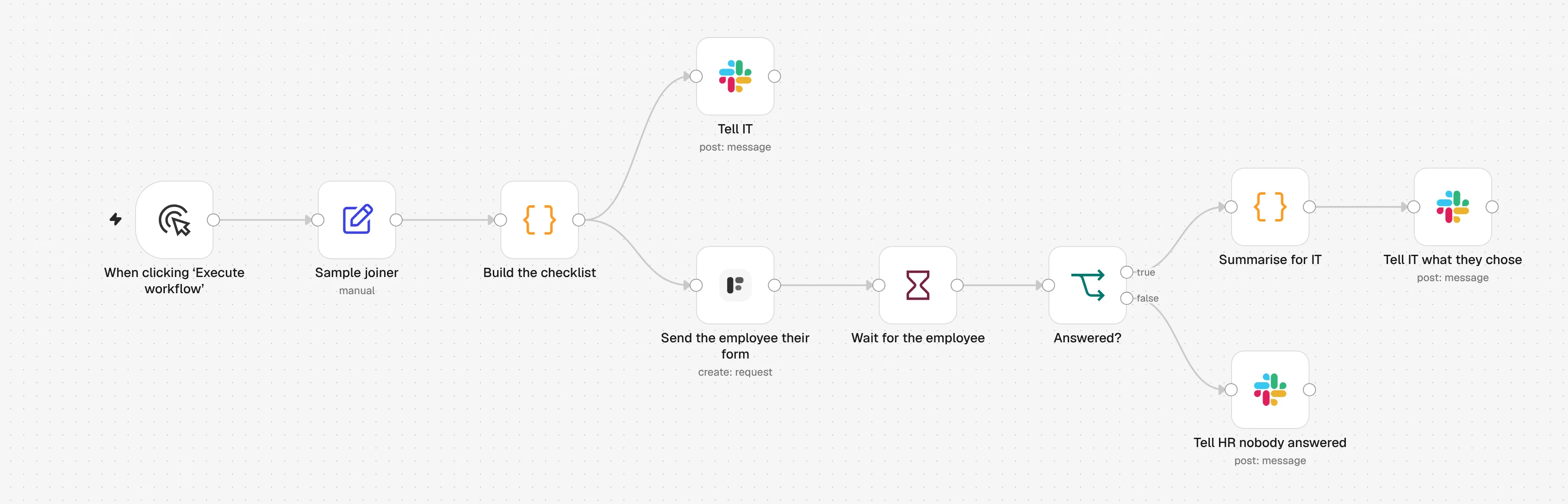
1. Sample joiner
Örnek bir yeni çalışan workflow'u başlatır. Yerine İK sisteminizi, bir Google Sheets satırını ya da aynı alanlara sahip bir Webhook'u koyun.
2. Build the checklist
Bir Code düğümü kişinin departmanındaki hesapları bulur ve işe başlayan ya da ayrılan formunu seçer.
3. Tell IT
Slack'e kişi, tarih, yönetici ve erişim kontrol listesi gider. Form bağlantısı asla paylaşılmaz.
4. Send the employee their form
Formstep düğümü formu çalışanın kişisel e-postasına, adı doldurulmuş olarak gönderir.
5. Wait for the employee
Bir Wait düğümü, çalışan formu gönderene ya da istek başlangıç tarihinde veya son günde sona erene kadar workflow'u bekletir.
6. Answered?
Yanıt geldiyse Slack, IT'ye neye göre hareket edeceğini, örneğin seçilen dizüstü bilgisayarı bildirir. Gelmediyse Slack, İK'dan kişiyi aramasını ister.
n8n iş akışını içe aktarın
Ctrl+V (Mac'te Cmd+V) ile bir n8n tuvaline yapıştırın ya da dosyayı indirip Import from File seçeneğini kullanın. Sonra uyarı işaretli düğümlerde kimlik bilgilerinizi ve formlarınızı seçin.
JSON'u göster
{
  "name": "Formstep: employee onboarding and offboarding",
  "nodes": [
    {
      "parameters": {
        "content": "## Employee onboarding and offboarding\n\nBoth forms are inside **Build the checklist**, so there is nothing to build in Formstep first.\n\n1. **Send the employee their form**: pick your Formstep credential.\n2. The three **Slack** nodes: pick a Slack credential and your IT channel.\n3. Edit the accounts per department at the top of **Build the checklist**.\n4. Swap **Sample joiner** for your HR system, a Google Sheets trigger or a Webhook, with the same six fields. Set `type` to `leaver` to try offboarding.\n\nTest Mode is on, so nothing is emailed. Delivery is Email the Invitation, which needs Formstep Pro or Business.",
        "height": 400,
        "width": 660,
        "color": 5
      },
      "type": "n8n-nodes-base.stickyNote",
      "typeVersion": 1,
      "position": [
        -40,
        -520
      ],
      "id": "5b9e3f70-3000-4000-8000-000000000001",
      "name": "How to set it up"
    },
    {
      "parameters": {},
      "type": "n8n-nodes-base.manualTrigger",
      "typeVersion": 1,
      "position": [
        0,
        0
      ],
      "id": "5b9e3f70-3000-4000-8000-000000000002",
      "name": "When clicking ‘Execute workflow’"
    },
    {
      "parameters": {
        "assignments": {
          "assignments": [
            {
              "id": "5b9e3f70-3000-4000-8000-000000000003",
              "name": "type",
              "value": "joiner",
              "type": "string"
            },
            {
              "id": "5b9e3f70-3000-4000-8000-000000000004",
              "name": "employee_id",
              "value": "E-1042",
              "type": "string"
            },
            {
              "id": "5b9e3f70-3000-4000-8000-000000000005",
              "name": "name",
              "value": "Ada Lovelace",
              "type": "string"
            },
            {
              "id": "5b9e3f70-3000-4000-8000-000000000006",
              "name": "personal_email",
              "value": "ada@example.com",
              "type": "string"
            },
            {
              "id": "5b9e3f70-3000-4000-8000-000000000007",
              "name": "department",
              "value": "Engineering",
              "type": "string"
            },
            {
              "id": "5b9e3f70-3000-4000-8000-000000000008",
              "name": "date",
              "value": "={{ $now.plus({ days: 14 }).toISODate() }}",
              "type": "string"
            },
            {
              "id": "5b9e3f70-3000-4000-8000-000000000009",
              "name": "manager",
              "value": "Grace Hopper",
              "type": "string"
            }
          ]
        },
        "options": {}
      },
      "type": "n8n-nodes-base.set",
      "typeVersion": 3.4,
      "position": [
        220,
        0
      ],
      "id": "5b9e3f70-3000-4000-8000-000000000010",
      "name": "Sample joiner"
    },
    {
      "parameters": {
        "mode": "runOnceForEachItem",
        "jsCode": "// Accounts per department. Everyone gets the first list; a team not listed gets only that.\nconst everyone = ['Google Workspace', 'Slack', '1Password']\nconst byDepartment = {\n  Engineering: ['GitHub', 'Linear', 'AWS'],\n  Sales: ['HubSpot', 'Gong'],\n  Finance: ['Xero', 'Expensify'],\n}\n\n// Two fixed forms, personalised only through prefill and context. Formstep builds\n// each one on the first request and reuses it for every later one, so a form that\n// changed per person would make a new form per person.\nconst forms = {\n  joiner: {\n    name: 'Welcome to the team',\n    blocks: [\n      { type: 'header', content: 'Welcome, {{first_name}}' },\n      {\n        type: 'paragraph',\n        content: 'You start on **{{date_label}}** with {{manager_name}}. Fill this in before then, so your accounts and laptop are ready on day one.',\n      },\n      { type: 'hiddenField', key: 'first_name' },\n      { type: 'hiddenField', key: 'date_label' },\n      { type: 'hiddenField', key: 'manager_name' },\n      { type: 'text', key: 'legal_name', title: 'Full legal name' },\n      { type: 'text', key: 'preferred_name', title: 'Preferred name', required: false },\n      { type: 'contact', key: 'phone', title: 'Phone number', contactType: 'phone' },\n      { type: 'date', key: 'date_of_birth', title: 'Date of birth' },\n      { type: 'text', key: 'home_address', title: 'Home address, for your laptop delivery', multiline: true },\n      { type: 'radio', key: 'laptop', title: 'Which laptop would you like?', options: ['Mac', 'Windows'] },\n      { type: 'select', key: 'tshirt_size', title: 'T-shirt size', options: ['XS', 'S', 'M', 'L', 'XL', 'XXL'] },\n      { type: 'text', key: 'emergency_contact', title: 'Emergency contact: name and phone number', multiline: true },\n    ],\n  },\n  leaver: {\n    name: 'Before your last day',\n    blocks: [\n      { type: 'header', content: 'Before your last day, {{first_name}}' },\n      {\n        type: 'paragraph',\n        content: 'Your last day is **{{date_label}}**. Tell us where to send your final payslip and how your equipment comes back.',\n      },\n      { type: 'hiddenField', key: 'first_name' },\n      { type: 'hiddenField', key: 'date_label' },\n      { type: 'contact', key: 'personal_email', title: 'Personal email for your final payslip', contactType: 'email' },\n      {\n        type: 'checkbox',\n        key: 'equipment',\n        title: 'What do you have from us?',\n        options: ['Laptop', 'Monitor', 'Phone', 'Access card', 'Headset'],\n      },\n      {\n        type: 'radio',\n        key: 'return_method',\n        title: 'How will you return it?',\n        options: ['Hand it in at the office', 'Send me a prepaid box'],\n      },\n      { type: 'text', key: 'shipping_address', title: 'If you chose a box: where should we send it?', multiline: true, required: false },\n      { type: 'text', key: 'feedback', title: 'Anything you would like us to know?', multiline: true, required: false },\n    ],\n  },\n}\n\nconst person = $json\nconst form = forms[person.type]\nif (!form) throw new Error(`type must be joiner or leaver, got \"${person.type}\"`)\n\nconst accounts = [...everyone, ...(byDepartment[person.department] ?? [])]\nconst firstName = person.name.split(' ')[0]\nconst dateLabel = DateTime.fromISO(person.date).toFormat('d LLLL yyyy')\n\nconst slackText =\n  person.type === 'joiner'\n    ? `:wave: *${person.name}* joins ${person.department} on ${dateLabel}, reporting to ${person.manager}.\\nAccounts to set up before day one: ${accounts.join(', ')}.\\nTheir onboarding form is on its way to their personal email.`\n    : `*${person.name}* leaves ${person.department} on ${dateLabel}.\\nAccounts to close on their last day: ${accounts.join(', ')}.\\nTheir offboarding form is on its way to their personal email.`\n\nreturn {\n  json: {\n    ...person,\n    firstName,\n    accounts,\n    slackText,\n    form,\n    prefill: person.type === 'joiner' ? { legal_name: person.name } : { personal_email: person.personal_email },\n    context:\n      person.type === 'joiner'\n        ? { first_name: firstName, date_label: dateLabel, manager_name: person.manager }\n        : { first_name: firstName, date_label: dateLabel },\n  },\n}"
      },
      "type": "n8n-nodes-base.code",
      "typeVersion": 2,
      "position": [
        440,
        0
      ],
      "id": "5b9e3f70-3000-4000-8000-000000000011",
      "name": "Build the checklist"
    },
    {
      "parameters": {
        "select": "channel",
        "channelId": {
          "__rl": true,
          "value": "#it-onboarding",
          "mode": "name"
        },
        "text": "={{ $json.slackText }}",
        "otherOptions": {}
      },
      "type": "n8n-nodes-base.slack",
      "typeVersion": 2.3,
      "position": [
        680,
        -180
      ],
      "id": "5b9e3f70-3000-4000-8000-000000000012",
      "name": "Tell IT",
      "webhookId": "5b9e3f70-3000-4000-8000-000000000112"
    },
    {
      "parameters": {
        "resource": "request",
        "operation": "create",
        "formSource": "inline",
        "formName": "={{ $json.form.name }}",
        "formBlocks": "={{ JSON.stringify($json.form.blocks) }}",
        "inlinePrefill": "={{ JSON.stringify($json.prefill) }}",
        "inlineContext": "={{ JSON.stringify($json.context) }}",
        "inlineReadonly": "",
        "formOptions": {
          "cover": "{ \"type\": \"color\", \"color\": \"#1f6f5c\" }"
        },
        "recipientEmail": "={{ $json.personal_email }}",
        "waitForOutcome": true,
        "additionalFields": {
          "delivery": "email",
          "recipientName": "={{ $json.firstName }}",
          "externalId": "={{ $json.type }}-{{ $json.employee_id }}-{{ $execution.id }}",
          "expiresAt": "={{ DateTime.fromISO($json.date).toISO() }}",
          "test": true
        }
      },
      "type": "n8n-nodes-formstep.formstep",
      "typeVersion": 5,
      "position": [
        680,
        80
      ],
      "id": "5b9e3f70-3000-4000-8000-000000000013",
      "name": "Send the employee their form"
    },
    {
      "parameters": {
        "resume": "webhook",
        "httpMethod": "POST",
        "options": {}
      },
      "type": "n8n-nodes-base.wait",
      "typeVersion": 1.1,
      "position": [
        900,
        80
      ],
      "id": "5b9e3f70-3000-4000-8000-000000000014",
      "name": "Wait for the employee",
      "webhookId": "5b9e3f70-3000-4000-8000-000000000015"
    },
    {
      "parameters": {
        "conditions": {
          "options": {
            "caseSensitive": true,
            "leftValue": "",
            "typeValidation": "strict",
            "version": 2
          },
          "conditions": [
            {
              "id": "5b9e3f70-3000-4000-8000-000000000016",
              "leftValue": "={{ $json.body.type }}",
              "rightValue": "request.completed",
              "operator": {
                "type": "string",
                "operation": "equals"
              }
            }
          ],
          "combinator": "and"
        },
        "options": {}
      },
      "type": "n8n-nodes-base.if",
      "typeVersion": 2.2,
      "position": [
        1120,
        80
      ],
      "id": "5b9e3f70-3000-4000-8000-000000000017",
      "name": "Answered?"
    },
    {
      "parameters": {
        "mode": "runOnceForEachItem",
        "jsCode": "// Only what IT acts on. Home address, date of birth and emergency contact stay in Formstep.\nconst person = $('Build the checklist').item.json\nconst display = $json.body.data.display\n\nconst text =\n  person.type === 'joiner'\n    ? `${person.name} filled in the onboarding form: ${display.laptop} laptop, T-shirt ${display.tshirt_size}. The delivery address is on the request in Formstep.`\n    : `${person.name} answered the offboarding form. Equipment: ${display.equipment}. Return: ${display.return_method}.`\n\nreturn { json: { text } }"
      },
      "type": "n8n-nodes-base.code",
      "typeVersion": 2,
      "position": [
        1340,
        -20
      ],
      "id": "5b9e3f70-3000-4000-8000-000000000018",
      "name": "Summarise for IT"
    },
    {
      "parameters": {
        "select": "channel",
        "channelId": {
          "__rl": true,
          "value": "#it-onboarding",
          "mode": "name"
        },
        "text": "={{ $json.text }}",
        "otherOptions": {}
      },
      "type": "n8n-nodes-base.slack",
      "typeVersion": 2.3,
      "position": [
        1560,
        -20
      ],
      "id": "5b9e3f70-3000-4000-8000-000000000019",
      "name": "Tell IT what they chose",
      "webhookId": "5b9e3f70-3000-4000-8000-000000000119"
    },
    {
      "parameters": {
        "select": "channel",
        "channelId": {
          "__rl": true,
          "value": "#it-onboarding",
          "mode": "name"
        },
        "text": "={{ $('Build the checklist').item.json.name }} has not answered the {{ $('Build the checklist').item.json.type === 'joiner' ? 'onboarding' : 'offboarding' }} form, and the request was {{ $json.body.type === 'request.expired' ? 'left to expire' : 'canceled' }}. Worth a call.",
        "otherOptions": {}
      },
      "type": "n8n-nodes-base.slack",
      "typeVersion": 2.3,
      "position": [
        1340,
        200
      ],
      "id": "5b9e3f70-3000-4000-8000-000000000020",
      "name": "Tell HR nobody answered",
      "webhookId": "5b9e3f70-3000-4000-8000-000000000120"
    }
  ],
  "pinData": {},
  "connections": {
    "When clicking ‘Execute workflow’": {
      "main": [
        [
          {
            "node": "Sample joiner",
            "type": "main",
            "index": 0
          }
        ]
      ]
    },
    "Sample joiner": {
      "main": [
        [
          {
            "node": "Build the checklist",
            "type": "main",
            "index": 0
          }
        ]
      ]
    },
    "Build the checklist": {
      "main": [
        [
          {
            "node": "Tell IT",
            "type": "main",
            "index": 0
          },
          {
            "node": "Send the employee their form",
            "type": "main",
            "index": 0
          }
        ]
      ]
    },
    "Send the employee their form": {
      "main": [
        [
          {
            "node": "Wait for the employee",
            "type": "main",
            "index": 0
          }
        ]
      ]
    },
    "Wait for the employee": {
      "main": [
        [
          {
            "node": "Answered?",
            "type": "main",
            "index": 0
          }
        ]
      ]
    },
    "Answered?": {
      "main": [
        [
          {
            "node": "Summarise for IT",
            "type": "main",
            "index": 0
          }
        ],
        [
          {
            "node": "Tell HR nobody answered",
            "type": "main",
            "index": 0
          }
        ]
      ]
    },
    "Summarise for IT": {
      "main": [
        [
          {
            "node": "Tell IT what they chose",
            "type": "main",
            "index": 0
          }
        ]
      ]
    }
  },
  "active": false,
  "settings": {
    "executionOrder": "v1"
  },
  "meta": {
    "templateCredsSetupCompleted": false
  },
  "tags": []
}
Formstep'in HTTPS üzerinden erişebildiği, kendi barındırdığınız bir n8n üzerinde n8n-nodes-formstep topluluk düğümü gerekir: kurun ve bağlayın. n8n 2.46 ve düğümün 0.15.0 sürümüyle denetlendi.
Bu adımda neden Formstep
- Çalıştırmadan önce kurulacak bir şey yok. İki form da Code düğümünde durur. Formstep her birini ilk kullanımda oluşturur ve sonraki her kişi için yeniden kullanır.
- Yeni başlayanlar ve ayrılanlar tek yerde. İki yön için de tek kontrol listesi, tek Slack kanalı ve tek çalıştırma kaydı.
- Kişisel veriler Slack'e gitmez. IT için hazırlanan özet yalnızca
laptop,tshirt_size,equipmentvereturn_methodalanlarını okur. Adres, doğum tarihi ve acil durum kişisi Formstep'te kalır.