

n8n ile e-posta toplayın, ardından HubSpot'tan önceden doldurulmuş form gönderin
Ziyaretçiler tek soruluk bir forma e-postalarını bırakır. n8n onları HubSpot'ta arar ve adı ile şirketi zaten doldurulmuş ikinci bir Formstep formu gönderir; böylece yalnızca kontrol edip gerisini eklerler. Aşağıdaki workflow'u içe aktarın ve iki formunuzu seçin.
Yayınlandı · Güncellendi
E-posta toplamak kolay. Ardından gelen daha uzun form ise daha zor: CRM’inizin bildikleriyle önceden doldurulmuş olarak gelmeli ve onu yalnızca o kişi açabilmeli. n8n’in kendi formu önceden doldurmayı URL’den okur, yani bağlantıya sahip olan herkes bunu görebilir ve değiştirebilir.
Formstep bu kişisel forma istek der: tek kişiye, özel bir bağlantıyla gönderilen ve bildiğiniz yanıtların önceden doldurulduğu form.
Kısaca: Formstep Trigger, herkese açık formdan gelen her e-postayı yakalar, ad ve şirketi HubSpot sağlar, bir Formstep isteği de o kişiye önceden doldurulmuş ikinci bir form gönderir. Workflow JSON’unu alın.
Neye ihtiyacınız var
- Formstep topluluk düğümünün kurulu ve bağlı olduğu, kendi sunucunuzda çalışan bir n8n.
- Kişileri okuyabilen bir HubSpot özel uygulama belirteci.
- Yayınlanmış iki Formstep formu:
emailanahtarlı tek e-posta sorusu olan herkese açık bir form ve Client Onboarding şablonu. - İsteğe bağlı: kişi yanıt verdiğinde güncellenmesi için ikinci formda HubSpot entegrasyonu.
n8n iş akışı adım adım nasıl çalışır
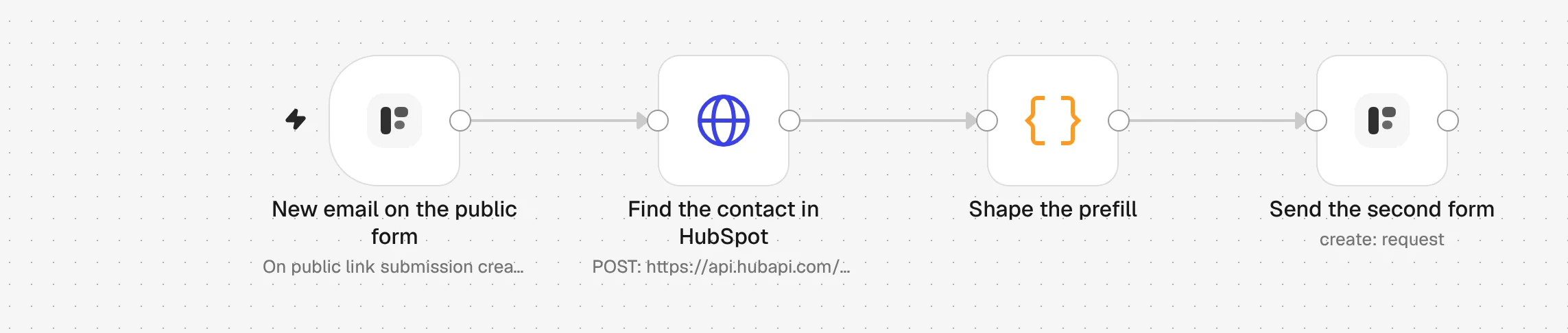
1. New email on the public form
Biri tek soruluk formunuzu gönderir. Formstep Trigger, yanıtı email altında olacak şekilde workflow'u başlatır.
2. Find the contact in HubSpot
Bir HTTP Request düğümü HubSpot kişilerinizde bu e-postayı arar ve varsa eşleşmeyi döndürür.
3. Shape the prefill
Bir Code düğümü kişiyi form yanıtlarına, yani full_name ve company_name alanlarına dönüştürür. Eşleşmesi olmayan yeni bir lead de formu alır, yalnızca daha az alan doldurulmuş olur.
4. Send the second form
Formstep düğümü bir istek oluşturur: Client Onboarding formu aynı e-postaya gönderilir ve email değiştirilemesin diye kilitlenir.
5. They check it and finish it
Kişi özel bağlantısını açar, güncel olmayanları düzeltir ve gerisini yanıtlar. Hesap gerekmez.
6. Get the answers back
İkinci formdaki HubSpot entegrasyonu kişiyi günceller. Daha fazlasını yapmak için Request Completed tetikleyicisiyle başka bir workflow başlatın.
n8n iş akışını içe aktarın
Ctrl+V (Mac'te Cmd+V) ile bir n8n tuvaline yapıştırın ya da dosyayı indirip Import from File seçeneğini kullanın. Sonra uyarı işaretli düğümlerde kimlik bilgilerinizi ve formlarınızı seçin.
JSON'u göster
{
  "name": "Formstep: public form to a CRM-prefilled request",
  "nodes": [
    {
      "parameters": {
        "content": "## Public form to a CRM-prefilled request\n\n1. **New email on the public form**: pick your short public form. It needs an email question with the field key `email`.\n2. **Find the contact in HubSpot**: pick a HubSpot App Token credential with the `crm.objects.contacts.read` scope.\n3. **Send the second form**: pick your Formstep credential and the published Client Onboarding form.\n\nDelivery is Email the Invitation, which needs Formstep Pro or Business. On Free, set it to None and send the request's `url` from a node of your own.\n\nTest Mode is on, so nothing is emailed. Turn it off before you publish.",
        "height": 360,
        "width": 620,
        "color": 5
      },
      "type": "n8n-nodes-base.stickyNote",
      "typeVersion": 1,
      "position": [
        -40,
        -360
      ],
      "id": "2f0a6c1e-1000-4000-8000-000000000001",
      "name": "How to set it up"
    },
    {
      "parameters": {
        "formId": {
          "__rl": true,
          "mode": "list",
          "value": ""
        },
        "event": "submission_created"
      },
      "type": "n8n-nodes-formstep.formstepTrigger",
      "typeVersion": 1.2,
      "position": [
        0,
        0
      ],
      "id": "2f0a6c1e-1000-4000-8000-000000000002",
      "name": "New email on the public form"
    },
    {
      "parameters": {
        "method": "POST",
        "url": "https://api.hubapi.com/crm/v3/objects/contacts/search",
        "authentication": "predefinedCredentialType",
        "nodeCredentialType": "hubspotAppToken",
        "sendBody": true,
        "specifyBody": "json",
        "jsonBody": "={{ JSON.stringify({ filterGroups: [{ filters: [{ propertyName: 'email', operator: 'EQ', value: $json.data.answers.email }] }], properties: ['firstname', 'lastname', 'company'], limit: 1 }) }}",
        "options": {}
      },
      "type": "n8n-nodes-base.httpRequest",
      "typeVersion": 4.2,
      "position": [
        240,
        0
      ],
      "id": "2f0a6c1e-1000-4000-8000-000000000003",
      "name": "Find the contact in HubSpot"
    },
    {
      "parameters": {
        "mode": "runOnceForEachItem",
        "jsCode": "// The first HubSpot match, or none: a new lead still gets the form, with less filled in.\nconst event = $('New email on the public form').item.json.data\nconst match = $json.results[0]\nconst contact = match ? match.properties : {}\nreturn {\n  json: {\n    email: event.answers.email,\n    first_name: contact.firstname ?? '',\n    full_name: [contact.firstname, contact.lastname].filter(Boolean).join(' '),\n    company_name: contact.company ?? '',\n    metadata: match ? { hubspotContactId: match.id } : {},\n    submission_id: event.submission.id,\n  },\n}"
      },
      "type": "n8n-nodes-base.code",
      "typeVersion": 2,
      "position": [
        480,
        0
      ],
      "id": "2f0a6c1e-1000-4000-8000-000000000004",
      "name": "Shape the prefill"
    },
    {
      "parameters": {
        "resource": "request",
        "operation": "create",
        "formId": {
          "__rl": true,
          "mode": "list",
          "value": ""
        },
        "recipientEmail": "={{ $json.email }}",
        "fields": {
          "mappingMode": "defineBelow",
          "value": {
            "full_name": "={{ $json.full_name }}",
            "email": "={{ $json.email }}",
            "company_name": "={{ $json.company_name }}"
          },
          "matchingColumns": [],
          "schema": [
            {
              "id": "full_name",
              "displayName": "Full Name (full_name)",
              "required": false,
              "defaultMatch": false,
              "canBeUsedToMatch": false,
              "display": true,
              "type": "string"
            },
            {
              "id": "email",
              "displayName": "Email Address (email)",
              "required": false,
              "defaultMatch": false,
              "canBeUsedToMatch": false,
              "display": true,
              "type": "string"
            },
            {
              "id": "company_name",
              "displayName": "Company (company_name)",
              "required": false,
              "defaultMatch": false,
              "canBeUsedToMatch": false,
              "display": true,
              "type": "string"
            }
          ],
          "attemptToConvertTypes": false,
          "convertFieldsToString": false
        },
        "readonly": [
          "email"
        ],
        "waitForOutcome": false,
        "additionalFields": {
          "delivery": "email",
          "recipientName": "={{ $json.first_name }}",
          "externalId": "=signup-{{ $json.submission_id }}",
          "metadata": "={{ JSON.stringify($json.metadata) }}",
          "test": true
        }
      },
      "type": "n8n-nodes-formstep.formstep",
      "typeVersion": 5,
      "position": [
        720,
        0
      ],
      "id": "2f0a6c1e-1000-4000-8000-000000000005",
      "name": "Send the second form"
    }
  ],
  "pinData": {},
  "connections": {
    "New email on the public form": {
      "main": [
        [
          {
            "node": "Find the contact in HubSpot",
            "type": "main",
            "index": 0
          }
        ]
      ]
    },
    "Find the contact in HubSpot": {
      "main": [
        [
          {
            "node": "Shape the prefill",
            "type": "main",
            "index": 0
          }
        ]
      ]
    },
    "Shape the prefill": {
      "main": [
        [
          {
            "node": "Send the second form",
            "type": "main",
            "index": 0
          }
        ]
      ]
    }
  },
  "active": false,
  "settings": {
    "executionOrder": "v1"
  },
  "meta": {
    "templateCredsSetupCompleted": false
  },
  "tags": []
}
Formstep'in HTTPS üzerinden erişebildiği, kendi barındırdığınız bir n8n üzerinde n8n-nodes-formstep topluluk düğümü gerekir: kurun ve bağlayın. n8n 2.46 ve düğümün 0.15.0 sürümüyle denetlendi.
Bu adımda neden Formstep
- Herkes kendi formunu alır. Önceden doldurulan bilgiler, tek bir e-posta adresine gönderilen özel bir bağlantıyla taşınır. Formu başka kimse açamaz, HubSpot'un bildiklerini göremez.
- HubSpot kişi kimliği yanıtlarla birlikte geri gelir. Kimlik, istekte form tarafından hiç gösterilmeyen meta veri olarak saklanır; böylece sonraki adım yeniden aramadan doğru kişiyi günceller.
- Bir soruyu yeniden ifade etmek hiçbir şeyi bozmaz. Yanıtlar sabit alan anahtarlarıyla gelir; bu yüzden soruyu yeniden adlandırsanız ya da çevirseniz de
{{ $json.data.answers.company_name }}çalışmaya devam eder.