

Read a PDF with AI in n8n, then have the sender confirm the data
Import this workflow and run it as it is. It downloads a sample invoice, reads it with an AI model and sends a Formstep form with every value filled in. The workflow then waits for the sender to confirm, and lists any values they corrected.
Published · Updated
An AI model reads an invoice in seconds and sounds just as sure of every value, including a total with two digits swapped. In the test run for this workflow, it read 27 325 as 27 235.
So the workflow asks the one person who knows the invoice: the sender. Formstep sends them a request, a form on a private link with what the AI read already filled in, and they confirm or fix each value.
In short: An AI model reads the PDF, a Formstep form asks the sender to confirm what it read, and the workflow carries on with checked values and a list of what they changed. Get the workflow JSON.
What you need
- A self-hosted n8n with the Formstep community node, installed and connected.
- The Confirm Invoice Details template, published in your workspace.
- An Anthropic API key for real invoices. The sample run uses a pinned result and needs none.
Other documents
For orders, claims or delivery notes, build a form for that document and name each attribute of the AI step after one of its field keys. n8n PDF extraction with AI, confirmed by the sender explains each node and the full test run.
How the n8n workflow works, step by step
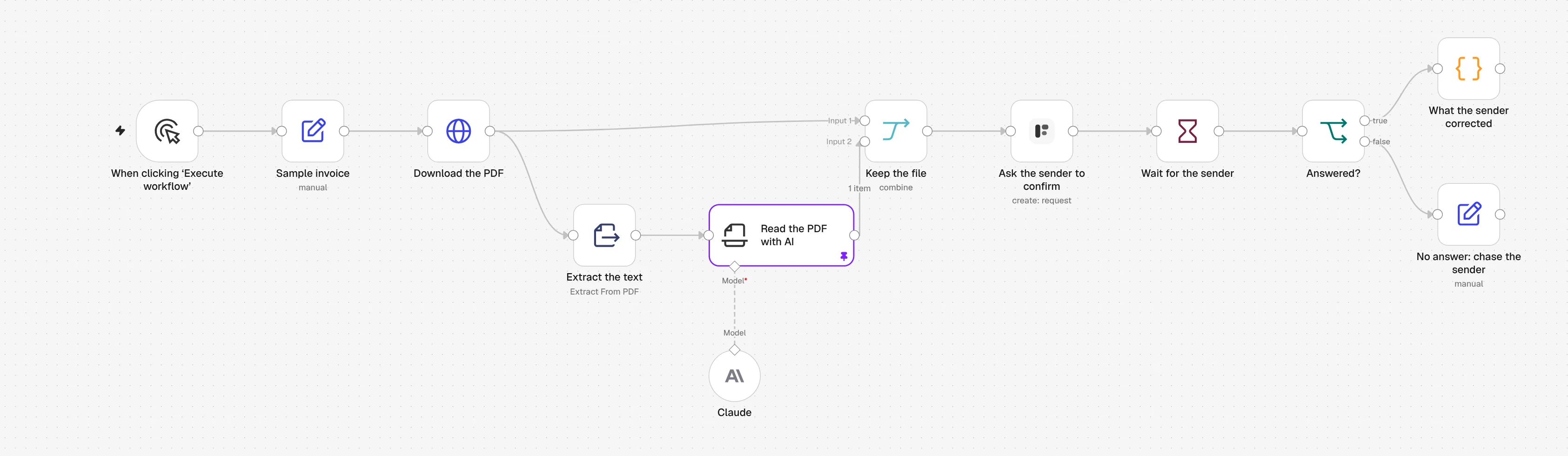
1. Download the PDF
A sample invoice downloads over HTTP. For real invoices, swap in a Gmail, Outlook or Google Drive trigger.
2. Extract the text
Extract from File pulls the text out of the PDF. A scanned PDF has no text, so see the questions below.
3. Read the PDF with AI
An Information Extractor with a Claude model returns one value per form question: supplier, invoice number, dates and total.
4. Ask the sender to confirm
The Formstep node sends the Confirm Invoice Details form to the sender, with every value filled in and their PDF shown above it.
5. Wait for the sender
A Wait node pauses the workflow until they submit, or until the request expires after five days.
6. What the sender corrected
A Code node compares the AI’s values with the confirmed ones and lists what changed, so corrected invoices go to a person.
Import the n8n workflow
Paste it onto an n8n canvas with Ctrl+V (Cmd+V on a Mac), or download the file and use Import from File. Then pick your credentials and forms in the nodes marked with a warning.
Show the JSON
{
  "name": "Formstep: read a PDF with AI, then have the sender confirm it",
  "nodes": [
    {
      "parameters": {
        "content": "## Read a PDF with AI, then have the sender confirm it\n\nRuns as it is on a sample invoice, with a pinned AI result.\n\n1. **Ask the sender to confirm**: pick your Formstep credential and the published Confirm Invoice Details form.\n2. **Claude**: pick a model credential, or swap in any chat model. Unpin **Read the PDF with AI** once it is connected.\n3. Swap **Sample invoice** and **Download the PDF** for your Gmail, Outlook or Google Drive trigger.\n\nTest Mode is on, so nothing is emailed. Delivery is Email the Invitation, which needs Formstep Pro or Business.",
        "height": 360,
        "width": 640,
        "color": 5
      },
      "type": "n8n-nodes-base.stickyNote",
      "typeVersion": 1,
      "position": [
        -40,
        -420
      ],
      "id": "7c4d1e2a-2000-4000-8000-000000000001",
      "name": "How to set it up"
    },
    {
      "parameters": {},
      "type": "n8n-nodes-base.manualTrigger",
      "typeVersion": 1,
      "position": [
        0,
        0
      ],
      "id": "7c4d1e2a-2000-4000-8000-000000000002",
      "name": "When clicking ‘Execute workflow’"
    },
    {
      "parameters": {
        "assignments": {
          "assignments": [
            {
              "id": "7c4d1e2a-2000-4000-8000-000000000003",
              "name": "pdfUrl",
              "value": "https://docs.formstep.io/guides/n8n/samples/invoice.pdf",
              "type": "string"
            },
            {
              "id": "7c4d1e2a-2000-4000-8000-000000000004",
              "name": "senderEmail",
              "value": "billing@fjord-office.example",
              "type": "string"
            }
          ]
        },
        "options": {}
      },
      "type": "n8n-nodes-base.set",
      "typeVersion": 3.4,
      "position": [
        220,
        0
      ],
      "id": "7c4d1e2a-2000-4000-8000-000000000005",
      "name": "Sample invoice"
    },
    {
      "parameters": {
        "url": "={{ $json.pdfUrl }}",
        "options": {
          "response": {
            "response": {
              "responseFormat": "file"
            }
          }
        }
      },
      "type": "n8n-nodes-base.httpRequest",
      "typeVersion": 4.2,
      "position": [
        440,
        0
      ],
      "id": "7c4d1e2a-2000-4000-8000-000000000006",
      "name": "Download the PDF"
    },
    {
      "parameters": {
        "operation": "pdf",
        "options": {}
      },
      "type": "n8n-nodes-base.extractFromFile",
      "typeVersion": 1.1,
      "position": [
        660,
        160
      ],
      "id": "7c4d1e2a-2000-4000-8000-000000000007",
      "name": "Extract the text"
    },
    {
      "parameters": {
        "text": "={{ $json.text }}",
        "attributes": {
          "attributes": [
            {
              "name": "supplier_name",
              "type": "string",
              "description": "The company that issued the invoice",
              "required": true
            },
            {
              "name": "invoice_number",
              "type": "string",
              "description": "The invoice number, as printed",
              "required": true
            },
            {
              "name": "invoice_date",
              "type": "date",
              "description": "The invoice date, as YYYY-MM-DD",
              "required": true
            },
            {
              "name": "due_date",
              "type": "date",
              "description": "The payment due date, as YYYY-MM-DD",
              "required": true
            },
            {
              "name": "total_amount",
              "type": "number",
              "description": "The total to pay, including VAT, as a number without currency",
              "required": true
            }
          ]
        },
        "options": {}
      },
      "type": "@n8n/n8n-nodes-langchain.informationExtractor",
      "typeVersion": 1.2,
      "position": [
        880,
        160
      ],
      "id": "7c4d1e2a-2000-4000-8000-000000000008",
      "name": "Read the PDF with AI"
    },
    {
      "parameters": {
        "model": {
          "__rl": true,
          "mode": "list",
          "value": "claude-sonnet-5-5",
          "cachedResultName": "Claude Sonnet 5.5"
        },
        "options": {}
      },
      "type": "@n8n/n8n-nodes-langchain.lmChatAnthropic",
      "typeVersion": 1.6,
      "position": [
        880,
        380
      ],
      "id": "7c4d1e2a-2000-4000-8000-000000000009",
      "name": "Claude"
    },
    {
      "parameters": {
        "mode": "combine",
        "combineBy": "combineByPosition",
        "options": {}
      },
      "type": "n8n-nodes-base.merge",
      "typeVersion": 3.2,
      "position": [
        1120,
        0
      ],
      "id": "7c4d1e2a-2000-4000-8000-000000000010",
      "name": "Keep the file"
    },
    {
      "parameters": {
        "resource": "request",
        "operation": "create",
        "formId": {
          "__rl": true,
          "mode": "list",
          "value": ""
        },
        "recipientEmail": "={{ $('Sample invoice').item.json.senderEmail }}",
        "fields": {
          "mappingMode": "defineBelow",
          "value": {
            "supplier_name": "={{ $json.output.supplier_name }}",
            "invoice_number": "={{ $json.output.invoice_number }}",
            "invoice_date": "={{ $json.output.invoice_date }}",
            "due_date": "={{ $json.output.due_date }}",
            "total_amount": "={{ $json.output.total_amount }}"
          },
          "matchingColumns": [],
          "schema": [
            {
              "id": "supplier_name",
              "displayName": "Supplier (supplier_name)",
              "required": false,
              "defaultMatch": false,
              "canBeUsedToMatch": false,
              "display": true,
              "type": "string"
            },
            {
              "id": "invoice_number",
              "displayName": "Invoice Number (invoice_number)",
              "required": false,
              "defaultMatch": false,
              "canBeUsedToMatch": false,
              "display": true,
              "type": "string"
            },
            {
              "id": "invoice_date",
              "displayName": "Invoice Date (invoice_date)",
              "required": false,
              "defaultMatch": false,
              "canBeUsedToMatch": false,
              "display": true,
              "type": "dateTime"
            },
            {
              "id": "due_date",
              "displayName": "Due Date (due_date)",
              "required": false,
              "defaultMatch": false,
              "canBeUsedToMatch": false,
              "display": true,
              "type": "dateTime"
            },
            {
              "id": "total_amount",
              "displayName": "Total Amount (total_amount)",
              "required": false,
              "defaultMatch": false,
              "canBeUsedToMatch": false,
              "display": true,
              "type": "number"
            },
            {
              "id": "confirmed",
              "displayName": "I confirm these details are correct (confirmed)",
              "required": false,
              "defaultMatch": false,
              "canBeUsedToMatch": false,
              "display": true,
              "type": "boolean",
              "removed": true
            },
            {
              "id": "notes",
              "displayName": "Notes (notes)",
              "required": false,
              "defaultMatch": false,
              "canBeUsedToMatch": false,
              "display": true,
              "type": "string",
              "removed": true
            }
          ],
          "attemptToConvertTypes": false,
          "convertFieldsToString": false
        },
        "readonly": [],
        "documents": {
          "values": [
            {
              "binaryProperty": "data",
              "name": "=Invoice {{ $json.output.invoice_number }}",
              "field": ""
            }
          ]
        },
        "waitForOutcome": true,
        "additionalFields": {
          "delivery": "email",
          "externalId": "=invoice-{{ $json.output.invoice_number }}-{{ $execution.id }}",
          "expiresAt": "={{ $now.plus({ days: 5 }).toISO() }}",
          "test": true
        }
      },
      "type": "n8n-nodes-formstep.formstep",
      "typeVersion": 5,
      "position": [
        1340,
        0
      ],
      "id": "7c4d1e2a-2000-4000-8000-000000000011",
      "name": "Ask the sender to confirm"
    },
    {
      "parameters": {
        "resume": "webhook",
        "httpMethod": "POST",
        "options": {}
      },
      "type": "n8n-nodes-base.wait",
      "typeVersion": 1.1,
      "position": [
        1560,
        0
      ],
      "id": "7c4d1e2a-2000-4000-8000-000000000012",
      "name": "Wait for the sender",
      "webhookId": "7c4d1e2a-2000-4000-8000-000000000013"
    },
    {
      "parameters": {
        "conditions": {
          "options": {
            "caseSensitive": true,
            "leftValue": "",
            "typeValidation": "strict",
            "version": 2
          },
          "conditions": [
            {
              "id": "7c4d1e2a-2000-4000-8000-000000000014",
              "leftValue": "={{ $json.body.type }}",
              "rightValue": "request.completed",
              "operator": {
                "type": "string",
                "operation": "equals"
              }
            }
          ],
          "combinator": "and"
        },
        "options": {}
      },
      "type": "n8n-nodes-base.if",
      "typeVersion": 2.2,
      "position": [
        1780,
        0
      ],
      "id": "7c4d1e2a-2000-4000-8000-000000000015",
      "name": "Answered?"
    },
    {
      "parameters": {
        "mode": "runOnceForEachItem",
        "jsCode": "// Compare what the AI read with what the sender confirmed.\nconst read = $('Read the PDF with AI').item.json.output\nconst confirmed = $json.body.data.answers\nconst corrected = Object.keys(read).filter((key) => String(read[key]) !== String(confirmed[key]))\nreturn { json: { invoice: confirmed, corrected, notes: confirmed.notes ?? null } }"
      },
      "type": "n8n-nodes-base.code",
      "typeVersion": 2,
      "position": [
        2000,
        -100
      ],
      "id": "7c4d1e2a-2000-4000-8000-000000000016",
      "name": "What the sender corrected"
    },
    {
      "parameters": {
        "assignments": {
          "assignments": [
            {
              "id": "7c4d1e2a-2000-4000-8000-000000000017",
              "name": "to",
              "value": "={{ $('Sample invoice').item.json.senderEmail }}",
              "type": "string"
            },
            {
              "id": "7c4d1e2a-2000-4000-8000-000000000018",
              "name": "message",
              "value": "=We still need you to confirm invoice {{ $('Read the PDF with AI').item.json.output.invoice_number }} ({{ $json.body.type }}).",
              "type": "string"
            }
          ]
        },
        "options": {}
      },
      "type": "n8n-nodes-base.set",
      "typeVersion": 3.4,
      "position": [
        2000,
        120
      ],
      "id": "7c4d1e2a-2000-4000-8000-000000000019",
      "name": "No answer: chase the sender"
    }
  ],
  "pinData": {
    "Read the PDF with AI": [
      {
        "json": {
          "output": {
            "supplier_name": "Fjord Office Supplies AS",
            "invoice_number": "INV-2026-0187",
            "invoice_date": "2026-10-20",
            "due_date": "2026-11-03",
            "total_amount": 27235
          }
        }
      }
    ]
  },
  "connections": {
    "When clicking ‘Execute workflow’": {
      "main": [
        [
          {
            "node": "Sample invoice",
            "type": "main",
            "index": 0
          }
        ]
      ]
    },
    "Sample invoice": {
      "main": [
        [
          {
            "node": "Download the PDF",
            "type": "main",
            "index": 0
          }
        ]
      ]
    },
    "Download the PDF": {
      "main": [
        [
          {
            "node": "Extract the text",
            "type": "main",
            "index": 0
          },
          {
            "node": "Keep the file",
            "type": "main",
            "index": 0
          }
        ]
      ]
    },
    "Extract the text": {
      "main": [
        [
          {
            "node": "Read the PDF with AI",
            "type": "main",
            "index": 0
          }
        ]
      ]
    },
    "Read the PDF with AI": {
      "main": [
        [
          {
            "node": "Keep the file",
            "type": "main",
            "index": 1
          }
        ]
      ]
    },
    "Claude": {
      "ai_languageModel": [
        [
          {
            "node": "Read the PDF with AI",
            "type": "ai_languageModel",
            "index": 0
          }
        ]
      ]
    },
    "Keep the file": {
      "main": [
        [
          {
            "node": "Ask the sender to confirm",
            "type": "main",
            "index": 0
          }
        ]
      ]
    },
    "Ask the sender to confirm": {
      "main": [
        [
          {
            "node": "Wait for the sender",
            "type": "main",
            "index": 0
          }
        ]
      ]
    },
    "Wait for the sender": {
      "main": [
        [
          {
            "node": "Answered?",
            "type": "main",
            "index": 0
          }
        ]
      ]
    },
    "Answered?": {
      "main": [
        [
          {
            "node": "What the sender corrected",
            "type": "main",
            "index": 0
          }
        ],
        [
          {
            "node": "No answer: chase the sender",
            "type": "main",
            "index": 0
          }
        ]
      ]
    }
  },
  "active": false,
  "settings": {
    "executionOrder": "v1"
  },
  "meta": {
    "templateCredsSetupCompleted": false
  },
  "tags": []
}
It needs the n8n-nodes-formstep community node on a self-hosted n8n that Formstep can reach over HTTPS: install it and connect it. Checked in n8n 2.46 with version 0.15.0 of the node.
Why use Formstep for this step
- One run from PDF to checked data. What the AI read and what the sender confirmed meet in one workflow run, with no database in between.
- The sender checks against the original. The PDF sits at the top of the form, next to every prefilled value.
- You learn where the AI goes wrong. The
correctedlist shows which fields the model misreads, invoice after invoice.
