

Verzamel een e-mailadres en stuur daarna een formulier dat n8n vooraf invult vanuit HubSpot
Bezoekers laten hun e-mailadres achter op een formulier met één vraag. n8n zoekt ze op in HubSpot en stuurt ze een tweede Formstep-formulier waarin hun naam en bedrijf al staan, zodat ze alleen hoeven te controleren en de rest aan te vullen. Importeer de workflow hieronder en kies je twee formulieren.
Gepubliceerd · Bijgewerkt
Een e-mailadres verzamelen is makkelijk. Het langere formulier dat daarna komt is lastiger: het moet al ingevuld zijn met wat je CRM weet, en alleen die persoon moet het kunnen openen. Het eigen formulier van n8n leest zijn prefill uit de URL, dus iedereen met de link kan die zien en wijzigen.
Formstep noemt dat persoonlijke formulier een aanvraag: een formulier dat naar één persoon gaat, via een privélink, met de antwoorden die je al weet vooraf ingevuld.
Kort gezegd: De Formstep Trigger vangt elk e-mailadres op van een openbaar formulier, HubSpot levert naam en bedrijf, en een Formstep-aanvraag stuurt die persoon een vooraf ingevuld tweede formulier. Download de workflow-JSON.
Wat je nodig hebt
- Een zelf gehoste n8n met de Formstep community-node, geïnstalleerd en gekoppeld.
- Een HubSpot private app-token waarmee contacten gelezen kunnen worden.
- Twee gepubliceerde Formstep-formulieren: een openbaar formulier met één e-mailvraag met sleutel
email, en het sjabloon Client Onboarding. - Optioneel: de HubSpot-integratie op het tweede formulier, om het contact bij te werken zodra die antwoordt.
Zo werkt de n8n-workflow, stap voor stap
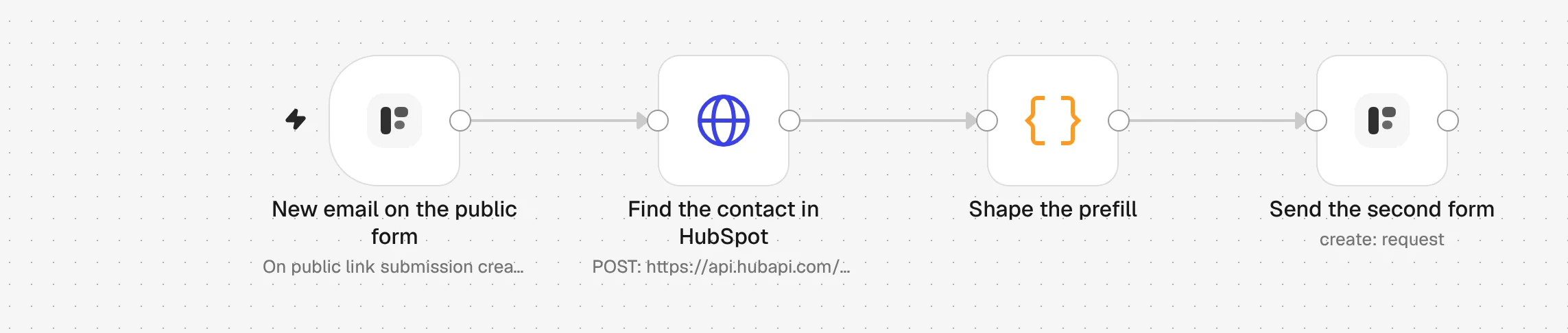
1. New email on the public form
Iemand verstuurt je formulier met één vraag. De Formstep Trigger start de workflow met het antwoord onder email.
2. Find the contact in HubSpot
Een HTTP Request-node zoekt in je HubSpot-contacten naar dat e-mailadres en geeft de match terug, als die er is.
3. Shape the prefill
Een Code-node zet het contact om in formulierantwoorden, full_name en company_name. Een nieuwe lead zonder match krijgt het formulier ook, met minder ingevuld.
4. Send the second form
De Formstep-node maakt een aanvraag: het formulier Client Onboarding, naar hetzelfde e-mailadres, met email vergrendeld zodat het niet te wijzigen is.
5. They check it and finish it
De persoon opent de eigen privélink, corrigeert wat verouderd is en beantwoordt de rest. Een account is niet nodig.
6. Get the answers back
De HubSpot-integratie op het tweede formulier werkt het contact bij. Wil je meer doen, start dan een andere workflow met de trigger Request Completed.
Importeer de n8n-workflow
Plak hem op een n8n-canvas met Ctrl+V (Cmd+V op een Mac), of download het bestand en gebruik Import from File. Kies daarna je inloggegevens en formulieren in de nodes met een waarschuwing.
Toon de JSON
{
  "name": "Formstep: public form to a CRM-prefilled request",
  "nodes": [
    {
      "parameters": {
        "content": "## Public form to a CRM-prefilled request\n\n1. **New email on the public form**: pick your short public form. It needs an email question with the field key `email`.\n2. **Find the contact in HubSpot**: pick a HubSpot App Token credential with the `crm.objects.contacts.read` scope.\n3. **Send the second form**: pick your Formstep credential and the published Client Onboarding form.\n\nDelivery is Email the Invitation, which needs Formstep Pro or Business. On Free, set it to None and send the request's `url` from a node of your own.\n\nTest Mode is on, so nothing is emailed. Turn it off before you publish.",
        "height": 360,
        "width": 620,
        "color": 5
      },
      "type": "n8n-nodes-base.stickyNote",
      "typeVersion": 1,
      "position": [
        -40,
        -360
      ],
      "id": "2f0a6c1e-1000-4000-8000-000000000001",
      "name": "How to set it up"
    },
    {
      "parameters": {
        "formId": {
          "__rl": true,
          "mode": "list",
          "value": ""
        },
        "event": "submission_created"
      },
      "type": "n8n-nodes-formstep.formstepTrigger",
      "typeVersion": 1.2,
      "position": [
        0,
        0
      ],
      "id": "2f0a6c1e-1000-4000-8000-000000000002",
      "name": "New email on the public form"
    },
    {
      "parameters": {
        "method": "POST",
        "url": "https://api.hubapi.com/crm/v3/objects/contacts/search",
        "authentication": "predefinedCredentialType",
        "nodeCredentialType": "hubspotAppToken",
        "sendBody": true,
        "specifyBody": "json",
        "jsonBody": "={{ JSON.stringify({ filterGroups: [{ filters: [{ propertyName: 'email', operator: 'EQ', value: $json.data.answers.email }] }], properties: ['firstname', 'lastname', 'company'], limit: 1 }) }}",
        "options": {}
      },
      "type": "n8n-nodes-base.httpRequest",
      "typeVersion": 4.2,
      "position": [
        240,
        0
      ],
      "id": "2f0a6c1e-1000-4000-8000-000000000003",
      "name": "Find the contact in HubSpot"
    },
    {
      "parameters": {
        "mode": "runOnceForEachItem",
        "jsCode": "// The first HubSpot match, or none: a new lead still gets the form, with less filled in.\nconst event = $('New email on the public form').item.json.data\nconst match = $json.results[0]\nconst contact = match ? match.properties : {}\nreturn {\n  json: {\n    email: event.answers.email,\n    first_name: contact.firstname ?? '',\n    full_name: [contact.firstname, contact.lastname].filter(Boolean).join(' '),\n    company_name: contact.company ?? '',\n    metadata: match ? { hubspotContactId: match.id } : {},\n    submission_id: event.submission.id,\n  },\n}"
      },
      "type": "n8n-nodes-base.code",
      "typeVersion": 2,
      "position": [
        480,
        0
      ],
      "id": "2f0a6c1e-1000-4000-8000-000000000004",
      "name": "Shape the prefill"
    },
    {
      "parameters": {
        "resource": "request",
        "operation": "create",
        "formId": {
          "__rl": true,
          "mode": "list",
          "value": ""
        },
        "recipientEmail": "={{ $json.email }}",
        "fields": {
          "mappingMode": "defineBelow",
          "value": {
            "full_name": "={{ $json.full_name }}",
            "email": "={{ $json.email }}",
            "company_name": "={{ $json.company_name }}"
          },
          "matchingColumns": [],
          "schema": [
            {
              "id": "full_name",
              "displayName": "Full Name (full_name)",
              "required": false,
              "defaultMatch": false,
              "canBeUsedToMatch": false,
              "display": true,
              "type": "string"
            },
            {
              "id": "email",
              "displayName": "Email Address (email)",
              "required": false,
              "defaultMatch": false,
              "canBeUsedToMatch": false,
              "display": true,
              "type": "string"
            },
            {
              "id": "company_name",
              "displayName": "Company (company_name)",
              "required": false,
              "defaultMatch": false,
              "canBeUsedToMatch": false,
              "display": true,
              "type": "string"
            }
          ],
          "attemptToConvertTypes": false,
          "convertFieldsToString": false
        },
        "readonly": [
          "email"
        ],
        "waitForOutcome": false,
        "additionalFields": {
          "delivery": "email",
          "recipientName": "={{ $json.first_name }}",
          "externalId": "=signup-{{ $json.submission_id }}",
          "metadata": "={{ JSON.stringify($json.metadata) }}",
          "test": true
        }
      },
      "type": "n8n-nodes-formstep.formstep",
      "typeVersion": 5,
      "position": [
        720,
        0
      ],
      "id": "2f0a6c1e-1000-4000-8000-000000000005",
      "name": "Send the second form"
    }
  ],
  "pinData": {},
  "connections": {
    "New email on the public form": {
      "main": [
        [
          {
            "node": "Find the contact in HubSpot",
            "type": "main",
            "index": 0
          }
        ]
      ]
    },
    "Find the contact in HubSpot": {
      "main": [
        [
          {
            "node": "Shape the prefill",
            "type": "main",
            "index": 0
          }
        ]
      ]
    },
    "Shape the prefill": {
      "main": [
        [
          {
            "node": "Send the second form",
            "type": "main",
            "index": 0
          }
        ]
      ]
    }
  },
  "active": false,
  "settings": {
    "executionOrder": "v1"
  },
  "meta": {
    "templateCredsSetupCompleted": false
  },
  "tags": []
}
Je hebt de community-node n8n-nodes-formstep nodig op een zelf gehoste n8n die Formstep via HTTPS kan bereiken: installeer hem en koppel hem. Getest in n8n 2.46 met versie 0.15.0 van de node.
Waarom Formstep voor deze stap gebruiken
- Elke persoon krijgt een eigen formulier. De vooraf ingevulde gegevens reizen mee in een privélink naar één e-mailadres. Niemand anders kan het formulier openen of zien wat HubSpot weet.
- De HubSpot-contact-ID komt terug met de antwoorden. Hij wordt op de aanvraag bewaard als metadata, die het formulier nooit toont, zodat de volgende stap het juiste contact bijwerkt zonder opnieuw te zoeken.
- Een vraag anders formuleren breekt niets. Antwoorden komen binnen onder vaste veldsleutels, dus
{{ $json.data.answers.company_name }}blijft werken als je de vraag hernoemt of vertaalt.