

Capture an email, then send a HubSpot-prefilled form with n8n
Visitors leave their email on a one-question form. n8n looks them up in HubSpot and sends them a second Formstep form with their name and company already filled in, so they only check it and add the rest. Import the workflow below and pick your two forms.
Published · Updated
Collecting an email is easy. The hard part comes next: a longer form, already filled in with what your CRM knows, that only that person can open. n8n’s own form reads its prefill from the URL, so anyone with the link can see and change it.
Formstep calls that personal form a request: a form sent to one person, on a private link, with the answers you already know filled in.
In short: The Formstep Trigger catches each email from a public form, HubSpot supplies the name and company, and a Formstep request sends that person a prefilled second form. Get the workflow JSON.
What you need
- A self-hosted n8n with the Formstep community node, installed and connected.
- A HubSpot private app token that can read contacts.
- Two published Formstep forms: a public form with one email question keyed
email, and the Client Onboarding template. - Optional: the HubSpot integration on the second form, to update the contact when they answer.
How the n8n workflow works, step by step
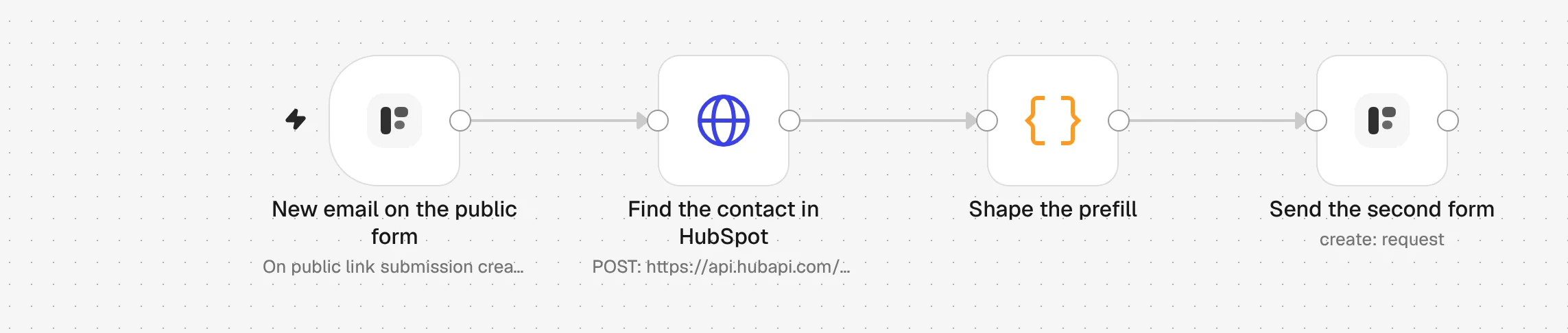
1. New email on the public form
Someone submits your one-question form. The Formstep Trigger starts the workflow with their answer under email.
2. Find the contact in HubSpot
An HTTP Request node searches your HubSpot contacts for that email and returns the match, if there is one.
3. Shape the prefill
A Code node turns the contact into form answers, full_name and company_name. A new lead with no match still gets the form, with less filled in.
4. Send the second form
The Formstep node creates a request: the Client Onboarding form, sent to the same email, with email locked so it cannot be changed.
5. They check it and finish it
The person opens their private link, fixes anything out of date and answers the rest. They need no account.
6. Get the answers back
The HubSpot integration on the second form updates the contact. To do more, start another workflow with the Request Completed trigger.
Import the n8n workflow
Paste it onto an n8n canvas with Ctrl+V (Cmd+V on a Mac), or download the file and use Import from File. Then pick your credentials and forms in the nodes marked with a warning.
Show the JSON
{
  "name": "Formstep: public form to a CRM-prefilled request",
  "nodes": [
    {
      "parameters": {
        "content": "## Public form to a CRM-prefilled request\n\n1. **New email on the public form**: pick your short public form. It needs an email question with the field key `email`.\n2. **Find the contact in HubSpot**: pick a HubSpot App Token credential with the `crm.objects.contacts.read` scope.\n3. **Send the second form**: pick your Formstep credential and the published Client Onboarding form.\n\nDelivery is Email the Invitation, which needs Formstep Pro or Business. On Free, set it to None and send the request's `url` from a node of your own.\n\nTest Mode is on, so nothing is emailed. Turn it off before you publish.",
        "height": 360,
        "width": 620,
        "color": 5
      },
      "type": "n8n-nodes-base.stickyNote",
      "typeVersion": 1,
      "position": [
        -40,
        -360
      ],
      "id": "2f0a6c1e-1000-4000-8000-000000000001",
      "name": "How to set it up"
    },
    {
      "parameters": {
        "formId": {
          "__rl": true,
          "mode": "list",
          "value": ""
        },
        "event": "submission_created"
      },
      "type": "n8n-nodes-formstep.formstepTrigger",
      "typeVersion": 1.2,
      "position": [
        0,
        0
      ],
      "id": "2f0a6c1e-1000-4000-8000-000000000002",
      "name": "New email on the public form"
    },
    {
      "parameters": {
        "method": "POST",
        "url": "https://api.hubapi.com/crm/v3/objects/contacts/search",
        "authentication": "predefinedCredentialType",
        "nodeCredentialType": "hubspotAppToken",
        "sendBody": true,
        "specifyBody": "json",
        "jsonBody": "={{ JSON.stringify({ filterGroups: [{ filters: [{ propertyName: 'email', operator: 'EQ', value: $json.data.answers.email }] }], properties: ['firstname', 'lastname', 'company'], limit: 1 }) }}",
        "options": {}
      },
      "type": "n8n-nodes-base.httpRequest",
      "typeVersion": 4.2,
      "position": [
        240,
        0
      ],
      "id": "2f0a6c1e-1000-4000-8000-000000000003",
      "name": "Find the contact in HubSpot"
    },
    {
      "parameters": {
        "mode": "runOnceForEachItem",
        "jsCode": "// The first HubSpot match, or none: a new lead still gets the form, with less filled in.\nconst event = $('New email on the public form').item.json.data\nconst match = $json.results[0]\nconst contact = match ? match.properties : {}\nreturn {\n  json: {\n    email: event.answers.email,\n    first_name: contact.firstname ?? '',\n    full_name: [contact.firstname, contact.lastname].filter(Boolean).join(' '),\n    company_name: contact.company ?? '',\n    metadata: match ? { hubspotContactId: match.id } : {},\n    submission_id: event.submission.id,\n  },\n}"
      },
      "type": "n8n-nodes-base.code",
      "typeVersion": 2,
      "position": [
        480,
        0
      ],
      "id": "2f0a6c1e-1000-4000-8000-000000000004",
      "name": "Shape the prefill"
    },
    {
      "parameters": {
        "resource": "request",
        "operation": "create",
        "formId": {
          "__rl": true,
          "mode": "list",
          "value": ""
        },
        "recipientEmail": "={{ $json.email }}",
        "fields": {
          "mappingMode": "defineBelow",
          "value": {
            "full_name": "={{ $json.full_name }}",
            "email": "={{ $json.email }}",
            "company_name": "={{ $json.company_name }}"
          },
          "matchingColumns": [],
          "schema": [
            {
              "id": "full_name",
              "displayName": "Full Name (full_name)",
              "required": false,
              "defaultMatch": false,
              "canBeUsedToMatch": false,
              "display": true,
              "type": "string"
            },
            {
              "id": "email",
              "displayName": "Email Address (email)",
              "required": false,
              "defaultMatch": false,
              "canBeUsedToMatch": false,
              "display": true,
              "type": "string"
            },
            {
              "id": "company_name",
              "displayName": "Company (company_name)",
              "required": false,
              "defaultMatch": false,
              "canBeUsedToMatch": false,
              "display": true,
              "type": "string"
            }
          ],
          "attemptToConvertTypes": false,
          "convertFieldsToString": false
        },
        "readonly": [
          "email"
        ],
        "waitForOutcome": false,
        "additionalFields": {
          "delivery": "email",
          "recipientName": "={{ $json.first_name }}",
          "externalId": "=signup-{{ $json.submission_id }}",
          "metadata": "={{ JSON.stringify($json.metadata) }}",
          "test": true
        }
      },
      "type": "n8n-nodes-formstep.formstep",
      "typeVersion": 5,
      "position": [
        720,
        0
      ],
      "id": "2f0a6c1e-1000-4000-8000-000000000005",
      "name": "Send the second form"
    }
  ],
  "pinData": {},
  "connections": {
    "New email on the public form": {
      "main": [
        [
          {
            "node": "Find the contact in HubSpot",
            "type": "main",
            "index": 0
          }
        ]
      ]
    },
    "Find the contact in HubSpot": {
      "main": [
        [
          {
            "node": "Shape the prefill",
            "type": "main",
            "index": 0
          }
        ]
      ]
    },
    "Shape the prefill": {
      "main": [
        [
          {
            "node": "Send the second form",
            "type": "main",
            "index": 0
          }
        ]
      ]
    }
  },
  "active": false,
  "settings": {
    "executionOrder": "v1"
  },
  "meta": {
    "templateCredsSetupCompleted": false
  },
  "tags": []
}
It needs the n8n-nodes-formstep community node on a self-hosted n8n that Formstep can reach over HTTPS: install it and connect it. Checked in n8n 2.46 with version 0.15.0 of the node.
Why use Formstep for this step
- Each person gets their own form. The prefilled details travel in a private link sent to one email address. Nobody else can open the form or see what HubSpot knows.
- The HubSpot contact ID comes back with the answers. It is saved on the request as metadata, which the form never shows, so the next step updates the right contact without searching again.
- Rewording a question breaks nothing. Answers arrive under fixed field keys, so
{{ $json.data.answers.company_name }}keeps working when you retitle or translate the question.
