

Onboarding und Offboarding mit n8n, Slack und Formstep automatisieren
Ein Workflow deckt Neueintritte und Austritte ab. Er ermittelt, welche Konten die Person braucht oder verliert, postet diese Checkliste an die IT in Slack und schickt der Person ein Formular für die Angaben, die die Personalabteilung noch braucht. Dann wartet er auf die Antworten. Beide Formulare sind im Workflow enthalten, Sie müssen also vorab nichts in Formstep einrichten.
Veröffentlicht · Aktualisiert
Beim Onboarding arbeiten drei Teams zusammen, die selten ein gemeinsames Tool haben. Die Personalabteilung kennt das Startdatum, die IT legt Konten an, und nur die neue Person kennt ihren rechtlichen Namen, ihre Privatadresse und ihren Notfallkontakt.
n8n spricht bereits mit Ihrem HR-System, mit Slack und mit den Tools der IT, hat aber keinen guten Weg, die Person selbst zu fragen. Formstep übernimmt das mit einer Anfrage: ein Formular, das über einen privaten Link an eine Person geht, mit allem vorausgefüllt, was Sie schon wissen.
Kurz gesagt: Ein Workflow deckt Onboarding und Offboarding ab. Ein Code-Node erstellt die Zugriffs-Checkliste und wählt das Formular, Slack informiert die IT, und der Workflow wartet auf die Antworten der Person. Workflow-JSON herunterladen.
Was Sie brauchen
- Ein selbst gehostetes n8n mit dem Formstep Community Node, installiert und verbunden.
- Eine Slack-Zugangsdatenverbindung in n8n und einen privaten IT-Kanal.
- Ihre Abteilungen und deren Konten, eingetragen im Code-Node.
Was die beiden Formulare abfragen
Das Formular für Neueintritte fragt nach rechtlichem und bevorzugtem Namen, Telefonnummer, Geburtsdatum, Privatadresse für den Laptop, Laptop-Auswahl, T-Shirt-Größe und Notfallkontakt. Das Formular für Austritte fragt nach einer privaten E-Mail-Adresse für die letzte Gehaltsabrechnung, den Geräten, die die Person hat, und wie sie zurückkommen. Wenn Sie die Formulare lieber im Editor gestalten möchten, starten Sie mit der Vorlage für Mitarbeiter-Onboarding.
So funktioniert der n8n-Workflow, Schritt für Schritt
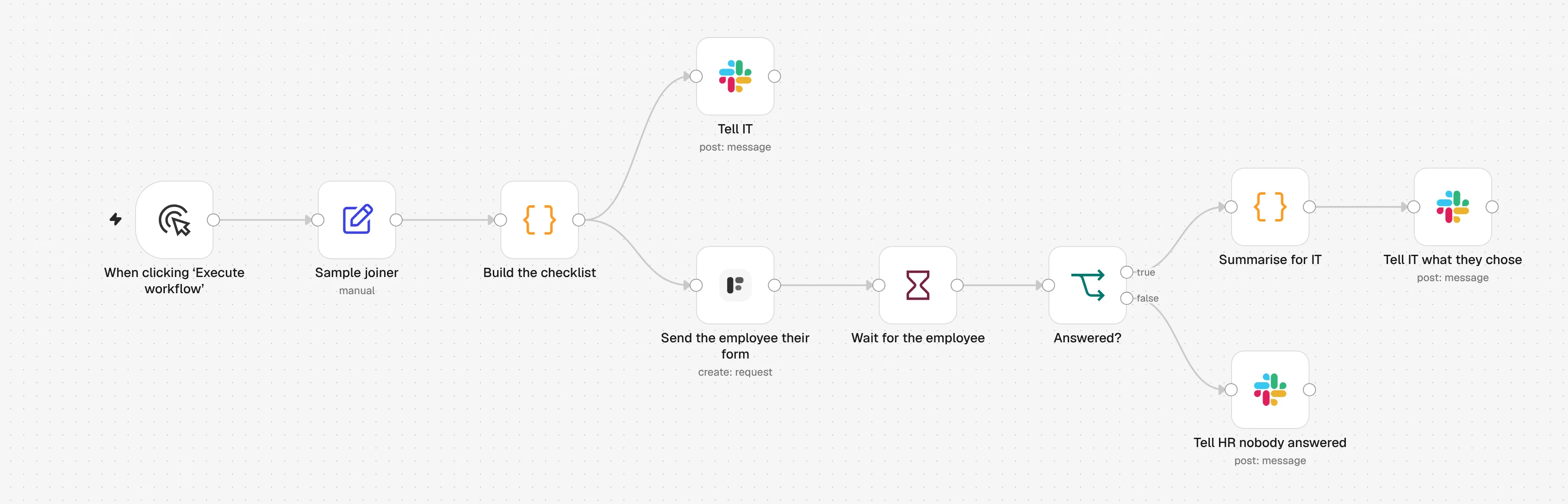
1. Sample joiner
Ein Beispiel-Neueintritt startet den Workflow. Ersetzen Sie ihn durch Ihr HR-System, eine Zeile in Google Sheets oder einen Webhook mit denselben Feldern.
2. Build the checklist
Ein Code-Node sucht die Konten für die Abteilung der Person heraus und wählt das Formular für Neueintritt oder Austritt.
3. Tell IT
Slack erhält die Person, das Datum, die Führungskraft und die Zugriffs-Checkliste. Der Formular-Link wird nie gepostet.
4. Send the employee their form
Der Formstep-Node sendet das Formular an die private E-Mail-Adresse der Person, mit ihrem bereits eingetragenen Namen.
5. Wait for the employee
Ein Wait-Node hält den Workflow an, bis die Person das Formular absendet oder die Anfrage am Starttag bzw. letzten Arbeitstag abläuft.
6. Answered?
Wurde geantwortet, sagt Slack der IT, was zu tun ist, zum Beispiel welchen Laptop die Person gewählt hat. Wenn nicht, bittet Slack die Personalabteilung, die Person anzurufen.
Den n8n-Workflow importieren
Fügen Sie ihn mit Strg+V (Cmd+V auf dem Mac) in eine n8n-Arbeitsfläche ein, oder laden Sie die Datei herunter und nutzen Sie Import from File. Wählen Sie dann in den mit einer Warnung markierten Nodes Ihre Zugangsdaten und Formulare.
JSON anzeigen
{
  "name": "Formstep: employee onboarding and offboarding",
  "nodes": [
    {
      "parameters": {
        "content": "## Employee onboarding and offboarding\n\nBoth forms are inside **Build the checklist**, so there is nothing to build in Formstep first.\n\n1. **Send the employee their form**: pick your Formstep credential.\n2. The three **Slack** nodes: pick a Slack credential and your IT channel.\n3. Edit the accounts per department at the top of **Build the checklist**.\n4. Swap **Sample joiner** for your HR system, a Google Sheets trigger or a Webhook, with the same six fields. Set `type` to `leaver` to try offboarding.\n\nTest Mode is on, so nothing is emailed. Delivery is Email the Invitation, which needs Formstep Pro or Business.",
        "height": 400,
        "width": 660,
        "color": 5
      },
      "type": "n8n-nodes-base.stickyNote",
      "typeVersion": 1,
      "position": [
        -40,
        -520
      ],
      "id": "5b9e3f70-3000-4000-8000-000000000001",
      "name": "How to set it up"
    },
    {
      "parameters": {},
      "type": "n8n-nodes-base.manualTrigger",
      "typeVersion": 1,
      "position": [
        0,
        0
      ],
      "id": "5b9e3f70-3000-4000-8000-000000000002",
      "name": "When clicking ‘Execute workflow’"
    },
    {
      "parameters": {
        "assignments": {
          "assignments": [
            {
              "id": "5b9e3f70-3000-4000-8000-000000000003",
              "name": "type",
              "value": "joiner",
              "type": "string"
            },
            {
              "id": "5b9e3f70-3000-4000-8000-000000000004",
              "name": "employee_id",
              "value": "E-1042",
              "type": "string"
            },
            {
              "id": "5b9e3f70-3000-4000-8000-000000000005",
              "name": "name",
              "value": "Ada Lovelace",
              "type": "string"
            },
            {
              "id": "5b9e3f70-3000-4000-8000-000000000006",
              "name": "personal_email",
              "value": "ada@example.com",
              "type": "string"
            },
            {
              "id": "5b9e3f70-3000-4000-8000-000000000007",
              "name": "department",
              "value": "Engineering",
              "type": "string"
            },
            {
              "id": "5b9e3f70-3000-4000-8000-000000000008",
              "name": "date",
              "value": "={{ $now.plus({ days: 14 }).toISODate() }}",
              "type": "string"
            },
            {
              "id": "5b9e3f70-3000-4000-8000-000000000009",
              "name": "manager",
              "value": "Grace Hopper",
              "type": "string"
            }
          ]
        },
        "options": {}
      },
      "type": "n8n-nodes-base.set",
      "typeVersion": 3.4,
      "position": [
        220,
        0
      ],
      "id": "5b9e3f70-3000-4000-8000-000000000010",
      "name": "Sample joiner"
    },
    {
      "parameters": {
        "mode": "runOnceForEachItem",
        "jsCode": "// Accounts per department. Everyone gets the first list; a team not listed gets only that.\nconst everyone = ['Google Workspace', 'Slack', '1Password']\nconst byDepartment = {\n  Engineering: ['GitHub', 'Linear', 'AWS'],\n  Sales: ['HubSpot', 'Gong'],\n  Finance: ['Xero', 'Expensify'],\n}\n\n// Two fixed forms, personalised only through prefill and context. Formstep builds\n// each one on the first request and reuses it for every later one, so a form that\n// changed per person would make a new form per person.\nconst forms = {\n  joiner: {\n    name: 'Welcome to the team',\n    blocks: [\n      { type: 'header', content: 'Welcome, {{first_name}}' },\n      {\n        type: 'paragraph',\n        content: 'You start on **{{date_label}}** with {{manager_name}}. Fill this in before then, so your accounts and laptop are ready on day one.',\n      },\n      { type: 'hiddenField', key: 'first_name' },\n      { type: 'hiddenField', key: 'date_label' },\n      { type: 'hiddenField', key: 'manager_name' },\n      { type: 'text', key: 'legal_name', title: 'Full legal name' },\n      { type: 'text', key: 'preferred_name', title: 'Preferred name', required: false },\n      { type: 'contact', key: 'phone', title: 'Phone number', contactType: 'phone' },\n      { type: 'date', key: 'date_of_birth', title: 'Date of birth' },\n      { type: 'text', key: 'home_address', title: 'Home address, for your laptop delivery', multiline: true },\n      { type: 'radio', key: 'laptop', title: 'Which laptop would you like?', options: ['Mac', 'Windows'] },\n      { type: 'select', key: 'tshirt_size', title: 'T-shirt size', options: ['XS', 'S', 'M', 'L', 'XL', 'XXL'] },\n      { type: 'text', key: 'emergency_contact', title: 'Emergency contact: name and phone number', multiline: true },\n    ],\n  },\n  leaver: {\n    name: 'Before your last day',\n    blocks: [\n      { type: 'header', content: 'Before your last day, {{first_name}}' },\n      {\n        type: 'paragraph',\n        content: 'Your last day is **{{date_label}}**. Tell us where to send your final payslip and how your equipment comes back.',\n      },\n      { type: 'hiddenField', key: 'first_name' },\n      { type: 'hiddenField', key: 'date_label' },\n      { type: 'contact', key: 'personal_email', title: 'Personal email for your final payslip', contactType: 'email' },\n      {\n        type: 'checkbox',\n        key: 'equipment',\n        title: 'What do you have from us?',\n        options: ['Laptop', 'Monitor', 'Phone', 'Access card', 'Headset'],\n      },\n      {\n        type: 'radio',\n        key: 'return_method',\n        title: 'How will you return it?',\n        options: ['Hand it in at the office', 'Send me a prepaid box'],\n      },\n      { type: 'text', key: 'shipping_address', title: 'If you chose a box: where should we send it?', multiline: true, required: false },\n      { type: 'text', key: 'feedback', title: 'Anything you would like us to know?', multiline: true, required: false },\n    ],\n  },\n}\n\nconst person = $json\nconst form = forms[person.type]\nif (!form) throw new Error(`type must be joiner or leaver, got \"${person.type}\"`)\n\nconst accounts = [...everyone, ...(byDepartment[person.department] ?? [])]\nconst firstName = person.name.split(' ')[0]\nconst dateLabel = DateTime.fromISO(person.date).toFormat('d LLLL yyyy')\n\nconst slackText =\n  person.type === 'joiner'\n    ? `:wave: *${person.name}* joins ${person.department} on ${dateLabel}, reporting to ${person.manager}.\\nAccounts to set up before day one: ${accounts.join(', ')}.\\nTheir onboarding form is on its way to their personal email.`\n    : `*${person.name}* leaves ${person.department} on ${dateLabel}.\\nAccounts to close on their last day: ${accounts.join(', ')}.\\nTheir offboarding form is on its way to their personal email.`\n\nreturn {\n  json: {\n    ...person,\n    firstName,\n    accounts,\n    slackText,\n    form,\n    prefill: person.type === 'joiner' ? { legal_name: person.name } : { personal_email: person.personal_email },\n    context:\n      person.type === 'joiner'\n        ? { first_name: firstName, date_label: dateLabel, manager_name: person.manager }\n        : { first_name: firstName, date_label: dateLabel },\n  },\n}"
      },
      "type": "n8n-nodes-base.code",
      "typeVersion": 2,
      "position": [
        440,
        0
      ],
      "id": "5b9e3f70-3000-4000-8000-000000000011",
      "name": "Build the checklist"
    },
    {
      "parameters": {
        "select": "channel",
        "channelId": {
          "__rl": true,
          "value": "#it-onboarding",
          "mode": "name"
        },
        "text": "={{ $json.slackText }}",
        "otherOptions": {}
      },
      "type": "n8n-nodes-base.slack",
      "typeVersion": 2.3,
      "position": [
        680,
        -180
      ],
      "id": "5b9e3f70-3000-4000-8000-000000000012",
      "name": "Tell IT",
      "webhookId": "5b9e3f70-3000-4000-8000-000000000112"
    },
    {
      "parameters": {
        "resource": "request",
        "operation": "create",
        "formSource": "inline",
        "formName": "={{ $json.form.name }}",
        "formBlocks": "={{ JSON.stringify($json.form.blocks) }}",
        "inlinePrefill": "={{ JSON.stringify($json.prefill) }}",
        "inlineContext": "={{ JSON.stringify($json.context) }}",
        "inlineReadonly": "",
        "formOptions": {
          "cover": "{ \"type\": \"color\", \"color\": \"#1f6f5c\" }"
        },
        "recipientEmail": "={{ $json.personal_email }}",
        "waitForOutcome": true,
        "additionalFields": {
          "delivery": "email",
          "recipientName": "={{ $json.firstName }}",
          "externalId": "={{ $json.type }}-{{ $json.employee_id }}-{{ $execution.id }}",
          "expiresAt": "={{ DateTime.fromISO($json.date).toISO() }}",
          "test": true
        }
      },
      "type": "n8n-nodes-formstep.formstep",
      "typeVersion": 5,
      "position": [
        680,
        80
      ],
      "id": "5b9e3f70-3000-4000-8000-000000000013",
      "name": "Send the employee their form"
    },
    {
      "parameters": {
        "resume": "webhook",
        "httpMethod": "POST",
        "options": {}
      },
      "type": "n8n-nodes-base.wait",
      "typeVersion": 1.1,
      "position": [
        900,
        80
      ],
      "id": "5b9e3f70-3000-4000-8000-000000000014",
      "name": "Wait for the employee",
      "webhookId": "5b9e3f70-3000-4000-8000-000000000015"
    },
    {
      "parameters": {
        "conditions": {
          "options": {
            "caseSensitive": true,
            "leftValue": "",
            "typeValidation": "strict",
            "version": 2
          },
          "conditions": [
            {
              "id": "5b9e3f70-3000-4000-8000-000000000016",
              "leftValue": "={{ $json.body.type }}",
              "rightValue": "request.completed",
              "operator": {
                "type": "string",
                "operation": "equals"
              }
            }
          ],
          "combinator": "and"
        },
        "options": {}
      },
      "type": "n8n-nodes-base.if",
      "typeVersion": 2.2,
      "position": [
        1120,
        80
      ],
      "id": "5b9e3f70-3000-4000-8000-000000000017",
      "name": "Answered?"
    },
    {
      "parameters": {
        "mode": "runOnceForEachItem",
        "jsCode": "// Only what IT acts on. Home address, date of birth and emergency contact stay in Formstep.\nconst person = $('Build the checklist').item.json\nconst display = $json.body.data.display\n\nconst text =\n  person.type === 'joiner'\n    ? `${person.name} filled in the onboarding form: ${display.laptop} laptop, T-shirt ${display.tshirt_size}. The delivery address is on the request in Formstep.`\n    : `${person.name} answered the offboarding form. Equipment: ${display.equipment}. Return: ${display.return_method}.`\n\nreturn { json: { text } }"
      },
      "type": "n8n-nodes-base.code",
      "typeVersion": 2,
      "position": [
        1340,
        -20
      ],
      "id": "5b9e3f70-3000-4000-8000-000000000018",
      "name": "Summarise for IT"
    },
    {
      "parameters": {
        "select": "channel",
        "channelId": {
          "__rl": true,
          "value": "#it-onboarding",
          "mode": "name"
        },
        "text": "={{ $json.text }}",
        "otherOptions": {}
      },
      "type": "n8n-nodes-base.slack",
      "typeVersion": 2.3,
      "position": [
        1560,
        -20
      ],
      "id": "5b9e3f70-3000-4000-8000-000000000019",
      "name": "Tell IT what they chose",
      "webhookId": "5b9e3f70-3000-4000-8000-000000000119"
    },
    {
      "parameters": {
        "select": "channel",
        "channelId": {
          "__rl": true,
          "value": "#it-onboarding",
          "mode": "name"
        },
        "text": "={{ $('Build the checklist').item.json.name }} has not answered the {{ $('Build the checklist').item.json.type === 'joiner' ? 'onboarding' : 'offboarding' }} form, and the request was {{ $json.body.type === 'request.expired' ? 'left to expire' : 'canceled' }}. Worth a call.",
        "otherOptions": {}
      },
      "type": "n8n-nodes-base.slack",
      "typeVersion": 2.3,
      "position": [
        1340,
        200
      ],
      "id": "5b9e3f70-3000-4000-8000-000000000020",
      "name": "Tell HR nobody answered",
      "webhookId": "5b9e3f70-3000-4000-8000-000000000120"
    }
  ],
  "pinData": {},
  "connections": {
    "When clicking ‘Execute workflow’": {
      "main": [
        [
          {
            "node": "Sample joiner",
            "type": "main",
            "index": 0
          }
        ]
      ]
    },
    "Sample joiner": {
      "main": [
        [
          {
            "node": "Build the checklist",
            "type": "main",
            "index": 0
          }
        ]
      ]
    },
    "Build the checklist": {
      "main": [
        [
          {
            "node": "Tell IT",
            "type": "main",
            "index": 0
          },
          {
            "node": "Send the employee their form",
            "type": "main",
            "index": 0
          }
        ]
      ]
    },
    "Send the employee their form": {
      "main": [
        [
          {
            "node": "Wait for the employee",
            "type": "main",
            "index": 0
          }
        ]
      ]
    },
    "Wait for the employee": {
      "main": [
        [
          {
            "node": "Answered?",
            "type": "main",
            "index": 0
          }
        ]
      ]
    },
    "Answered?": {
      "main": [
        [
          {
            "node": "Summarise for IT",
            "type": "main",
            "index": 0
          }
        ],
        [
          {
            "node": "Tell HR nobody answered",
            "type": "main",
            "index": 0
          }
        ]
      ]
    },
    "Summarise for IT": {
      "main": [
        [
          {
            "node": "Tell IT what they chose",
            "type": "main",
            "index": 0
          }
        ]
      ]
    }
  },
  "active": false,
  "settings": {
    "executionOrder": "v1"
  },
  "meta": {
    "templateCredsSetupCompleted": false
  },
  "tags": []
}
Er braucht den Community-Node n8n-nodes-formstep auf einer selbst gehosteten n8n-Instanz, die Formstep über HTTPS erreichen kann: installieren Sie ihn und verbinden Sie ihn. Geprüft in n8n 2.46 mit Version 0.15.0 des Nodes.
Warum Formstep für diesen Schritt
- Nichts vorab aufzubauen. Beide Formulare stecken im Code-Node. Formstep erstellt jedes beim ersten Einsatz und nutzt es für jede weitere Person erneut.
- Neueintritte und Austritte an einem Ort. Eine Checkliste, ein Slack-Kanal und ein Ausführungsprotokoll für beide Richtungen.
- Persönliche Daten bleiben aus Slack heraus. Die Zusammenfassung für die IT enthält nur
laptop,tshirt_size,equipmentundreturn_method. Adresse, Geburtsdatum und Notfallkontakt bleiben in Formstep.