

Automatiza la incorporación y la baja de empleados con n8n, Slack y Formstep
Un solo flujo cubre las altas y las bajas. Calcula qué cuentas necesita o pierde la persona, publica esa lista para TI en Slack y envía al empleado un formulario con los datos que RR. HH. aún necesita. Después espera sus respuestas. Los dos formularios vienen incluidos en el flujo, así que no hay nada que configurar antes en Formstep.
Publicado · Actualizado
La incorporación de un empleado involucra a tres equipos que rara vez comparten herramienta. RR. HH. tiene la fecha de inicio, TI tiene cuentas que crear, y solo la persona que entra conoce su nombre legal, su dirección y su contacto de emergencia.
n8n ya se conecta con tu sistema de RR. HH., Slack y las herramientas que gestiona TI, pero no tiene una buena forma de preguntarle al empleado. Formstep se encarga de eso con una solicitud: un formulario enviado a una sola persona por un enlace privado, con lo que ya sabes rellenado.
En resumen: Un solo flujo se encarga de las altas y las bajas. Un nodo Code arma la lista de accesos y elige el formulario, Slack avisa a TI y el flujo espera las respuestas del empleado. Obtén el JSON del flujo.
Qué necesitas
- Un n8n autoalojado con el nodo de comunidad de Formstep, instalado y conectado.
- Una credencial de Slack en n8n y un canal privado para TI.
- Tus departamentos y sus cuentas, escritos en el nodo Code.
Qué preguntan los dos formularios
El formulario de alta pide nombre legal y preferido, teléfono, fecha de nacimiento, una dirección para enviar el portátil, la elección de portátil, una talla de camiseta y un contacto de emergencia. El de baja pide un correo personal para la última nómina, el equipo que tiene la persona y cómo lo devolverá. Para diseñarlos en el editor, parte de la plantilla de incorporación de empleados.
Cómo funciona el flujo de n8n, paso a paso
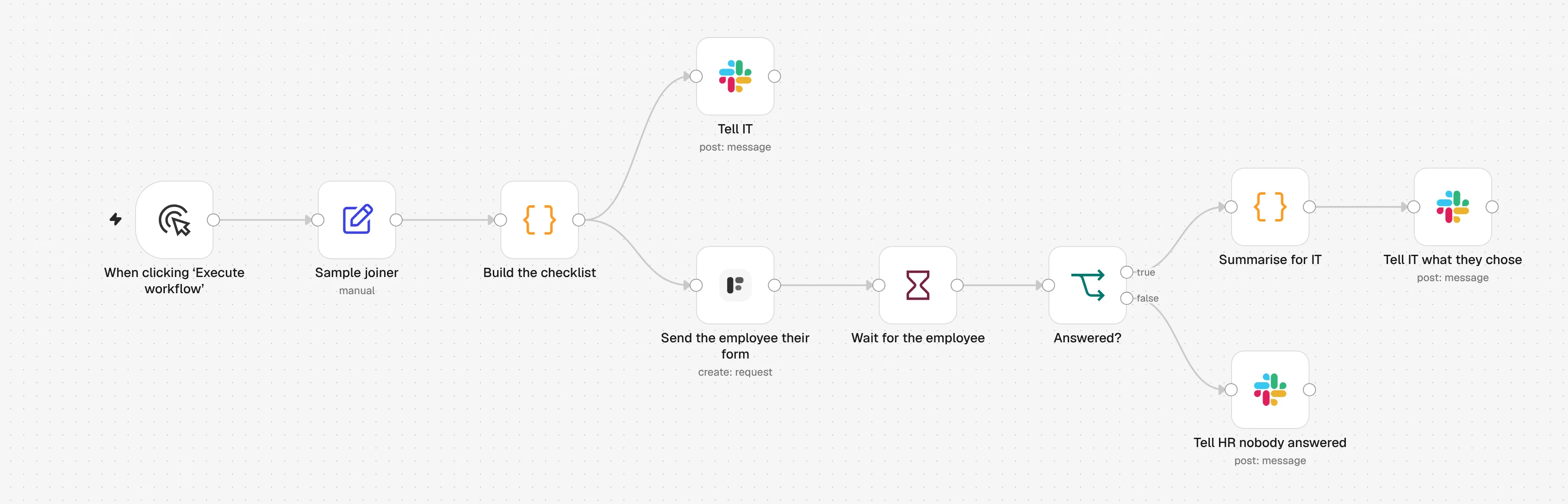
1. Sample joiner
Un nuevo empleado de ejemplo inicia el flujo. Cámbialo por tu sistema de RR. HH., una fila de Google Sheets o un Webhook con los mismos campos.
2. Build the checklist
Un nodo Code busca las cuentas del departamento de la persona y elige el formulario de alta o el de baja.
3. Tell IT
Slack recibe la persona, la fecha, el responsable y la lista de accesos. El enlace del formulario nunca se publica.
4. Send the employee their form
El nodo de Formstep envía el formulario al correo personal del empleado, con su nombre ya rellenado.
5. Wait for the employee
Un nodo Wait pausa el flujo hasta que la persona envíe el formulario, o hasta que la solicitud expire en la fecha de inicio o en el último día.
6. Answered?
Si la persona respondió, Slack le dice a TI qué hacer, como el portátil que eligió. Si no, Slack le pide a RR. HH. que la llame.
Importa el flujo de n8n
Pégalo en un lienzo de n8n con Ctrl+V (Cmd+V en Mac), o descarga el archivo y usa Import from File. Luego elige tus credenciales y formularios en los nodos marcados con una advertencia.
Mostrar el JSON
{
  "name": "Formstep: employee onboarding and offboarding",
  "nodes": [
    {
      "parameters": {
        "content": "## Employee onboarding and offboarding\n\nBoth forms are inside **Build the checklist**, so there is nothing to build in Formstep first.\n\n1. **Send the employee their form**: pick your Formstep credential.\n2. The three **Slack** nodes: pick a Slack credential and your IT channel.\n3. Edit the accounts per department at the top of **Build the checklist**.\n4. Swap **Sample joiner** for your HR system, a Google Sheets trigger or a Webhook, with the same six fields. Set `type` to `leaver` to try offboarding.\n\nTest Mode is on, so nothing is emailed. Delivery is Email the Invitation, which needs Formstep Pro or Business.",
        "height": 400,
        "width": 660,
        "color": 5
      },
      "type": "n8n-nodes-base.stickyNote",
      "typeVersion": 1,
      "position": [
        -40,
        -520
      ],
      "id": "5b9e3f70-3000-4000-8000-000000000001",
      "name": "How to set it up"
    },
    {
      "parameters": {},
      "type": "n8n-nodes-base.manualTrigger",
      "typeVersion": 1,
      "position": [
        0,
        0
      ],
      "id": "5b9e3f70-3000-4000-8000-000000000002",
      "name": "When clicking ‘Execute workflow’"
    },
    {
      "parameters": {
        "assignments": {
          "assignments": [
            {
              "id": "5b9e3f70-3000-4000-8000-000000000003",
              "name": "type",
              "value": "joiner",
              "type": "string"
            },
            {
              "id": "5b9e3f70-3000-4000-8000-000000000004",
              "name": "employee_id",
              "value": "E-1042",
              "type": "string"
            },
            {
              "id": "5b9e3f70-3000-4000-8000-000000000005",
              "name": "name",
              "value": "Ada Lovelace",
              "type": "string"
            },
            {
              "id": "5b9e3f70-3000-4000-8000-000000000006",
              "name": "personal_email",
              "value": "ada@example.com",
              "type": "string"
            },
            {
              "id": "5b9e3f70-3000-4000-8000-000000000007",
              "name": "department",
              "value": "Engineering",
              "type": "string"
            },
            {
              "id": "5b9e3f70-3000-4000-8000-000000000008",
              "name": "date",
              "value": "={{ $now.plus({ days: 14 }).toISODate() }}",
              "type": "string"
            },
            {
              "id": "5b9e3f70-3000-4000-8000-000000000009",
              "name": "manager",
              "value": "Grace Hopper",
              "type": "string"
            }
          ]
        },
        "options": {}
      },
      "type": "n8n-nodes-base.set",
      "typeVersion": 3.4,
      "position": [
        220,
        0
      ],
      "id": "5b9e3f70-3000-4000-8000-000000000010",
      "name": "Sample joiner"
    },
    {
      "parameters": {
        "mode": "runOnceForEachItem",
        "jsCode": "// Accounts per department. Everyone gets the first list; a team not listed gets only that.\nconst everyone = ['Google Workspace', 'Slack', '1Password']\nconst byDepartment = {\n  Engineering: ['GitHub', 'Linear', 'AWS'],\n  Sales: ['HubSpot', 'Gong'],\n  Finance: ['Xero', 'Expensify'],\n}\n\n// Two fixed forms, personalised only through prefill and context. Formstep builds\n// each one on the first request and reuses it for every later one, so a form that\n// changed per person would make a new form per person.\nconst forms = {\n  joiner: {\n    name: 'Welcome to the team',\n    blocks: [\n      { type: 'header', content: 'Welcome, {{first_name}}' },\n      {\n        type: 'paragraph',\n        content: 'You start on **{{date_label}}** with {{manager_name}}. Fill this in before then, so your accounts and laptop are ready on day one.',\n      },\n      { type: 'hiddenField', key: 'first_name' },\n      { type: 'hiddenField', key: 'date_label' },\n      { type: 'hiddenField', key: 'manager_name' },\n      { type: 'text', key: 'legal_name', title: 'Full legal name' },\n      { type: 'text', key: 'preferred_name', title: 'Preferred name', required: false },\n      { type: 'contact', key: 'phone', title: 'Phone number', contactType: 'phone' },\n      { type: 'date', key: 'date_of_birth', title: 'Date of birth' },\n      { type: 'text', key: 'home_address', title: 'Home address, for your laptop delivery', multiline: true },\n      { type: 'radio', key: 'laptop', title: 'Which laptop would you like?', options: ['Mac', 'Windows'] },\n      { type: 'select', key: 'tshirt_size', title: 'T-shirt size', options: ['XS', 'S', 'M', 'L', 'XL', 'XXL'] },\n      { type: 'text', key: 'emergency_contact', title: 'Emergency contact: name and phone number', multiline: true },\n    ],\n  },\n  leaver: {\n    name: 'Before your last day',\n    blocks: [\n      { type: 'header', content: 'Before your last day, {{first_name}}' },\n      {\n        type: 'paragraph',\n        content: 'Your last day is **{{date_label}}**. Tell us where to send your final payslip and how your equipment comes back.',\n      },\n      { type: 'hiddenField', key: 'first_name' },\n      { type: 'hiddenField', key: 'date_label' },\n      { type: 'contact', key: 'personal_email', title: 'Personal email for your final payslip', contactType: 'email' },\n      {\n        type: 'checkbox',\n        key: 'equipment',\n        title: 'What do you have from us?',\n        options: ['Laptop', 'Monitor', 'Phone', 'Access card', 'Headset'],\n      },\n      {\n        type: 'radio',\n        key: 'return_method',\n        title: 'How will you return it?',\n        options: ['Hand it in at the office', 'Send me a prepaid box'],\n      },\n      { type: 'text', key: 'shipping_address', title: 'If you chose a box: where should we send it?', multiline: true, required: false },\n      { type: 'text', key: 'feedback', title: 'Anything you would like us to know?', multiline: true, required: false },\n    ],\n  },\n}\n\nconst person = $json\nconst form = forms[person.type]\nif (!form) throw new Error(`type must be joiner or leaver, got \"${person.type}\"`)\n\nconst accounts = [...everyone, ...(byDepartment[person.department] ?? [])]\nconst firstName = person.name.split(' ')[0]\nconst dateLabel = DateTime.fromISO(person.date).toFormat('d LLLL yyyy')\n\nconst slackText =\n  person.type === 'joiner'\n    ? `:wave: *${person.name}* joins ${person.department} on ${dateLabel}, reporting to ${person.manager}.\\nAccounts to set up before day one: ${accounts.join(', ')}.\\nTheir onboarding form is on its way to their personal email.`\n    : `*${person.name}* leaves ${person.department} on ${dateLabel}.\\nAccounts to close on their last day: ${accounts.join(', ')}.\\nTheir offboarding form is on its way to their personal email.`\n\nreturn {\n  json: {\n    ...person,\n    firstName,\n    accounts,\n    slackText,\n    form,\n    prefill: person.type === 'joiner' ? { legal_name: person.name } : { personal_email: person.personal_email },\n    context:\n      person.type === 'joiner'\n        ? { first_name: firstName, date_label: dateLabel, manager_name: person.manager }\n        : { first_name: firstName, date_label: dateLabel },\n  },\n}"
      },
      "type": "n8n-nodes-base.code",
      "typeVersion": 2,
      "position": [
        440,
        0
      ],
      "id": "5b9e3f70-3000-4000-8000-000000000011",
      "name": "Build the checklist"
    },
    {
      "parameters": {
        "select": "channel",
        "channelId": {
          "__rl": true,
          "value": "#it-onboarding",
          "mode": "name"
        },
        "text": "={{ $json.slackText }}",
        "otherOptions": {}
      },
      "type": "n8n-nodes-base.slack",
      "typeVersion": 2.3,
      "position": [
        680,
        -180
      ],
      "id": "5b9e3f70-3000-4000-8000-000000000012",
      "name": "Tell IT",
      "webhookId": "5b9e3f70-3000-4000-8000-000000000112"
    },
    {
      "parameters": {
        "resource": "request",
        "operation": "create",
        "formSource": "inline",
        "formName": "={{ $json.form.name }}",
        "formBlocks": "={{ JSON.stringify($json.form.blocks) }}",
        "inlinePrefill": "={{ JSON.stringify($json.prefill) }}",
        "inlineContext": "={{ JSON.stringify($json.context) }}",
        "inlineReadonly": "",
        "formOptions": {
          "cover": "{ \"type\": \"color\", \"color\": \"#1f6f5c\" }"
        },
        "recipientEmail": "={{ $json.personal_email }}",
        "waitForOutcome": true,
        "additionalFields": {
          "delivery": "email",
          "recipientName": "={{ $json.firstName }}",
          "externalId": "={{ $json.type }}-{{ $json.employee_id }}-{{ $execution.id }}",
          "expiresAt": "={{ DateTime.fromISO($json.date).toISO() }}",
          "test": true
        }
      },
      "type": "n8n-nodes-formstep.formstep",
      "typeVersion": 5,
      "position": [
        680,
        80
      ],
      "id": "5b9e3f70-3000-4000-8000-000000000013",
      "name": "Send the employee their form"
    },
    {
      "parameters": {
        "resume": "webhook",
        "httpMethod": "POST",
        "options": {}
      },
      "type": "n8n-nodes-base.wait",
      "typeVersion": 1.1,
      "position": [
        900,
        80
      ],
      "id": "5b9e3f70-3000-4000-8000-000000000014",
      "name": "Wait for the employee",
      "webhookId": "5b9e3f70-3000-4000-8000-000000000015"
    },
    {
      "parameters": {
        "conditions": {
          "options": {
            "caseSensitive": true,
            "leftValue": "",
            "typeValidation": "strict",
            "version": 2
          },
          "conditions": [
            {
              "id": "5b9e3f70-3000-4000-8000-000000000016",
              "leftValue": "={{ $json.body.type }}",
              "rightValue": "request.completed",
              "operator": {
                "type": "string",
                "operation": "equals"
              }
            }
          ],
          "combinator": "and"
        },
        "options": {}
      },
      "type": "n8n-nodes-base.if",
      "typeVersion": 2.2,
      "position": [
        1120,
        80
      ],
      "id": "5b9e3f70-3000-4000-8000-000000000017",
      "name": "Answered?"
    },
    {
      "parameters": {
        "mode": "runOnceForEachItem",
        "jsCode": "// Only what IT acts on. Home address, date of birth and emergency contact stay in Formstep.\nconst person = $('Build the checklist').item.json\nconst display = $json.body.data.display\n\nconst text =\n  person.type === 'joiner'\n    ? `${person.name} filled in the onboarding form: ${display.laptop} laptop, T-shirt ${display.tshirt_size}. The delivery address is on the request in Formstep.`\n    : `${person.name} answered the offboarding form. Equipment: ${display.equipment}. Return: ${display.return_method}.`\n\nreturn { json: { text } }"
      },
      "type": "n8n-nodes-base.code",
      "typeVersion": 2,
      "position": [
        1340,
        -20
      ],
      "id": "5b9e3f70-3000-4000-8000-000000000018",
      "name": "Summarise for IT"
    },
    {
      "parameters": {
        "select": "channel",
        "channelId": {
          "__rl": true,
          "value": "#it-onboarding",
          "mode": "name"
        },
        "text": "={{ $json.text }}",
        "otherOptions": {}
      },
      "type": "n8n-nodes-base.slack",
      "typeVersion": 2.3,
      "position": [
        1560,
        -20
      ],
      "id": "5b9e3f70-3000-4000-8000-000000000019",
      "name": "Tell IT what they chose",
      "webhookId": "5b9e3f70-3000-4000-8000-000000000119"
    },
    {
      "parameters": {
        "select": "channel",
        "channelId": {
          "__rl": true,
          "value": "#it-onboarding",
          "mode": "name"
        },
        "text": "={{ $('Build the checklist').item.json.name }} has not answered the {{ $('Build the checklist').item.json.type === 'joiner' ? 'onboarding' : 'offboarding' }} form, and the request was {{ $json.body.type === 'request.expired' ? 'left to expire' : 'canceled' }}. Worth a call.",
        "otherOptions": {}
      },
      "type": "n8n-nodes-base.slack",
      "typeVersion": 2.3,
      "position": [
        1340,
        200
      ],
      "id": "5b9e3f70-3000-4000-8000-000000000020",
      "name": "Tell HR nobody answered",
      "webhookId": "5b9e3f70-3000-4000-8000-000000000120"
    }
  ],
  "pinData": {},
  "connections": {
    "When clicking ‘Execute workflow’": {
      "main": [
        [
          {
            "node": "Sample joiner",
            "type": "main",
            "index": 0
          }
        ]
      ]
    },
    "Sample joiner": {
      "main": [
        [
          {
            "node": "Build the checklist",
            "type": "main",
            "index": 0
          }
        ]
      ]
    },
    "Build the checklist": {
      "main": [
        [
          {
            "node": "Tell IT",
            "type": "main",
            "index": 0
          },
          {
            "node": "Send the employee their form",
            "type": "main",
            "index": 0
          }
        ]
      ]
    },
    "Send the employee their form": {
      "main": [
        [
          {
            "node": "Wait for the employee",
            "type": "main",
            "index": 0
          }
        ]
      ]
    },
    "Wait for the employee": {
      "main": [
        [
          {
            "node": "Answered?",
            "type": "main",
            "index": 0
          }
        ]
      ]
    },
    "Answered?": {
      "main": [
        [
          {
            "node": "Summarise for IT",
            "type": "main",
            "index": 0
          }
        ],
        [
          {
            "node": "Tell HR nobody answered",
            "type": "main",
            "index": 0
          }
        ]
      ]
    },
    "Summarise for IT": {
      "main": [
        [
          {
            "node": "Tell IT what they chose",
            "type": "main",
            "index": 0
          }
        ]
      ]
    }
  },
  "active": false,
  "settings": {
    "executionOrder": "v1"
  },
  "meta": {
    "templateCredsSetupCompleted": false
  },
  "tags": []
}
Necesita el nodo de comunidad n8n-nodes-formstep en un n8n autoalojado al que Formstep pueda acceder por HTTPS: instálalo y conéctalo. Comprobado en n8n 2.46 con la versión 0.15.0 del nodo.
Por qué usar Formstep en este paso
- Nada que construir antes de ejecutarlo. Los dos formularios viven en el nodo Code. Formstep crea cada uno la primera vez que se usa y lo reutiliza para todas las personas siguientes.
- Altas y bajas en un solo lugar. Una lista, un canal de Slack y un registro de ejecuciones para ambos casos.
- Los datos personales no llegan a Slack. El resumen para TI solo contiene
laptop,tshirt_size,equipmentyreturn_method. La dirección, la fecha de nacimiento y el contacto de emergencia se quedan en Formstep.