

Automate employee onboarding and offboarding with n8n, Slack and Formstep
One workflow covers new hires and leavers. It works out which accounts the person needs or loses, posts that checklist to IT in Slack, and sends the employee a form for the details HR still needs. Then it waits for their answers. Both forms are built into the workflow, so there is nothing to set up in Formstep first.
Published · Updated
Employee onboarding touches three teams that rarely share a tool. HR has the start date, IT has accounts to create, and only the new hire knows their legal name, home address and emergency contact.
n8n already talks to your HR system, Slack and the tools IT manages. What it lacks is a good way to ask the employee. Formstep fills that gap with a request: a form sent to one person on a private link, with what you already know filled in.
In short: One workflow handles onboarding and offboarding. A Code node builds the access checklist and picks the form, Slack tells IT, and the workflow waits for the employee’s answers. Get the workflow JSON.
What you need
- A self-hosted n8n with the Formstep community node, installed and connected.
- A Slack credential in n8n and a private IT channel.
- Your departments and their accounts, typed into the Code node.
What the two forms ask
The joiner form asks for a legal and preferred name, phone, date of birth, a home address for the laptop, a laptop choice, a T-shirt size and an emergency contact. The leaver form asks for a personal email for the final payslip, the equipment they hold and how it comes back. To design them in the editor instead, start from the Employee Onboarding template.
How the n8n workflow works, step by step
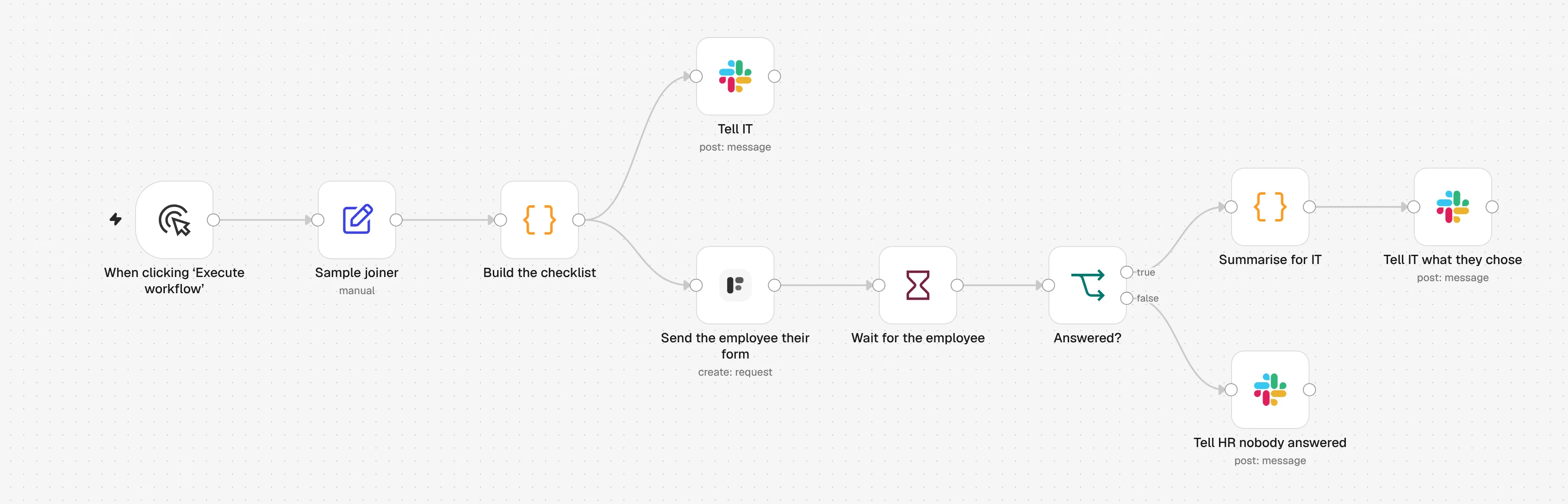
1. Sample joiner
A sample new hire starts the workflow. Swap in your HR system, a Google Sheets row or a Webhook with the same fields.
2. Build the checklist
A Code node looks up the accounts for the person’s department and picks the joiner or the leaver form.
3. Tell IT
Slack gets the person, the date, the manager and the access checklist. The form link is never posted.
4. Send the employee their form
The Formstep node sends the form to the employee’s personal email, with their name filled in.
5. Wait for the employee
A Wait node pauses the workflow until they submit, or until the request expires on the start date or last day.
6. Answered?
If they answered, Slack tells IT what to act on, like the laptop they picked. If not, Slack asks HR to call them.
Import the n8n workflow
Paste it onto an n8n canvas with Ctrl+V (Cmd+V on a Mac), or download the file and use Import from File. Then pick your credentials and forms in the nodes marked with a warning.
Show the JSON
{
  "name": "Formstep: employee onboarding and offboarding",
  "nodes": [
    {
      "parameters": {
        "content": "## Employee onboarding and offboarding\n\nBoth forms are inside **Build the checklist**, so there is nothing to build in Formstep first.\n\n1. **Send the employee their form**: pick your Formstep credential.\n2. The three **Slack** nodes: pick a Slack credential and your IT channel.\n3. Edit the accounts per department at the top of **Build the checklist**.\n4. Swap **Sample joiner** for your HR system, a Google Sheets trigger or a Webhook, with the same six fields. Set `type` to `leaver` to try offboarding.\n\nTest Mode is on, so nothing is emailed. Delivery is Email the Invitation, which needs Formstep Pro or Business.",
        "height": 400,
        "width": 660,
        "color": 5
      },
      "type": "n8n-nodes-base.stickyNote",
      "typeVersion": 1,
      "position": [
        -40,
        -520
      ],
      "id": "5b9e3f70-3000-4000-8000-000000000001",
      "name": "How to set it up"
    },
    {
      "parameters": {},
      "type": "n8n-nodes-base.manualTrigger",
      "typeVersion": 1,
      "position": [
        0,
        0
      ],
      "id": "5b9e3f70-3000-4000-8000-000000000002",
      "name": "When clicking ‘Execute workflow’"
    },
    {
      "parameters": {
        "assignments": {
          "assignments": [
            {
              "id": "5b9e3f70-3000-4000-8000-000000000003",
              "name": "type",
              "value": "joiner",
              "type": "string"
            },
            {
              "id": "5b9e3f70-3000-4000-8000-000000000004",
              "name": "employee_id",
              "value": "E-1042",
              "type": "string"
            },
            {
              "id": "5b9e3f70-3000-4000-8000-000000000005",
              "name": "name",
              "value": "Ada Lovelace",
              "type": "string"
            },
            {
              "id": "5b9e3f70-3000-4000-8000-000000000006",
              "name": "personal_email",
              "value": "ada@example.com",
              "type": "string"
            },
            {
              "id": "5b9e3f70-3000-4000-8000-000000000007",
              "name": "department",
              "value": "Engineering",
              "type": "string"
            },
            {
              "id": "5b9e3f70-3000-4000-8000-000000000008",
              "name": "date",
              "value": "={{ $now.plus({ days: 14 }).toISODate() }}",
              "type": "string"
            },
            {
              "id": "5b9e3f70-3000-4000-8000-000000000009",
              "name": "manager",
              "value": "Grace Hopper",
              "type": "string"
            }
          ]
        },
        "options": {}
      },
      "type": "n8n-nodes-base.set",
      "typeVersion": 3.4,
      "position": [
        220,
        0
      ],
      "id": "5b9e3f70-3000-4000-8000-000000000010",
      "name": "Sample joiner"
    },
    {
      "parameters": {
        "mode": "runOnceForEachItem",
        "jsCode": "// Accounts per department. Everyone gets the first list; a team not listed gets only that.\nconst everyone = ['Google Workspace', 'Slack', '1Password']\nconst byDepartment = {\n  Engineering: ['GitHub', 'Linear', 'AWS'],\n  Sales: ['HubSpot', 'Gong'],\n  Finance: ['Xero', 'Expensify'],\n}\n\n// Two fixed forms, personalised only through prefill and context. Formstep builds\n// each one on the first request and reuses it for every later one, so a form that\n// changed per person would make a new form per person.\nconst forms = {\n  joiner: {\n    name: 'Welcome to the team',\n    blocks: [\n      { type: 'header', content: 'Welcome, {{first_name}}' },\n      {\n        type: 'paragraph',\n        content: 'You start on **{{date_label}}** with {{manager_name}}. Fill this in before then, so your accounts and laptop are ready on day one.',\n      },\n      { type: 'hiddenField', key: 'first_name' },\n      { type: 'hiddenField', key: 'date_label' },\n      { type: 'hiddenField', key: 'manager_name' },\n      { type: 'text', key: 'legal_name', title: 'Full legal name' },\n      { type: 'text', key: 'preferred_name', title: 'Preferred name', required: false },\n      { type: 'contact', key: 'phone', title: 'Phone number', contactType: 'phone' },\n      { type: 'date', key: 'date_of_birth', title: 'Date of birth' },\n      { type: 'text', key: 'home_address', title: 'Home address, for your laptop delivery', multiline: true },\n      { type: 'radio', key: 'laptop', title: 'Which laptop would you like?', options: ['Mac', 'Windows'] },\n      { type: 'select', key: 'tshirt_size', title: 'T-shirt size', options: ['XS', 'S', 'M', 'L', 'XL', 'XXL'] },\n      { type: 'text', key: 'emergency_contact', title: 'Emergency contact: name and phone number', multiline: true },\n    ],\n  },\n  leaver: {\n    name: 'Before your last day',\n    blocks: [\n      { type: 'header', content: 'Before your last day, {{first_name}}' },\n      {\n        type: 'paragraph',\n        content: 'Your last day is **{{date_label}}**. Tell us where to send your final payslip and how your equipment comes back.',\n      },\n      { type: 'hiddenField', key: 'first_name' },\n      { type: 'hiddenField', key: 'date_label' },\n      { type: 'contact', key: 'personal_email', title: 'Personal email for your final payslip', contactType: 'email' },\n      {\n        type: 'checkbox',\n        key: 'equipment',\n        title: 'What do you have from us?',\n        options: ['Laptop', 'Monitor', 'Phone', 'Access card', 'Headset'],\n      },\n      {\n        type: 'radio',\n        key: 'return_method',\n        title: 'How will you return it?',\n        options: ['Hand it in at the office', 'Send me a prepaid box'],\n      },\n      { type: 'text', key: 'shipping_address', title: 'If you chose a box: where should we send it?', multiline: true, required: false },\n      { type: 'text', key: 'feedback', title: 'Anything you would like us to know?', multiline: true, required: false },\n    ],\n  },\n}\n\nconst person = $json\nconst form = forms[person.type]\nif (!form) throw new Error(`type must be joiner or leaver, got \"${person.type}\"`)\n\nconst accounts = [...everyone, ...(byDepartment[person.department] ?? [])]\nconst firstName = person.name.split(' ')[0]\nconst dateLabel = DateTime.fromISO(person.date).toFormat('d LLLL yyyy')\n\nconst slackText =\n  person.type === 'joiner'\n    ? `:wave: *${person.name}* joins ${person.department} on ${dateLabel}, reporting to ${person.manager}.\\nAccounts to set up before day one: ${accounts.join(', ')}.\\nTheir onboarding form is on its way to their personal email.`\n    : `*${person.name}* leaves ${person.department} on ${dateLabel}.\\nAccounts to close on their last day: ${accounts.join(', ')}.\\nTheir offboarding form is on its way to their personal email.`\n\nreturn {\n  json: {\n    ...person,\n    firstName,\n    accounts,\n    slackText,\n    form,\n    prefill: person.type === 'joiner' ? { legal_name: person.name } : { personal_email: person.personal_email },\n    context:\n      person.type === 'joiner'\n        ? { first_name: firstName, date_label: dateLabel, manager_name: person.manager }\n        : { first_name: firstName, date_label: dateLabel },\n  },\n}"
      },
      "type": "n8n-nodes-base.code",
      "typeVersion": 2,
      "position": [
        440,
        0
      ],
      "id": "5b9e3f70-3000-4000-8000-000000000011",
      "name": "Build the checklist"
    },
    {
      "parameters": {
        "select": "channel",
        "channelId": {
          "__rl": true,
          "value": "#it-onboarding",
          "mode": "name"
        },
        "text": "={{ $json.slackText }}",
        "otherOptions": {}
      },
      "type": "n8n-nodes-base.slack",
      "typeVersion": 2.3,
      "position": [
        680,
        -180
      ],
      "id": "5b9e3f70-3000-4000-8000-000000000012",
      "name": "Tell IT",
      "webhookId": "5b9e3f70-3000-4000-8000-000000000112"
    },
    {
      "parameters": {
        "resource": "request",
        "operation": "create",
        "formSource": "inline",
        "formName": "={{ $json.form.name }}",
        "formBlocks": "={{ JSON.stringify($json.form.blocks) }}",
        "inlinePrefill": "={{ JSON.stringify($json.prefill) }}",
        "inlineContext": "={{ JSON.stringify($json.context) }}",
        "inlineReadonly": "",
        "formOptions": {
          "cover": "{ \"type\": \"color\", \"color\": \"#1f6f5c\" }"
        },
        "recipientEmail": "={{ $json.personal_email }}",
        "waitForOutcome": true,
        "additionalFields": {
          "delivery": "email",
          "recipientName": "={{ $json.firstName }}",
          "externalId": "={{ $json.type }}-{{ $json.employee_id }}-{{ $execution.id }}",
          "expiresAt": "={{ DateTime.fromISO($json.date).toISO() }}",
          "test": true
        }
      },
      "type": "n8n-nodes-formstep.formstep",
      "typeVersion": 5,
      "position": [
        680,
        80
      ],
      "id": "5b9e3f70-3000-4000-8000-000000000013",
      "name": "Send the employee their form"
    },
    {
      "parameters": {
        "resume": "webhook",
        "httpMethod": "POST",
        "options": {}
      },
      "type": "n8n-nodes-base.wait",
      "typeVersion": 1.1,
      "position": [
        900,
        80
      ],
      "id": "5b9e3f70-3000-4000-8000-000000000014",
      "name": "Wait for the employee",
      "webhookId": "5b9e3f70-3000-4000-8000-000000000015"
    },
    {
      "parameters": {
        "conditions": {
          "options": {
            "caseSensitive": true,
            "leftValue": "",
            "typeValidation": "strict",
            "version": 2
          },
          "conditions": [
            {
              "id": "5b9e3f70-3000-4000-8000-000000000016",
              "leftValue": "={{ $json.body.type }}",
              "rightValue": "request.completed",
              "operator": {
                "type": "string",
                "operation": "equals"
              }
            }
          ],
          "combinator": "and"
        },
        "options": {}
      },
      "type": "n8n-nodes-base.if",
      "typeVersion": 2.2,
      "position": [
        1120,
        80
      ],
      "id": "5b9e3f70-3000-4000-8000-000000000017",
      "name": "Answered?"
    },
    {
      "parameters": {
        "mode": "runOnceForEachItem",
        "jsCode": "// Only what IT acts on. Home address, date of birth and emergency contact stay in Formstep.\nconst person = $('Build the checklist').item.json\nconst display = $json.body.data.display\n\nconst text =\n  person.type === 'joiner'\n    ? `${person.name} filled in the onboarding form: ${display.laptop} laptop, T-shirt ${display.tshirt_size}. The delivery address is on the request in Formstep.`\n    : `${person.name} answered the offboarding form. Equipment: ${display.equipment}. Return: ${display.return_method}.`\n\nreturn { json: { text } }"
      },
      "type": "n8n-nodes-base.code",
      "typeVersion": 2,
      "position": [
        1340,
        -20
      ],
      "id": "5b9e3f70-3000-4000-8000-000000000018",
      "name": "Summarise for IT"
    },
    {
      "parameters": {
        "select": "channel",
        "channelId": {
          "__rl": true,
          "value": "#it-onboarding",
          "mode": "name"
        },
        "text": "={{ $json.text }}",
        "otherOptions": {}
      },
      "type": "n8n-nodes-base.slack",
      "typeVersion": 2.3,
      "position": [
        1560,
        -20
      ],
      "id": "5b9e3f70-3000-4000-8000-000000000019",
      "name": "Tell IT what they chose",
      "webhookId": "5b9e3f70-3000-4000-8000-000000000119"
    },
    {
      "parameters": {
        "select": "channel",
        "channelId": {
          "__rl": true,
          "value": "#it-onboarding",
          "mode": "name"
        },
        "text": "={{ $('Build the checklist').item.json.name }} has not answered the {{ $('Build the checklist').item.json.type === 'joiner' ? 'onboarding' : 'offboarding' }} form, and the request was {{ $json.body.type === 'request.expired' ? 'left to expire' : 'canceled' }}. Worth a call.",
        "otherOptions": {}
      },
      "type": "n8n-nodes-base.slack",
      "typeVersion": 2.3,
      "position": [
        1340,
        200
      ],
      "id": "5b9e3f70-3000-4000-8000-000000000020",
      "name": "Tell HR nobody answered",
      "webhookId": "5b9e3f70-3000-4000-8000-000000000120"
    }
  ],
  "pinData": {},
  "connections": {
    "When clicking ‘Execute workflow’": {
      "main": [
        [
          {
            "node": "Sample joiner",
            "type": "main",
            "index": 0
          }
        ]
      ]
    },
    "Sample joiner": {
      "main": [
        [
          {
            "node": "Build the checklist",
            "type": "main",
            "index": 0
          }
        ]
      ]
    },
    "Build the checklist": {
      "main": [
        [
          {
            "node": "Tell IT",
            "type": "main",
            "index": 0
          },
          {
            "node": "Send the employee their form",
            "type": "main",
            "index": 0
          }
        ]
      ]
    },
    "Send the employee their form": {
      "main": [
        [
          {
            "node": "Wait for the employee",
            "type": "main",
            "index": 0
          }
        ]
      ]
    },
    "Wait for the employee": {
      "main": [
        [
          {
            "node": "Answered?",
            "type": "main",
            "index": 0
          }
        ]
      ]
    },
    "Answered?": {
      "main": [
        [
          {
            "node": "Summarise for IT",
            "type": "main",
            "index": 0
          }
        ],
        [
          {
            "node": "Tell HR nobody answered",
            "type": "main",
            "index": 0
          }
        ]
      ]
    },
    "Summarise for IT": {
      "main": [
        [
          {
            "node": "Tell IT what they chose",
            "type": "main",
            "index": 0
          }
        ]
      ]
    }
  },
  "active": false,
  "settings": {
    "executionOrder": "v1"
  },
  "meta": {
    "templateCredsSetupCompleted": false
  },
  "tags": []
}
It needs the n8n-nodes-formstep community node on a self-hosted n8n that Formstep can reach over HTTPS: install it and connect it. Checked in n8n 2.46 with version 0.15.0 of the node.
Why use Formstep for this step
- Nothing to build before you run it. Both forms live in the Code node. Formstep creates each one on first use and reuses it for every later person.
- Joiners and leavers in one place. One checklist, one Slack channel and one execution log for both directions.
- Personal data stays out of Slack. The summary for IT reads only
laptop,tshirt_size,equipmentandreturn_method. Address, date of birth and emergency contact stay in Formstep.
