

Pausing an n8n workflow until the customer confirms their details
n8n's Wait node is built for colleagues. This four-node pattern asks a customer instead, with prefilled and locked fields, reminders and expiry.
Every automation I have built for a client eventually hits the same wall. The workflow has done its part, and now it needs one thing from a person who is not on the team. A vendor has to confirm their bank details. A tenant has to sign. A lead has to correct the address the enrichment step got wrong. The workflow stops, and someone writes an email.
I built Formstep to be that step. This post shows the n8n version, with the real nodes and the real payloads.
The shape of the problem
n8n already has two ways to wait for a person. The Wait node can pause On Form Submitted and show an n8n form, or pause On Webhook Call and give you $execution.resumeUrl. Both work well when the person is a colleague. They get awkward when the person is a customer:
- The form opens on your n8n instance’s address. Your client’s customer has never heard of it.
- Query parameters can fill in fields of a Form Trigger, but nothing locks a field the customer must not edit, and the values travel in the URL.
- Nothing chases them. If they never open the link, the execution waits, and you find out from the executions list.
The workflow
Four nodes: a trigger, the Formstep Create request node, a Wait node, and a Switch.
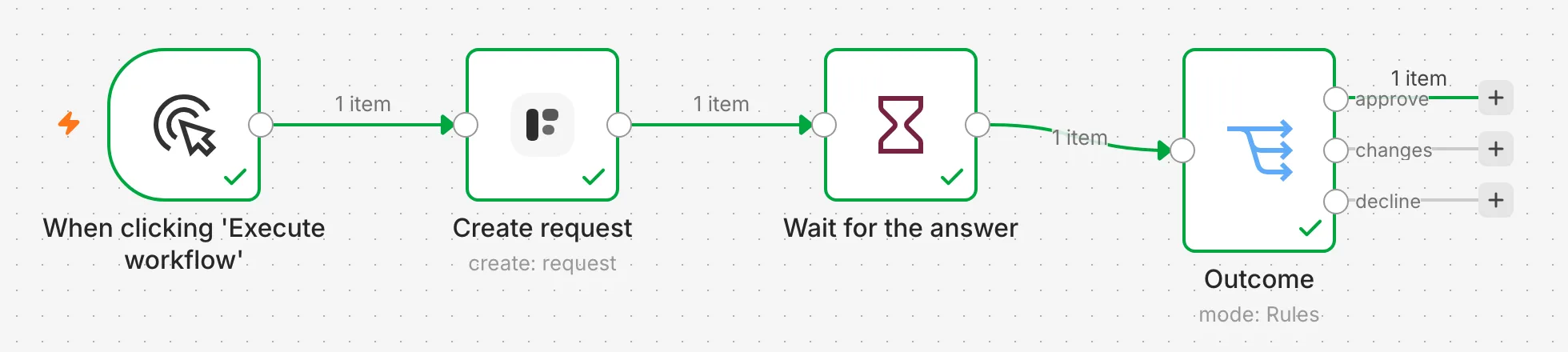
1. Trigger. Anything. Here it is a new row in a Google Sheet with a vendor’s name, email, company, and the IBAN we have on file.
2. Create request. Install the n8n-nodes-formstep community node on your self-hosted n8n, connect it with the Formstep credential, and add Create request after the trigger. Pick the form and map the recipient’s email. Under Values to Send, the node lists every question you can prefill by its title and field key. Map company_name and iban from the sheet, and pick company_name under Read-Only Field Names or IDs. Then turn on Wait for the Outcome.
That one node does a lot. With Delivery set to Email the Invitation, Formstep emails the vendor a link. The form opens with the company name locked and the IBAN filled in, so they confirm or correct it instead of typing it. If the form has a hidden field like vendor_id, the node lists it as context: the form can mention it, the vendor cannot change it, and it comes back untouched. Wait for the Outcome hands Formstep this execution’s resume URL as the callback, so you never build that URL yourself.
Set External ID to something that includes {{ $execution.id }}, or leave it empty. Each execution has its own resume URL, so an External ID from an earlier run fails instead of quietly reusing the old request.
3. Wait, with Resume set to On Webhook Call and the method left at POST. That is the URL the Create request node just handed to Formstep. Set Limit Wait Time if you want n8n to give up on its own. Otherwise the request’s expiry ends the wait: 30 days unless you set Expires At.
4. Switch. After the Wait node, the item is the callback, under body. Formstep calls back on every ending, not only on success, so branch on {{ $json.body.type }} first:
request.completed:{{ $json.body.data.answers.iban }}is the confirmed value, and{{ $json.body.data.request.outcome }}isapprove,declineorchangeswhen the form has a Decision question.request.expired: the vendor never finished. Open a ticket, or send a new request.request.canceled: someone withdrew it from the dashboard, the API or a Cancel request node.
Field keys are what make step 4 boring, in the good sense. iban is the key I set once in the form’s Keys table, and it is frozen at first publish. I can retitle the question, translate the form into Polish, or duplicate it for another client, and $json.body.data.answers.iban still works.
Test it without emailing anyone
Turn on Test Mode in the Create request node while you build. A test request sends no email and counts nowhere, and its callback still resumes the Wait node, so you can open the link yourself and watch the execution continue. Before you publish, turn Test Mode off.
Verifying the callback
The Wait node does not check signatures. It relies on the resume URL being hard to guess, and for most workflows that is enough. If it is not, use the Formstep Trigger instead: a second workflow that starts on Request Completed, Expired or Canceled and checks the X-Formstep-Signature header on every event. It is also the better fit when requests to a form are sent from many places and one workflow should handle all their answers.
The parts I did not have to build
Reminders: the form carries a reminder schedule, like one day idle, then three days, then a week, and Formstep sends them on Pro and Business. Language: set the request’s language to one the form is translated into, and the recipient can still switch. Documents and signatures: if the form has a Documents block and a signature question, the same request shows the documents and collects the signature.
When you do not need this
If the person is on your team, the n8n form is fine, and it is one fewer service. If you only need a yes or no from someone with a Slack account, Slack buttons are simpler. Formstep earns its place when the person is outside your company, the data has to be prefilled or locked, and the workflow has to carry on in the same run.
The node is MIT-licensed, and the source is at github.com/formstep/n8n-nodes-formstep. The step-by-step version of this post, with every option, is in the n8n guide.