

How to make a multilingual form and read the answers in your language
How to make a multilingual form: one form in up to 65 languages with AI translation, on a public link or sent to one person, and every answer in your language.
By Onur Hakbilen, founder of Formstep · Published
A multilingual form is one form that people can answer in several languages. The alternative is one copy per language, which means several places to fix a typo, several sets of logic to keep in step, and answers spread across several spreadsheets. A multi-language form keeps one set of questions and one list of answers.
Translating the questions is only half of the job, though. The answers come back in the respondent’s language too, and someone on your team has to read them. This guide covers the whole trip in Formstep, the product I build: AI form translation, choosing the language each person sees, translated emails, and translating form responses back into your language.
The comparison further down shows what Typeform, Jotform, Tally, Google Forms and Microsoft Forms document, checked on 5 November 2026.
In short: write one form, translate it into up to 65 languages, and each person sees their own. Answers come back in their language, and you can translate them into yours.
Step 1: translate the form
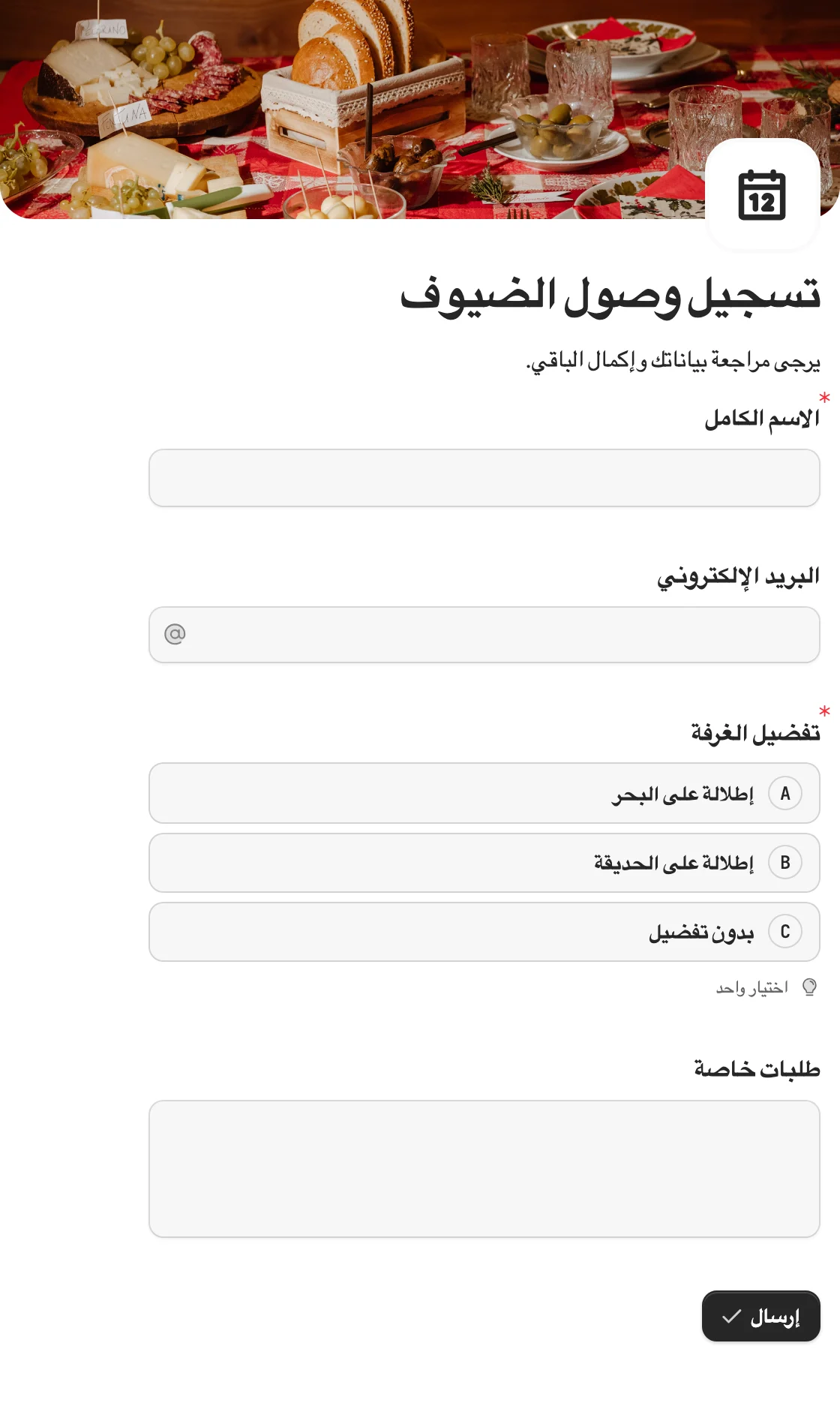
Write the form once in your own language, then open Translate in the editor’s top bar and add a language. There are 65 to choose from, including regional variants such as pt-BR and fr-CA, and right-to-left languages such as Arabic and Hebrew lay out correctly on their own.
The translation editor shows each piece of text as a row, with the original on the left and the translation on the right. Translate everything has AI draft every row, and you accept or decline each suggestion, or accept them all.
Headings, question titles, placeholders, options, scale and matrix labels, tables, image captions, the thank-you page and your own email text can all be translated.
Two things make the form easier to keep up to date:
- A row whose original you change later shows as Outdated, with the previous version beside it. Refresh outdated has AI redo those rows, so a small edit never means starting over.
- A language goes live only when you publish it. Rows you have not translated fall back to the original, and the issue indicator warns you about missing and outdated rows before you publish.
AI translation is a first draft. Have a native speaker read anything legal and anything about payment before it goes out.
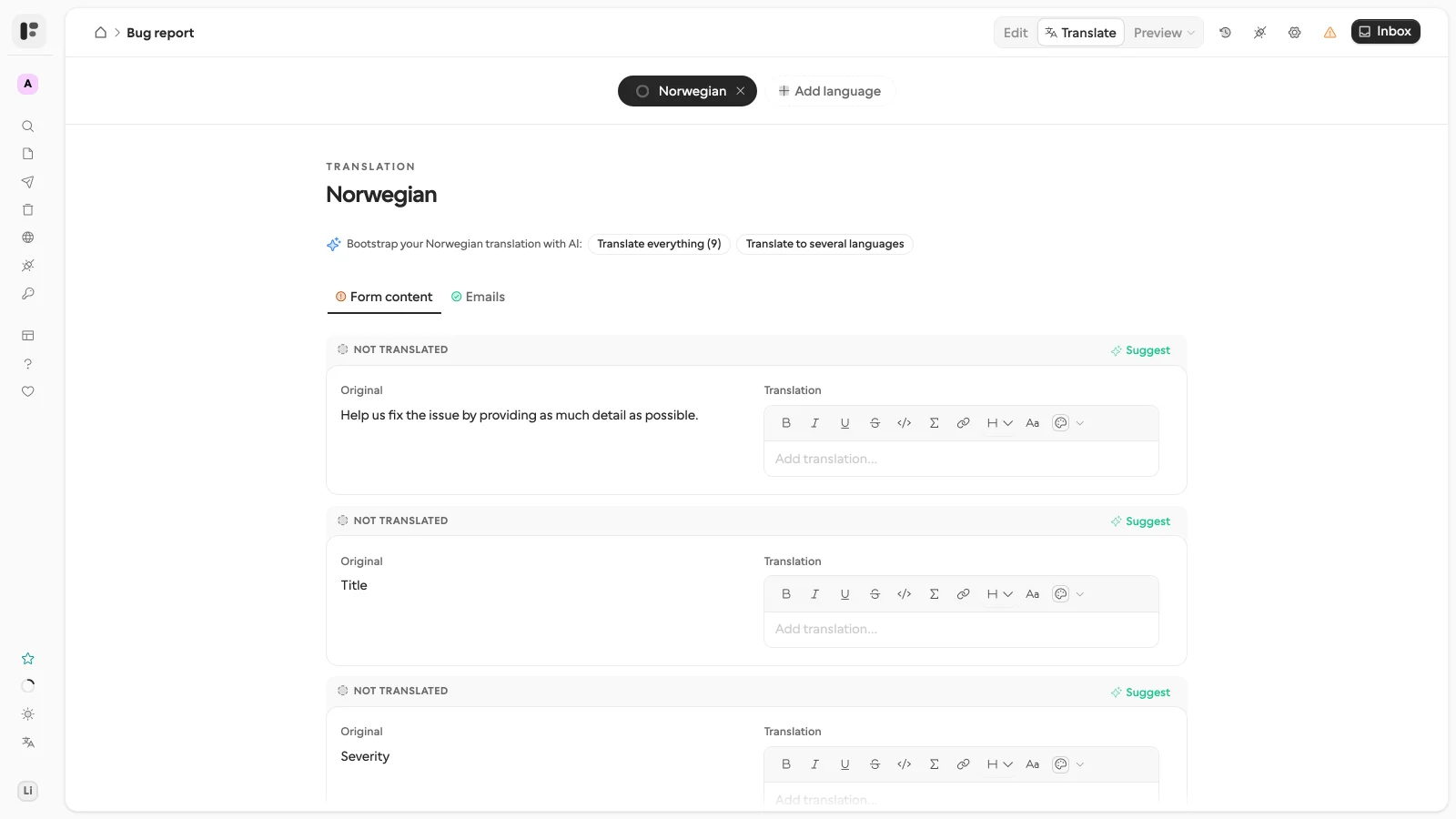
The translation editor: the original on the left, your translation on the right, and AI suggestions per row or for everything.
Step 2: decide how people get their language
On a public form, one share link serves every published language, and people can switch with the language picker at any point. You can also steer them:
- Give each share link its own default language, such as one link for your French campaign and one for your Dutch one.
- End a link in
?lang=frto open the form in French. A language you have not published is ignored. - Leave it alone, and people are asked to pick a language first. The form remembers the choice in that browser for next time.
On a request to one person, the workflow or agent that creates the request sets its language, and the invitation email is written in that language. A request sent by hand opens in the form’s default language. Either way the recipient can still switch, so a wrong guess costs them one click. Typeform, by contrast, follows the respondent’s browser language and offers no picker, a repeated complaint in its community threads on the feature.
Step 3: translate what you send them
The confirmation, reminder and invitation emails have their own tab in the translation editor. A person who answered in Spanish gets a Spanish confirmation, and the PDF of their submission comes out in Spanish too, laid out as they saw the form.
Where you have not translated your own email text, Formstep sends its built-in email in the respondent’s language rather than your text in the wrong one.
Plan lines matter here. The PDF download is on every plan. Confirmation emails to respondents, PDF attachments, and invitations and reminders emailed by Formstep need Pro or Business; Free includes 10 invitations so you can see the email before paying. A workflow that delivers the request link through its own channel needs none of that.
Step 4: read the answers in your language
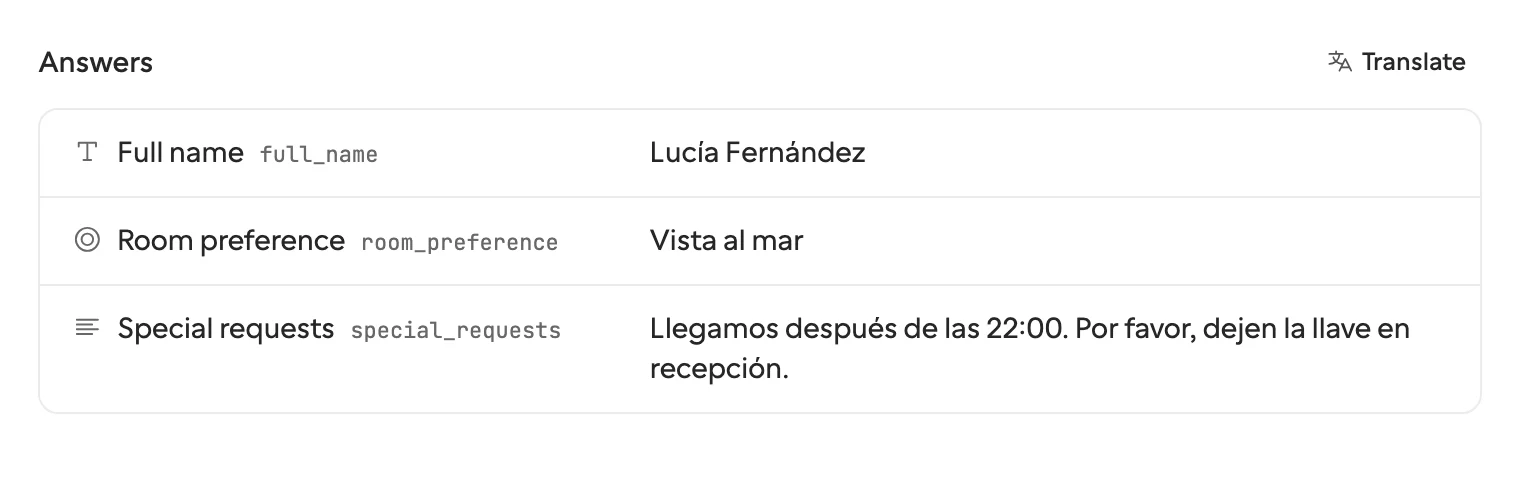
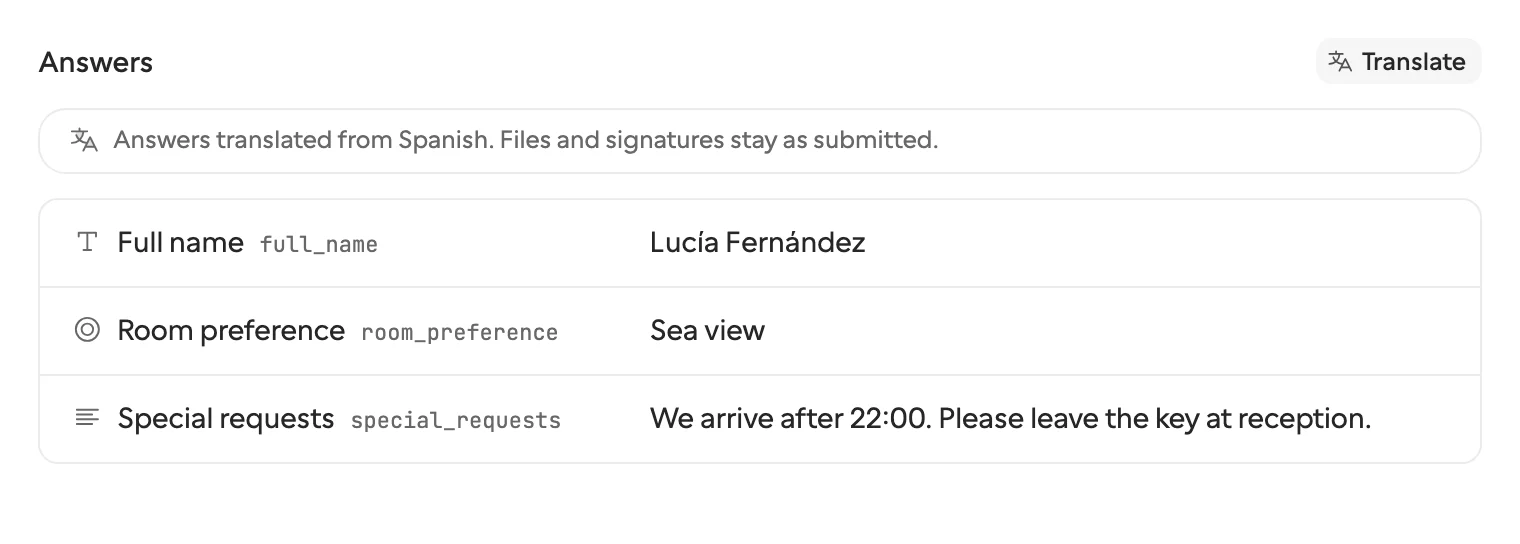
Every language lands in one list of submissions, and each submission records the language it was answered in. To read one you do not understand, open the row’s menu in the Submissions table and choose Translate submission, or click Translate above the answers on a request’s page.
Written answers and chosen options appear in your language, and you switch between Show translation and Show original.
The limits are worth knowing before you plan around it:
- It runs one submission at a time, so it is for reading, not for bulk processing. For a form with thousands of answers in many languages, translate on the way out instead, in your n8n or Zapier workflow.
- It uses about one AI credit per submission, and translating the same submission again is free unless the answers changed. The target language is your workspace’s notification email language, or the language you use Formstep in.
- Dates, numbers, ratings, emails, phone numbers, files, signatures, bookings and payments stay as they are.
- Exports always contain the original answers, so your spreadsheet shows what the person wrote.
Step 5: keep your workflow in one language
This is where separate copies of a form hurt most. A workflow reading answers has to know that “Oui” and “Yes” mean the same thing, and a chosen option arrives as whatever label the respondent clicked.
Formstep answers come back under field keys and option keys that do not change with the language. answers.plan == "pro" is true whichever language the person answered in, so a form in six languages needs one branch in your Zap or MCP tool call, not six.
The form’s logic can also read the respondent’s language, for example to show a question only to people answering in German. An AI agent that builds the form inside the request itself can send the translations with it in the same call.
How other form builders handle multilingual forms
These come from each vendor’s own help pages and support threads, read on 5 November 2026, and we have not tested any of them by hand. “Not found in its docs” means we did not find it, so it may exist under another name.
| Tool | One form, many languages | AI translation | Choosing the language | Translating the answers |
|---|---|---|---|---|
| Formstep | Every plan, up to 65 | Yes, with AI credits | Link default, URL parameter, request, browser, picker | Per submission, with AI credits; originals kept |
| Typeform | Business and up, 27 languages | Yes, with size limits on forms not written in English | Browser language, or a typeform-lang URL parameter |
Not found in its docs. Closed answers show in the main language, open text as typed |
| Jotform | 130+ languages | Yes | Picker button, or browser language | Support replies from 2018 and May 2026 say answers are not translated; a blog table updated in October 2026 says yes |
| Tally | Not built in; a Weglot route on Pro with a custom domain | Through Weglot | Weglot’s switcher | Not found in its docs |
| Google Forms | Not found in its docs; third parties describe one form per language, or a section per language | Not found in its docs | Not found in its docs; third parties add a dropdown question that jumps to a section | Not found in its docs; third parties suggest a formula in Google Sheets |
| Microsoft Forms | Up to 11 languages, including yours; a Microsoft answer says work or school accounts only | Not on the help page; a Microsoft answer from February 2026 says machine translations are offered | The respondent’s own default language | Responses are stored in your default language with a language column; a community thread asking for the second language got no fix |
Where the others win: Jotform lists far more languages, so pick it if you need one Formstep does not list. Typeform’s help page puts no separate price on AI translation, and it shows closed answers in your main language without any extra step.
Microsoft Forms costs nothing extra on a work or school Microsoft 365 account, and its language column tells you who answered in what. Tally’s free plan lists unlimited submissions under a fair use policy, if you can live with the Weglot setup.
Where Formstep wins: every plan gets the languages, the respondent can always see a picker, a request can carry its own language, and answers come back both as readable text in your language and as stable keys for your workflow. The best form builders compared covers the wider picture, and Formstep vs Typeform goes deeper on that pair.
Common questions before you start
Should I translate everything at once? No. Publish the languages you can check, then add more. A language you have not published is not shown to anyone, and a published language with gaps shows the original text in those gaps.
What stays untranslated? Answers until you translate them, uploaded files, and Cal.com event names. Keep @ mentions in the translated text, and translate only the words around them.
How do I check a language before sharing it? Open the form with ?lang=xx and send a test response. For a request, send a test request to yourself from the Share sheet.
Do I need a workflow for any of this? No. Send a request from the dashboard or share a public link, and read the answers on the page. If you want a starting point, the client onboarding template and the other templates can be translated the same way.
