

n8n human in the loop, for people outside your team
Your workflow reaches a point only one person can answer, and that person is not on your team. The Formstep node sends them a request with what you already know filled in, and the workflow carries on with their answers, keyed by field key.
Updated
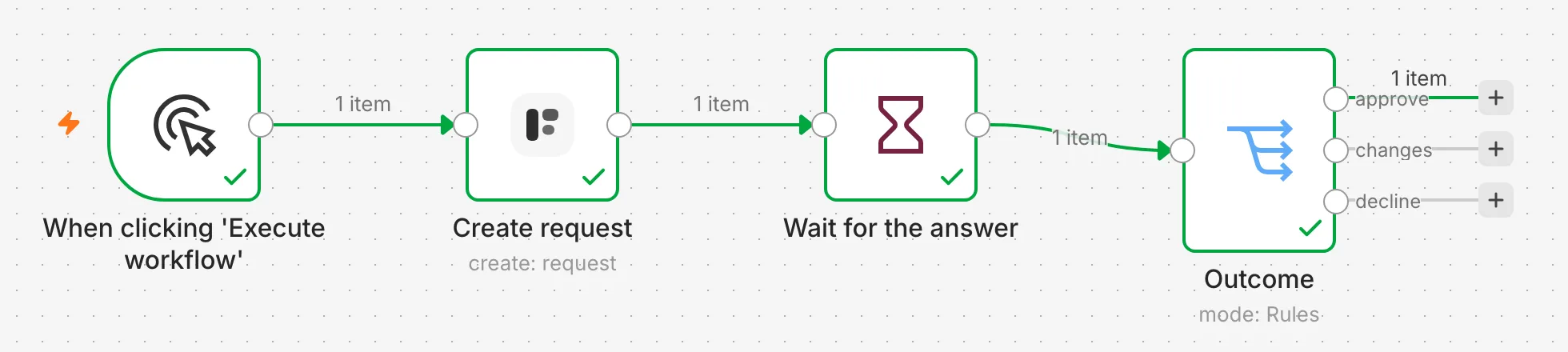
How it works
- A Create request node picks a published form and the recipient, prefills what you already know, and locks what must not change.
- Formstep emails the link, or your next node sends it by Slack, SMS or your own email tool.
- The recipient checks the form, corrects it, adds the rest and submits.
- Wait for the Outcome resumes the same execution with the answers. Or a Formstep Trigger starts another workflow on completed, expired and canceled requests.
Why not the Wait node’s own form
It suits colleagues. A customer gets a form with your branding instead of your n8n address, sees what you already know with locked fields they cannot edit, and gets reminders when they go quiet on Pro and Business. Expiry ends the wait with an event, so the workflow can act on a request nobody answered. The Wait node’s form has six field types and no file upload or field name in its docs; a Formstep request can carry files, signatures and payments, and {{ $json.body.data.answers.iban }} stays iban when you retitle or translate the question. There is a full comparison, with the forum threads people hit on prefill, locked fields, expired Wait links and languages, and where n8n’s form is the better choice.
Needs a self-hosted n8n that Formstep can reach over HTTPS. Install n8n-nodes-formstep from Settings › Community nodes.
With n8n's Wait node form
8 steps to build and keep running
- Trigger: a new vendor in your sheet
- Email node: send the form's resume URL
- Wait node: On Form Submitted, with a time limit
- IF: did the wait run out?
- Email node: send a reminder, loop back to Wait
- IF: gave up after three reminders? Tell someone
- Code node: check the answers, ask again if wrong
- Your next step
With a Formstep request
4 steps to build
- Trigger: a new vendor in your sheet
- Create request: prefill, lock, wait for the outcome
- Wait node: On Webhook Call
- Switch: completed, expired or canceled
Formstep handles the rest
- Prefilled and locked fields, held on the server
- A form under your brand, in their language
- Invitation and reminder emails, on Pro
- Answers checked with AI Validation, on Pro
- Expiry and cancellation, sent as events
Three workflows worth building
A vendor confirms their bank details
A new row in a sheet creates the request, with company_name locked and iban prefilled. The vendor confirms or corrects, and the workflow writes {{ $json.body.data.answers.iban }} to your finance system. If the request expires, that branch opens a ticket. The walkthrough has every node.
A claimant sends the documents their case needs
A water damage claim needs photos and a repair estimate, and a theft claim needs a police report and receipts. A Code node builds the form from the claim’s checklist, Create request sends it with Form Source set to New Form, and the workflow files each upload after the Wait node. The walkthrough has the code, and it needs no form built in Formstep first.
A manager approves an expense
The workflow attaches the receipt to the request for that manager only and sets Expires At to three days. A Switch routes approve, changes and decline, and its fallback output catches a request nobody answered, which can go to finance as a second request. The guide includes a workflow file to import.
To have AI read a document first and the sender confirm what it read, see reading a PDF with AI.
Public link submissions start a workflow too
A form anyone can open, through a share link, an embed or a popup, needs no request. Set the Formstep Trigger to Public Link Submission Created, and every submission starts the workflow with its answers under their field keys, ready for the next node. Public Link Submission Updated follows an edit. Public Link Submission Abandoned follows a form left unfinished, and needs Pro or Business. A submission to a request arrives as Request Completed instead. Start an n8n workflow from public link submissions builds it node by node.