

Client intake and onboarding form template
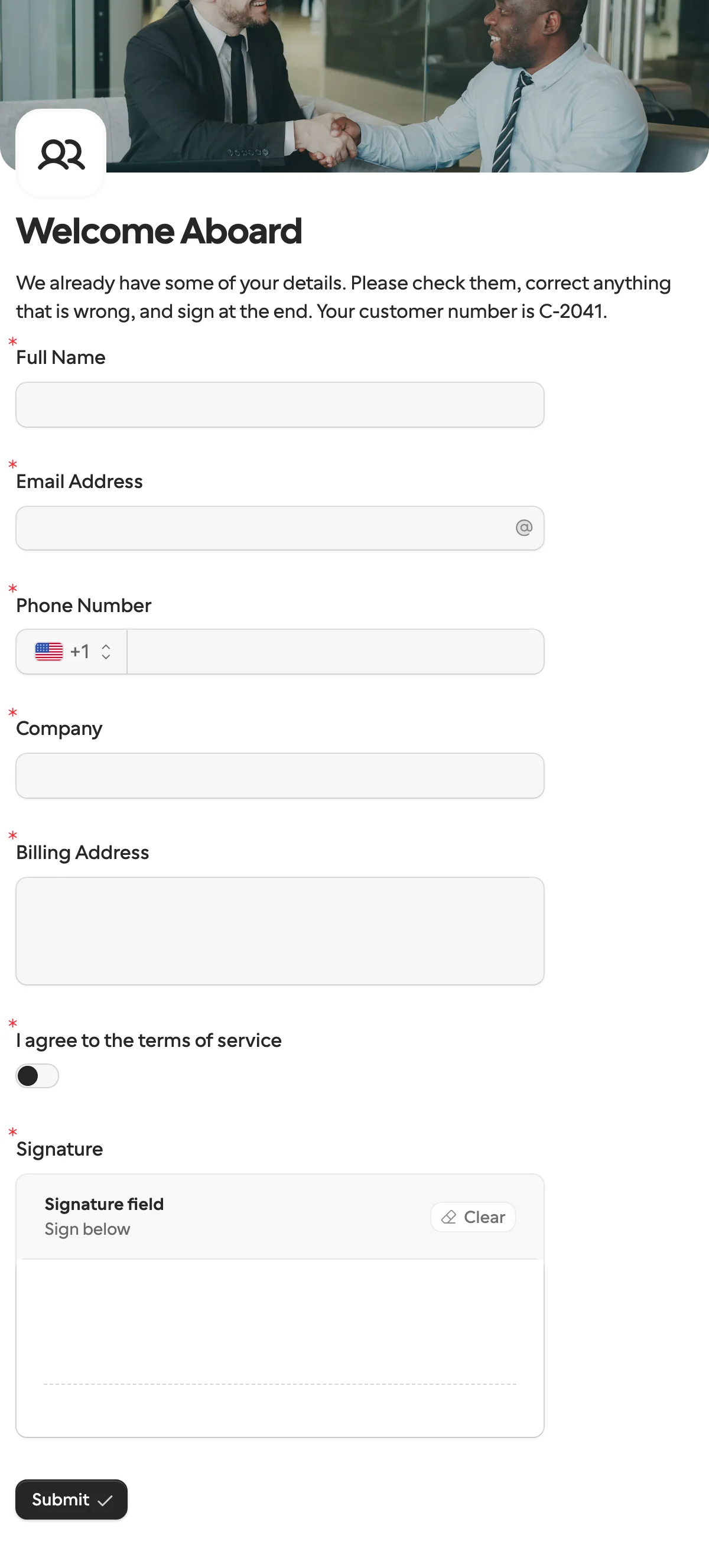
A client intake form collects what you need from a new client before work starts. This one asks for contact and billing details, your terms and a signature, with what you already know filled in.
Updated
Opens in the editor. No account needed to try it.
What it asks
| Question | Field key |
|---|---|
| Full Name | full_name |
| Email Address | email |
| Phone Number | phone |
| Company | company_name |
| Billing Address | billing_address |
| I agree to the terms of service | terms_accepted |
| Signature | signature |
What the customer ID does
The form has a hidden field, customer_id, that shows in the welcome text. Your caller sets it on the request, the client cannot change it, and it comes back with the answers. That is how the answers find their way to the right record in your CRM.
How to use it
- Select Use this template, then add your logo, colors and the questions your service needs.
- Publish it, and create a request with the client’s name, email and company filled in. They only correct what is wrong.
- Send the link yourself, or on Pro let Formstep email it and remind them until they finish.
- A new deal in your CRM can start the same request from n8n, Zapier or an AI agent.
With HubSpot, a request can be prefilled from a contact, and the answers update that contact. To send it automatically to everyone who leaves an email on your site, import the Zapier or n8n workflow template.
What to change
- Billing.
billing_addressis one multiline question. Split it into street, city and country if your invoicing tool wants separate fields, each with its own key. - Your terms. Put them in the form text above
terms_accepted, or add a Documents question with the PDF attached, so the client reads the real document before the switch and the signature. - The work itself. Add what you need to start: a dropdown for the service, a date for the kickoff, a file upload for brand assets. Questions only some clients should see can sit behind a logic rule.
- Keys. Your CRM mapping reads the keys, not the titles, so rename questions freely once the form is published.
Send it from a workflow
A closed deal in your CRM has the client’s name, email and company. Send those in as prefill, lock the email so the answers stay with the right contact, and put your record id in customer_id.
{
  "method": "requests.create",
  "params": {
    "formId": "j57...",
    "recipient": { "email": "ada@acme.example", "name": "Ada Lovelace" },
    "context": { "customer_id": "C-2041" },
    "prefill": { "full_name": "Ada Lovelace", "email": "ada@acme.example", "company_name": "Acme Ltd" },
    "readonly": ["email"],
    "delivery": "email",
    "externalId": "deal-2041",
    "callbackUrl": "https://automation.example/webhook/deal-2041"
  }
}
The callback returns context.customer_id unchanged and the answers under their keys: billing_address, phone, terms_accepted: true and the signature. The n8n and Zapier steps take the same fields, and the HubSpot integration writes mapped answers back to the contact without a workflow at all.
Clients abroad can answer in their own language, because one form can run in up to 65.
When another template fits
- Vendor onboarding is the mirror image: a supplier’s tax and bank details before you pay them.
- Document collection when you only need files from a client you already have on record.
- Approval when a client has to sign off on a proposal or a scope, not fill in details.
- Payment request to take a deposit before the work starts.
More templates
- Vendor onboardingCompany, tax and bank details, a registration document and a signature.
- Document collectionAsk one person for files, with your own paperwork attached.
- ApprovalApprove, decline or request changes, signed on approval.
- Payment requestShow an invoice number and amount, then take the payment.
- Invoice verificationHave a supplier check what your AI read from their invoice.
- Employee onboardingPersonal details, emergency contact and preferences from a new hire.
- Job applicationCandidate details, experience, resume and availability.
- Contact formName, email and a message, from anyone on your site.
- Lead generationA demo request with company details, straight into your CRM.
- Appointment bookingPick a service and a time from your live calendar, in one form.
- Support requestA ticket with category, priority, description and a file.
- Event registrationAttendee details and dietary requirements, from anyone with the link.
- RSVPA yes or a no, with a meal choice for every guest they bring.
- Quick feedbackA five-star rating and an optional comment, done in ten seconds.
- NPS surveyThe 0 to 10 question, the reason, and what could be better.
Questions about this template
Something else on your mind? The docs cover every setting, and we answer email.
It is the first thing a new client fills in after saying yes. It collects the contact and billing details you need to start working, and records that they accepted your terms.
Edit the text in the form, or add a Documents question with your terms attached so the client reads them before signing. A request can also carry its own documents.
Yes. Each client or brand can have its own workspace, with its own forms and answers. Team members and workspaces are unlimited on every plan.
Contact details, the company and billing address, what the client needs from you, and a signed acceptance of your terms. Add questions about their project, and file uploads for anything you need before you start.
Intake collects what you need to know before you start, and onboarding is the process of starting the work. One form can do both, which is how this template is built.
