

Invoice verification form template
An invoice verification form asks a supplier to check the details read from their invoice. An AI or OCR step fills in the values, and the supplier fixes what it got wrong before anything reaches your books.
Updated
Opens in the editor. No account needed to try it.
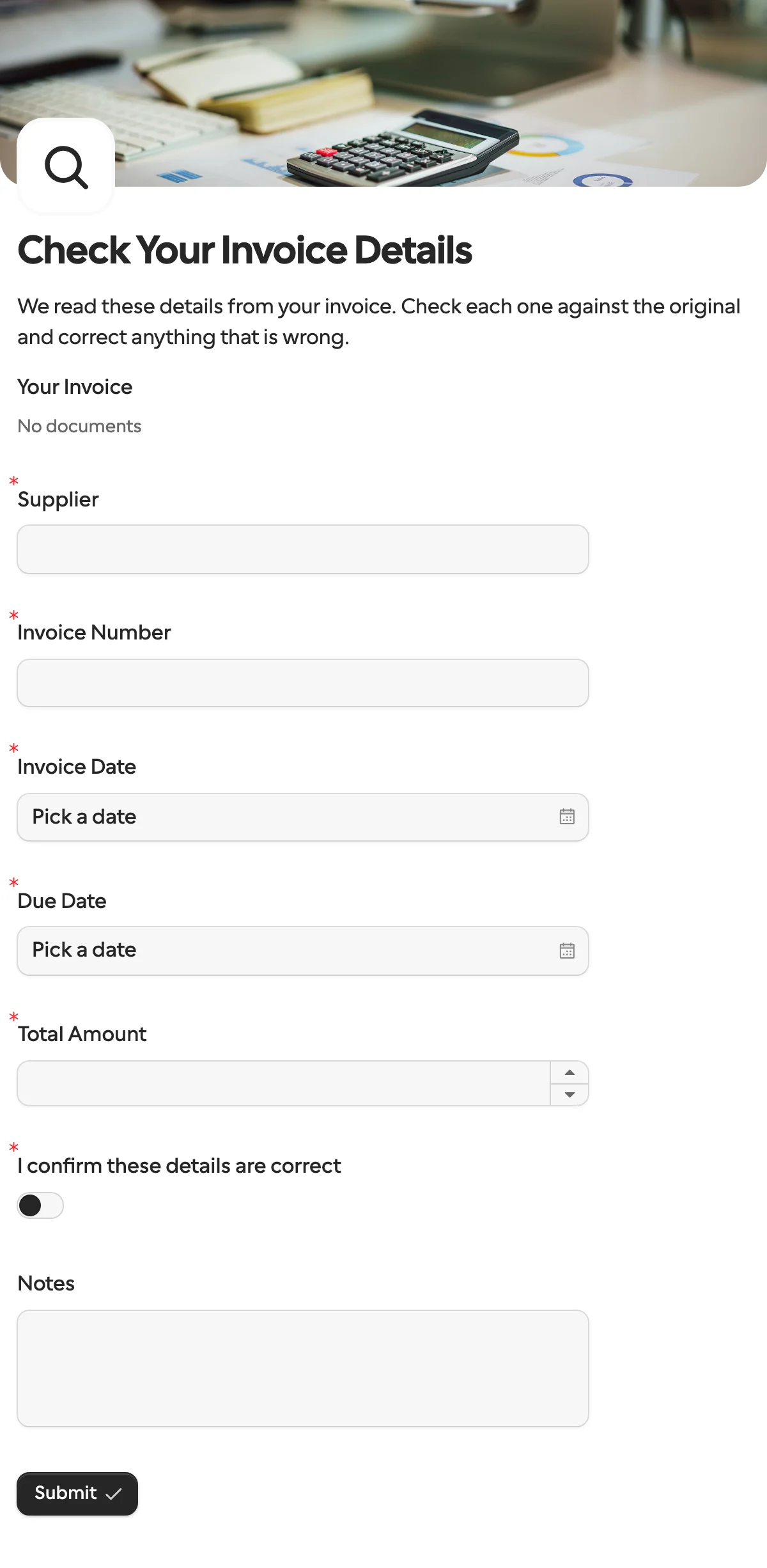
What it asks
| Question | Field key |
|---|---|
| Your Invoice (the invoice you read, attached by you) | |
| Supplier | supplier_name |
| Invoice Number | invoice_number |
| Invoice Date | invoice_date |
| Due Date | due_date |
| Total Amount | total_amount |
| I confirm these details are correct | confirmed |
| Notes (optional) | notes |
Why this works
Extraction gets most of an invoice right, and the part it gets wrong is expensive. Prefilling turns the supplier’s job from typing into checking, which takes seconds, and the corrected values come back under the same field keys you sent.
How to use it
- Select Use this template.
- Publish it. Your workflow reads the invoice, then creates a request with the values as prefill and the invoice attached as a document.
- When the request completes, post
total_amountand the other answers to your accounting system.
The n8n guide to reading a PDF with AI walks through the whole flow.
What to change
- Other documents. For a purchase order, a delivery note or a claim, rename the questions and their keys to the values that document carries. The AI step names its outputs after the keys, so the two stay in step.
- Currency.
total_amountis a number. If you take invoices in several currencies, add a dropdown for the currency with option keys such aseurandusd. - Line items. When the total alone is not enough, add a repeating group for line items. It comes back as a list under its own key.
- Who confirms. The template addresses the supplier. The same form works for an employee’s expense receipt or a tenant’s meter reading, with the Documents block showing the photo they sent in.
Send it from a workflow
The values come from your extraction step, the PDF from your inbox. Upload the file with documents.create, then send the request with the extracted values as prefill. Nothing is locked: the point is that the supplier can change anything the model misread.
{
  "method": "requests.create",
  "params": {
    "formId": "j57...",
    "recipient": { "email": "billing@acme.example", "name": "Acme Ltd" },
    "prefill": {
      "supplier_name": "Acme Ltd",
      "invoice_number": "INV-2041",
      "invoice_date": "2026-11-02",
      "due_date": "2026-12-02",
      "total_amount": 27325
    },
    "documents": [{ "documentId": "kn7...", "name": "INV-2041.pdf" }],
    "externalId": "INV-2041",
    "callbackUrl": "https://automation.example/webhook/INV-2041"
  }
}
The callback carries the same keys with the supplier’s values, and confirmed: true. Compare answers with what you sent: a key whose value changed is a correction, which is how the n8n workflow template routes corrected invoices to a person. Dates go in and come back as YYYY-MM-DD, the amount as a number.
The same pattern fits any document: read a PDF with AI in n8n shows it step by step. Ready-made versions are in the n8n and Zapier workflow templates.
When another template fits
- Payment request when the next step is to get paid, not to check what was billed.
- Vendor onboarding for a supplier’s first invoice, when you still need their bank details and tax number.
- Approval when you need a verdict on the invoice, approve or decline, rather than corrected values.
More templates
- Vendor onboardingCompany, tax and bank details, a registration document and a signature.
- Client intake and onboardingContact and billing details, terms and a signature from a new client.
- Document collectionAsk one person for files, with your own paperwork attached.
- ApprovalApprove, decline or request changes, signed on approval.
- Payment requestShow an invoice number and amount, then take the payment.
- Employee onboardingPersonal details, emergency contact and preferences from a new hire.
- Job applicationCandidate details, experience, resume and availability.
- Contact formName, email and a message, from anyone on your site.
- Lead generationA demo request with company details, straight into your CRM.
- Appointment bookingPick a service and a time from your live calendar, in one form.
- Support requestA ticket with category, priority, description and a file.
- Event registrationAttendee details and dietary requirements, from anyone with the link.
- RSVPA yes or a no, with a meal choice for every guest they bring.
- Quick feedbackA five-star rating and an optional comment, done in ten seconds.
- NPS surveyThe 0 to 10 question, the reason, and what could be better.
Questions about this template
Something else on your mind? The docs cover every setting, and we answer email.
The supplier knows what they billed. A colleague checking extracted values can only compare them to the same PDF, while the supplier can also correct a wrong amount or due date at the source.
No. The form only needs the values you want checked. They can come from AI, OCR, your ERP or a person.
The request expires after 30 days unless you set another date, and your workflow gets a request.expired event, so it does not wait forever.
Checking that the details on an invoice are right before you pay or post it, such as the supplier, invoice number, dates and total. This form asks the supplier to do that check on the values you read.
