

Formstep vs AgentForms
AgentForms is a small JSON form API for AI agents at $19 a month. Formstep sends one person a prefilled form and follows up. Checked on 5 November 2026.
By Onur Hakbilen, founder of Formstep · Published
We make Formstep, so read this Formstep vs AgentForms comparison as one side’s account and check AgentForms’ own site. AgentForms describes itself as in public beta: an AI agent calls one API, gets a form link to hand to a person, and reads JSON back. If you want a form from one API call and the fields are simple, AgentForms does less and costs less, and that may be all you need.
Formstep starts from a different question: who has to answer? A request goes to one named person with what you know filled in, under your brand, and a signed callback comes back when it ends for any reason.
Which one should you pick?
Pick AgentForms if a developer or an agent needs a quick structured answer: send JSON, get a link, read JSON back, at $19 a month for 1,000 responses.
Pick Formstep if the person is someone specific outside your team, and the form has real work in it: confirming prefilled values, uploading files, signing, or paying. Also pick it if a person should be able to send one by hand and see what is pending.
How do Formstep and AgentForms compare?
AgentForms’ column comes from its homepage, REST API reference, field types, webhook docs and MCP docs, checked on 5 November 2026. Formstep’s comes from our pricing and docs on the same day. Prices are per month in US dollars, and we read the docs without running AgentForms. “Not found” means we did not find it in the documentation on that date, so check with AgentForms if it decides your choice.
| What you are comparing | AgentForms | Formstep |
|---|---|---|
| Status | Public beta; its site shows a waitlist notice saying the beta is full and paid plans will reopen | All plans open to sign up |
| Free plan | 3 active forms, 30 responses and 150 API calls a month, 7 days of retention | Unlimited forms, 1,000 submissions and requests a month |
| Paid plans | Pro $19: 50 active forms, 1,000 responses. Team $49: unlimited forms, 10,000 responses | Pro $39, or $32.50 billed yearly: 50,000 submissions and requests, 100 GB. Business $109, or $90.83: 50,000 and 500 GB |
| Field types | 8: text, textarea, number, email, select, multi-select, date, checkbox, with more promised | 20+, with file upload, signature, payment, scheduling, documents and repeating groups |
| Prefill and locked fields | Not found in its docs | Prefill held on the server; locking per request |
| Reminders, languages, operator dashboard | Not found in its docs | Reminders on Pro and Business; up to 65 languages on every plan; Requests page with status and callback history |
| Events and expiry | form.completed only; 48-hour default expiry, shown as a form status you read, 4 webhook retries |
request.completed, request.expired, request.canceled; 30 days, at most 365; 8 retries over about four hours, replayable |
| MCP server | Run locally from source, Python 3.12+; 6 tools, including register |
Remote, one URL, API token or OAuth sign-in; builds forms and sends requests |
Its pages disagree in small ways. The docs index lists a file type that the field types page does not, so we followed the field types page. Its sign-up dialog says “We’ve reached the maximum number of users for our beta program”, while the Get API Key button still opens a registration form, so we did not register.
Where is AgentForms the better pick?
For the smallest thing that works. Registering takes one call with no email, creating a form takes one more, and there is no editor to open.
- Price at low volume. $19 a month against our $39, if 1,000 responses cover you.
- Simple scope. If an agent needs a name, a plan choice and a yes, a form engine is more than you need.
- An agent that sets itself up. Its MCP server has a
registertool, so an agent can get its own key. Formstep’s MCP connection needs a person’s sign-in or a workspace token. - A single state blob.
contexttakes any JSON up to 64 KB. Formstep’scontextonly takes the form’s hidden fields, andmetadataholds your own key and value pairs.
Where is Formstep the better pick?
When the person is outside your team and the form has real work in it. They get your logo and cover in their language, on your domain on Pro, and find what you know already filled in.
- Values that must not change. A company name can be shown and locked per request, on the server, with nothing in the URL.
- Harder questions. File uploads, signatures, documents to read, Stripe payments, scheduling, logic and repeating groups run on the same request, as in the document collection and confirm invoice details templates.
- Chasing. On Pro and Business, reminders go out on a schedule and stop when the request ends. On Free you send the link yourself, because invitation and reminder emails start on Pro.
- Knowing it ended. Expired and canceled requests fire the same signed callback as a completed one, so a waiting workflow does not wait forever.
- Connectors. A Zapier app, an n8n node for self-hosted n8n, and a remote MCP server. AgentForms’ homepage lists n8n, Make, CrewAI and OpenClaw, which we did not test. Make reaches Formstep through its HTTP module.
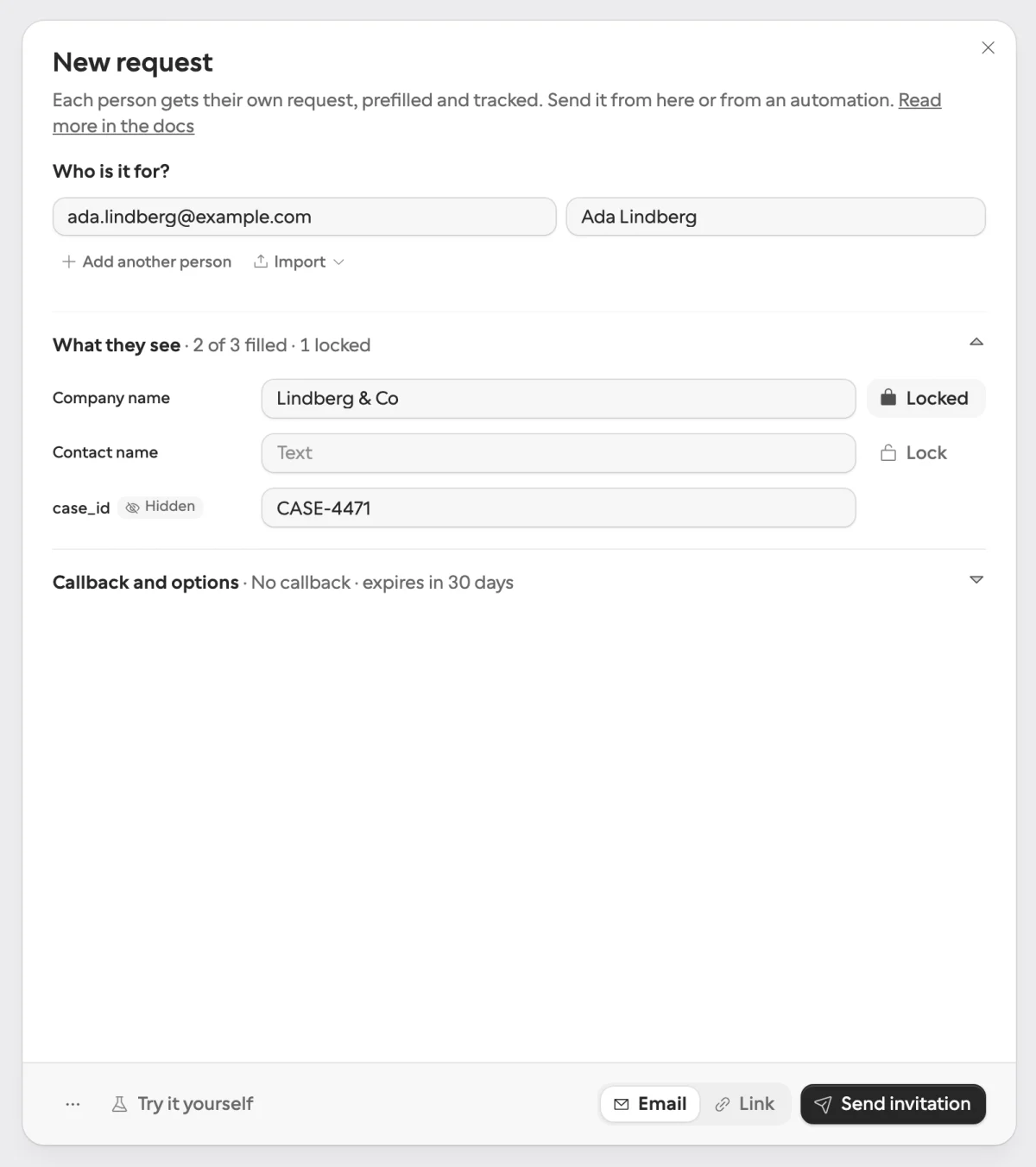
How do field keys work on each side?
Both hand answers back under names you can address in code, and the difference is how long the names last. On AgentForms, you name each field with key in the create call, and the form exists for one ask, so keys never have to survive an edit.
On Formstep, one form serves many requests, so the key outlives edits. It is derived from the question title until you set your own, and it is fixed from the first publish: renaming “Company name” to “Legal entity name” keeps company_name. Choice options carry option keys too, so a workflow branches on answers.plan == "pro" in any language. An agent reads every key with fields.list before requests.create.
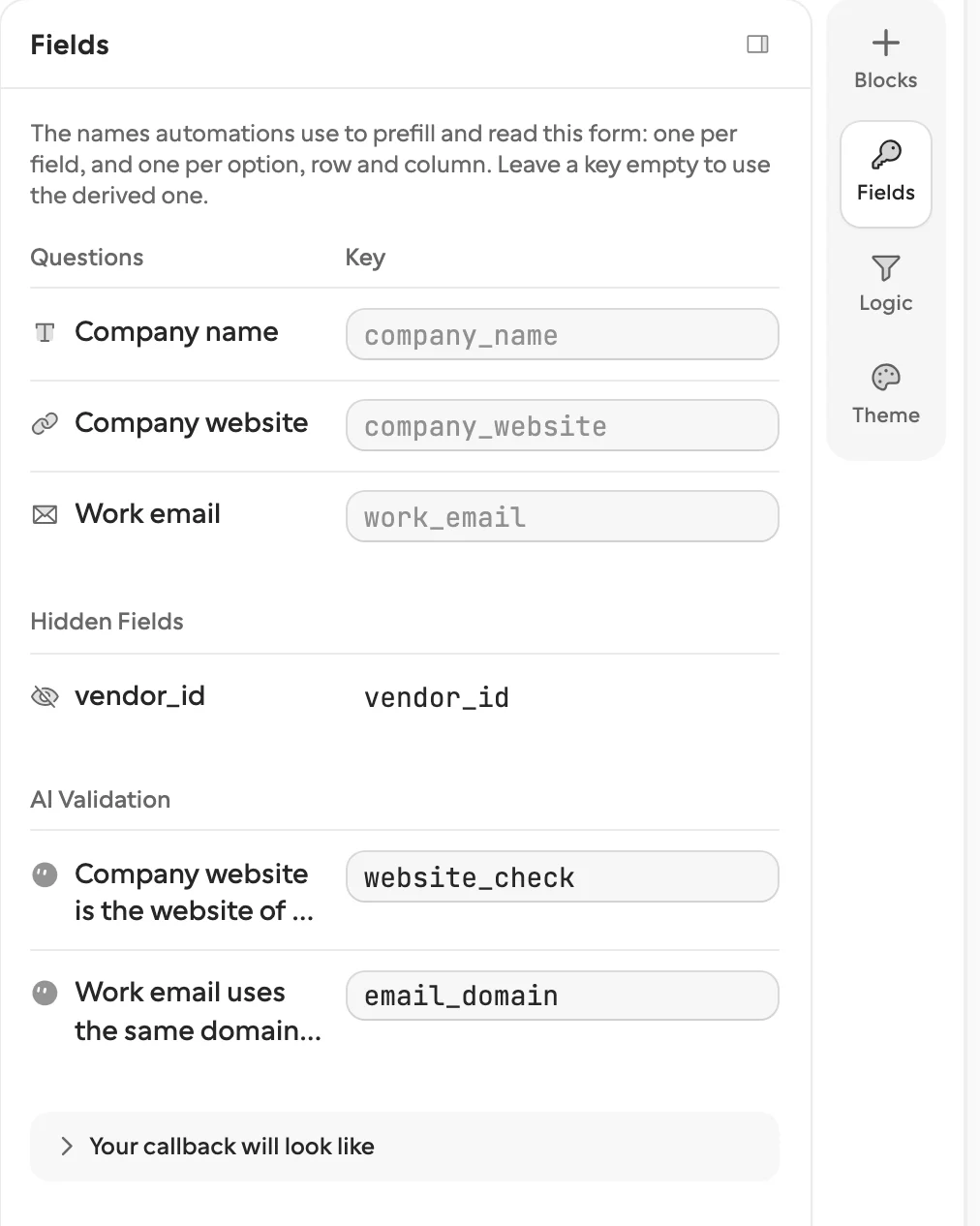
Can an agent build the form in the same call?
On AgentForms, that is the whole model. On Formstep, point requests.create at a formId to send one form to many people, or send form with a name and the blocks when the workflow decides what to ask. Formstep then builds the form, publishes it and creates the request in one step, and the same definition sent again reuses the same form.
Can the recipient answer in another language?
On Formstep, yes. You translate a form once into up to 65 languages, by hand or with AI suggestions paid from AI credits, and a request names the language it opens in. A free-text answer you cannot read can be translated per submission, also on AI credits. We did not find languages in AgentForms’ docs, so one form per language is the way to do it there.
How do you see what is pending?
On Formstep, the Requests page lists every request with the recipient, the form and where it stands, with a red badge when a callback failed. Open one to see each answer by field key, the timeline, and the callback with a Replay button. On AgentForms you list forms by status through the API, and we did not find a dashboard in its docs.
Can I use both?
You could, but there is little reason to unless two teams have already picked, so start with the one that fits your hardest case. An agent asking its own developer can use plain chat or MCP elicitation and needs neither.
How we compared them
We read AgentForms’ homepage and docs at agentforms.dev and agentforms-landing.pages.dev, which answered as the same site on the date above. We did not sign up for AgentForms or run a scored test, and no link carries an affiliate code. If something is out of date, tell us through Contact support in the footer.
For more, see Formstep vs n8n’s form, why not just use a form builder, and the request templates.
