

Document collection form template
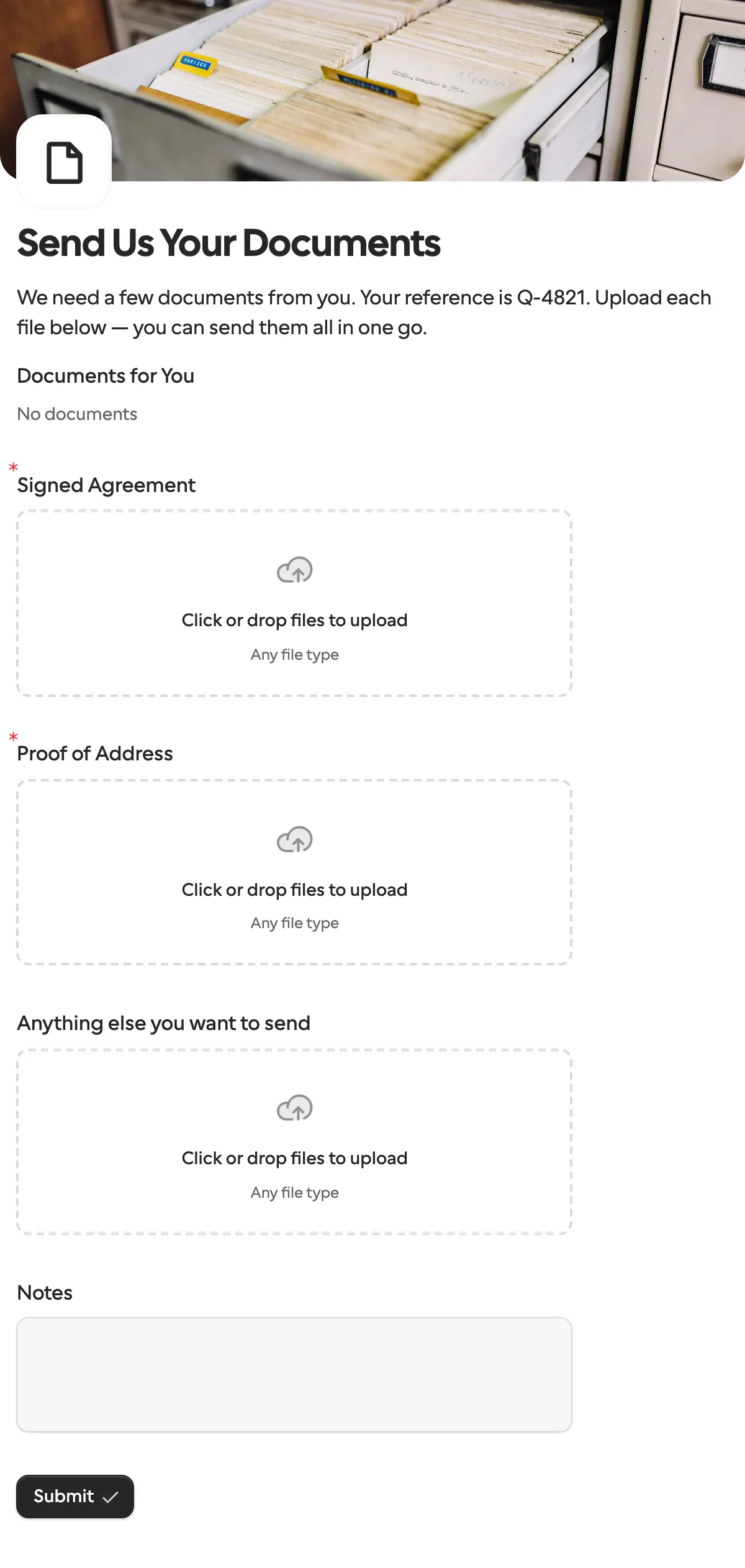
A document collection form gives one person a labelled upload for each file you need, so nothing gets lost in an email thread. Your own paperwork can be attached for them to read or sign.
Updated
Opens in the editor. No account needed to try it.
What it asks
| Question | Field key |
|---|---|
| Documents for You (your files to read or sign, optional) | |
| Signed Agreement (file upload) | signed_agreement |
| Proof of Address (file upload) | proof_of_address |
| Anything else you want to send (file upload, optional) | other_files |
| Notes (optional) | notes |
Two kinds of file
Documents for You goes the other way: blank forms, a checklist or an example that you hand to the person, attached to the form or per request. The file uploads are what they send back. Rename the two uploads to whatever you actually need, such as a passport copy or last year’s accounts.
The hidden reference field shows your case number in the intro, and comes back unchanged with the answers.
How to use it
- Select Use this template, and change the uploads to the files you need.
- Publish it, and create a request for the person who has them.
- On Pro and Business, Formstep reminds them on a schedule and stops when the request ends. On Free, you send the link and follow up yourself.
- From a workflow, the n8n document guide stores each file where you want it.
What to change
- The uploads. Rename
signed_agreementandproof_of_addressto what you actually need, and add one upload per file: a passport copy, last year’s accounts, a certificate. One file per question is what lets you see what is missing without opening anything. - Required or not.
other_filesandnotesare optional. Make an upload required when the case cannot move without it, and leave the rest open. - Types and sizes. Each upload can limit the file types and the number of files. A photo of a passport and a signed PDF have different rules.
- What they get from you. Attach a blank form or a checklist to the Documents block on the form, or per request, so a tenant gets their own lease and nobody else’s.
Send it from a workflow
Files cannot be prefilled, so the request carries your case number and the documents the person should read. Set reference in context, and attach a file you uploaded with documents.create.
{
  "method": "requests.create",
  "params": {
    "formId": "j57...",
    "recipient": { "email": "ada@acme.example", "name": "Ada Lovelace" },
    "context": { "reference": "CASE-9" },
    "documents": [{ "documentId": "kn7...", "name": "Your lease agreement" }],
    "delivery": "email",
    "expiresAt": 1797600000000,
    "externalId": "CASE-9",
    "callbackUrl": "https://automation.example/webhook/CASE-9"
  }
}
When everything is in, the callback lists each upload under its key as file URLs, with context.reference unchanged and other_files empty when they sent nothing extra. On Pro and Business the reminders run until then. expiresAt closes the link on a date you choose, and a request that runs out sends request.expired instead, so the case does not wait forever. The n8n document guide shows how to store each file from there.
The n8n walkthrough builds the list of files from a checklist for each case.
When another template fits
- Client intake and onboarding or vendor onboarding when you need details and a signature along with the files.
- Job application when anyone may send a file through one public link, rather than one named person.
More templates
- Vendor onboardingCompany, tax and bank details, a registration document and a signature.
- Client intake and onboardingContact and billing details, terms and a signature from a new client.
- ApprovalApprove, decline or request changes, signed on approval.
- Payment requestShow an invoice number and amount, then take the payment.
- Invoice verificationHave a supplier check what your AI read from their invoice.
- Employee onboardingPersonal details, emergency contact and preferences from a new hire.
- Job applicationCandidate details, experience, resume and availability.
- Contact formName, email and a message, from anyone on your site.
- Lead generationA demo request with company details, straight into your CRM.
- Appointment bookingPick a service and a time from your live calendar, in one form.
- Support requestA ticket with category, priority, description and a file.
- Event registrationAttendee details and dietary requirements, from anyone with the link.
- RSVPA yes or a no, with a meal choice for every guest they bring.
- Quick feedbackA five-star rating and an optional comment, done in ten seconds.
- NPS surveyThe 0 to 10 question, the reason, and what could be better.
Questions about this template
Something else on your mind? The docs cover every setting, and we answer email.
Create a request from this form for that client and send them the link. Each file has its own labelled upload, so you know what is missing without opening anything. They need no account.
Up to 1 GB per file, with the types and number of files you allow, within your plan’s storage.
Yes, on Pro and up. AI validation checks an answer against your rule while the recipient fills in the form, and flags a mismatch without blocking them. It is paid from AI credits.
One labelled upload per file, so you can see at a glance what is missing, plus a reference the person recognises and space for notes. Mark the files you must have as required.
