

MCP elicitation or a request: human input from someone else
MCP elicitation asks the person using the client. When an AI agent needs human input from a customer or supplier, it needs a request. How to tell them apart.
By Onur Hakbilen, founder of Formstep · Published
Agents are good at asking you things. You say “book the supplier”, it says “which one?”, you answer in the chat. MCP elicitation is the protocol’s feature for exactly that kind of human input, and for that job it is the right tool.
Then the agent reaches the question you cannot answer. What is the supplier’s IBAN? Does this tenant agree to the new date? Is this invoice total right? The person who knows is not in the conversation and may answer on Thursday.
Elicitation sounds like it should cover this. It does not, and the reason tells you which tool you need. Everything below about MCP comes from the specification and the client docs as they read on 5 November 2026.
In short: MCP elicitation asks the person using the client. To ask a customer or supplier, send a request: a form they open from a link, with an answer the agent reads later.
What MCP elicitation is
The current MCP specification (revision 2026-07-28) describes elicitation as a way for a server to request more information from users through the client. So there are three parties: the server, the client, and the user of that client. The answer comes back through that same client.
Since that revision it works as a multi round-trip request. The server answers a tool call with an input-required result that carries the elicitation/create request, the client collects the input, and the client retries the original call with the answer attached. Elicitation has two modes:
- Form mode collects structured data inside the client. The schema is limited to flat objects with simple properties: strings, numbers, booleans, and single or multi-select enums. The spec says servers must not use it for secrets such as passwords, API keys or payment credentials. A name or an email address is allowed, at the server’s discretion.
- URL mode sends the user to a web page for interactions that must not pass through the client, like an OAuth flow, an API key or a payment. The client must show the full address, ask for consent before opening it, and never fetch it on its own.
A client declares which modes it supports in the metadata of each request, and a server must not use a mode the client did not declare. Support varies between clients, so check yours. The list below is a start.
Why elicitation does not reach someone else
Form mode has no way to address another person. It renders in the client of whoever is using the agent.
URL mode looks closer, because a URL can be forwarded. But the spec pushes the other way. Its phishing section says a server must verify the identity of the user who opens the URL before accepting information, and in an authorization flow it must make sure the person who completes it is the one who started the elicitation.
Handing the link to somebody else is the attack it describes. The security section also says a server must bind each elicitation request to the client and user identity.
There is a smaller sign in the same revision. The client is no longer told when a URL mode interaction finishes: the 2025-11-25 completion notification was removed, and the client learns the outcome by retrying the original request.
Even for the user at the keyboard, the protocol expects the agent to ask again rather than be woken up. For a person who answers on Thursday, that is the whole job.
None of this is a flaw. Elicitation is designed for the person at the keyboard. A customer needs a different mechanism.
Which MCP clients support elicitation
What each client’s own documentation said on 5 November 2026:
- Claude Code documents both modes: form mode as a dialog in the terminal, URL mode as a prompt asking whether to open the link in your browser. Both only in interactive terminal sessions. In a non-interactive session it asks the server to cancel instead.
- Cursor lists elicitation as supported. Which mode is not stated.
- VS Code lists elicitation among the capabilities it supports. Which mode is not stated.
- Claude.ai and Claude Desktop connectors: the connector docs list tools, prompts and resources. Elicitation was not found in its docs.
- ChatGPT: elicitation was not found in its docs.
If your client does not declare the capability, a server may not send the request, so a tool that depends on it has to fail or guess. That is one more reason to keep the asking of other people outside the elicitation path.
What asking someone else takes
When the person is outside the conversation, the job changes. Someone has to address them by name, reach them, wait for days, chase them, and hand back an answer the agent can read later, possibly in another conversation. That is what a request does.
| What you are comparing | MCP elicitation | Formstep request |
|---|---|---|
| Who is asked | The user of the MCP client | One named recipient you choose |
| Where they answer | In the client, or a page opened from it | A form on their own device, from a link |
| What they need | That client, connected to the server | A browser; no account |
| What it can collect | Form mode: flat simple values. URL mode: whatever the page does | Files, signatures, payments, scheduling, repeating groups, and more than 20 question types |
| What they see first | Whatever the client renders | Your form, in your brand and their language, with what you know prefilled or locked |
| If they do not answer | They decline or cancel, and the server handles it | Reminder emails on Pro and Business; expiry after 30 days unless you set another date, on any plan |
| How the answer returns | Through the same client, on a retry | The agent reads it by external ID, or a workflow gets a signed callback |
| What it costs | Nothing beyond a client that supports it | One unit of the monthly allowance per request; Free includes 1,000 a month |
| Who provides it | Your MCP client and server, if both support it | Formstep’s MCP server, through ordinary tool calls |
How it looks from the agent
Connect https://api.formstep.io/api/mcp to your AI tool, sign in and pick a workspace. The connect guide has the steps for Claude, ChatGPT and Cursor. Then ask:
Send a Formstep request with the "Supplier onboarding" form to Ada Lovelace (ada@acme.example). Fill in the company name "Analytical Engines Ltd" and lock it. Use supplier-2041 as the external ID. Don't email her; give me the link and I will send it myself.Under that sentence, the agent lists the form’s field keys with fields_list, then calls request_create:
{
  "formId": "j57...",
  "recipient": { "email": "ada@acme.example", "name": "Ada Lovelace" },
  "prefill": { "company_name": "Analytical Engines Ltd" },
  "readonly": ["company_name"],
  "delivery": "none",
  "externalId": "supplier-2041"
}
It replies with the link and the expiry date. delivery is none by default, so you pass the link on through any channel. Set to email, Formstep sends the invitation and reminders, which needs Pro or Business; a Free account gets 10 invitations to its own address to see what the recipient gets.
On Pro and Business, if the form has Send reminders on, Formstep still emails its scheduled reminders with none, so say no reminders if you do not want that.
Ada opens the link and finds the company name filled in and locked:
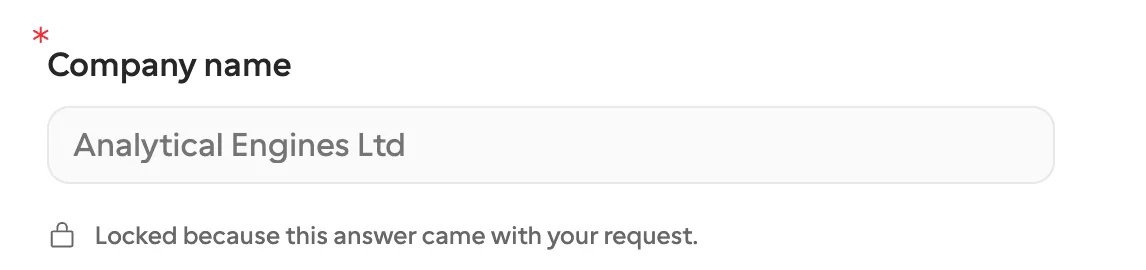
No suitable form? The agent can send the questions with the request, and Formstep builds and publishes the form in the same call. The same definition reuses the same form.
For the common cases there is a template to start from: vendor onboarding for the supplier above, invoice verification when the agent has extracted numbers that a person should confirm, and an approval form with a decision question when the answer is approve, decline or changes.
How the agent finds out that she answered
Do not expect the agent to wake up when Ada answers. It is not told. Three things work instead:
Ask later. In the same conversation or a new one, say Has supplier-2041 been answered? and the agent looks it up by external ID and lists her answers. This suits a person working with an agent.
Poll. An agent running on its own calls request_get until status leaves pending, on the order of minutes rather than seconds. Tool calls share a budget of 120 a minute per token, so poll on a timer, never in a loop. The request’s expiry tells it when to stop.
Use a workflow. If something has to happen the moment she answers, pass callbackUrl and let a workflow receive the signed event, or start one from Zapier or n8n. One warning from the MCP reference: the signing secret never appears over MCP or the API. An agent with no person to set up a receiver cannot verify a callback, so it should poll instead.
Where elicitation wins
If the person who has the answer is the person using the agent, use elicitation or plain chat. A request would make them leave the conversation to fill in a form for themselves. Sign-in and payment steps for that same user belong in URL mode, which is what it was built for.
If the person is a colleague, a message in Slack may be enough, and I would say so.
A request also has a cost that elicitation does not. Each one spends a unit of the workspace’s monthly allowance when it is created, answered or not, and the emails from Formstep need a paid plan. The pricing page has the numbers. If you are weighing Formstep against a tool built only for agents, Formstep vs AgentForms covers that.
Reach for a request when the person is outside the conversation, the answer can take days, and the agent has to be able to trust and read it later. The AI agent guide has the full walkthrough.
