

Vendor onboarding form template
A vendor onboarding form collects the company, tax and bank details you need before you pay a new supplier. Send one link with what you already know filled in, and they check it, upload their documents and sign.
Updated
Opens in the editor. No account needed to try it.
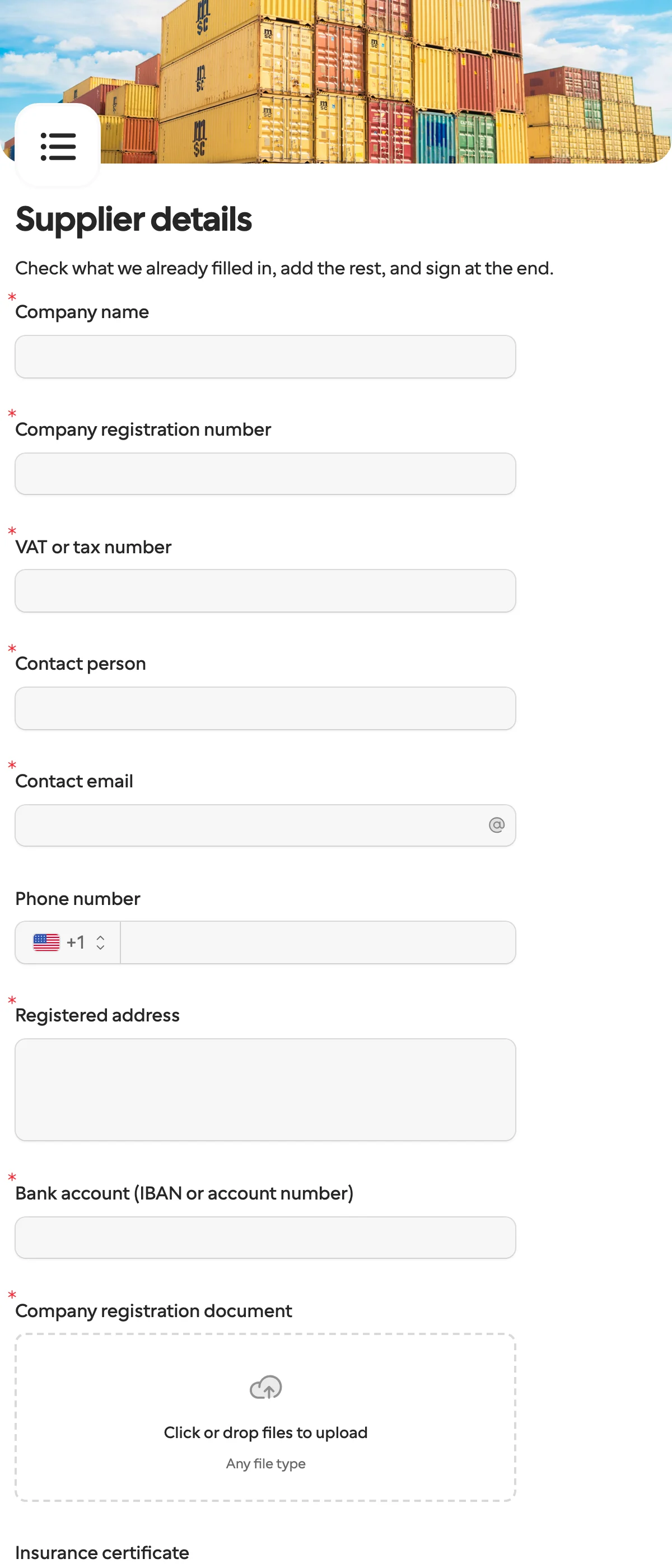
What it asks
| Question | Field key |
|---|---|
| Company name | company_name |
| Company registration number | registration_number |
| VAT or tax number | tax_number |
| Contact person | contact_name |
| Contact email | contact_email |
| Phone number (optional) | phone |
| Registered address | address |
| Bank account (IBAN or account number) | bank_account |
| Company registration document (file upload) | company_registration |
| Insurance certificate (file upload, optional) | insurance_certificate |
| I confirm these details are correct | details_confirmed |
| Signature | signature |
Why not send a PDF
A PDF comes back scanned, half filled in, or with the wrong attachment, and someone retypes it into your finance system. Here the bank account arrives under the key bank_account every time, so a later step can read it without parsing anything.
How to use it
- Select Use this template, and change the questions to match your own rules.
- Publish it, then create a request for one supplier. Fill in what you know, such as the company name from your CRM, and lock it.
- Send the link yourself on any plan. On Pro and Business, Formstep emails the invitation and reminders from your own domain.
- Read the answers on the Requests page, or have a workflow receive them. The n8n guide and the Zapier guide show that loop.
What to change
- Tax and registration. Rename
tax_numberto what your country calls it, VAT number or EIN, and add a second one if you need both. The same goes forregistration_number. - Files.
insurance_certificateis optional. Make it required, or swap it for a bank confirmation letter or a signed code of conduct. Each upload has its own key, so a later step knows which file is which. - Payment terms. Add a dropdown for currency or payment terms if your finance system needs them, with an option key per choice that a workflow can branch on.
- Keep the keys. Retitle freely once the form is published: the field key stays, and your workflow keeps reading
bank_accountafter the question is called “IBAN”.
Send it from a workflow
Your CRM already knows the supplier’s name and who your contact is. Pass that in and lock the company name, so the supplier checks the rest and cannot register a different entity under your record.
{
  "method": "requests.create",
  "params": {
    "formId": "j57...",
    "recipient": { "email": "ada@acme.example", "name": "Ada Lovelace" },
    "prefill": { "company_name": "Acme Ltd", "contact_name": "Ada Lovelace", "contact_email": "ada@acme.example" },
    "readonly": ["company_name"],
    "delivery": "email",
    "externalId": "supplier-2041",
    "callbackUrl": "https://automation.example/webhook/supplier-2041"
  }
}
The form id is in the Share sheet under From an automation, next to a curl call like this one. When the supplier submits, the callback carries answers.bank_account, answers.tax_number and the rest under the keys in the table above, each upload as a file URL, and details_confirmed: true. In n8n the Create request node takes the same fields, and Wait for the Outcome resumes the run with the answers. In Zapier, Create Request sends it and Request Completed starts the next Zap.
A form like this collects bank details, so check who in your team can see the answers, and how long you need to keep them.
Suppliers abroad can answer in their own language. One form can run in up to 65, and you can read each submission in yours.
When another template fits
- Client intake and onboarding asks a new customer for contact and billing details instead, with your terms to sign.
- Document collection is the same request with only the uploads, for a supplier you already have on file.
- Invoice verification is for the step after: once the supplier bills you, they confirm what your AI read from the invoice.
More templates
- Client intake and onboardingContact and billing details, terms and a signature from a new client.
- Document collectionAsk one person for files, with your own paperwork attached.
- ApprovalApprove, decline or request changes, signed on approval.
- Payment requestShow an invoice number and amount, then take the payment.
- Invoice verificationHave a supplier check what your AI read from their invoice.
- Employee onboardingPersonal details, emergency contact and preferences from a new hire.
- Job applicationCandidate details, experience, resume and availability.
- Contact formName, email and a message, from anyone on your site.
- Lead generationA demo request with company details, straight into your CRM.
- Appointment bookingPick a service and a time from your live calendar, in one form.
- Support requestA ticket with category, priority, description and a file.
- Event registrationAttendee details and dietary requirements, from anyone with the link.
- RSVPA yes or a no, with a meal choice for every guest they bring.
- Quick feedbackA five-star rating and an optional comment, done in ten seconds.
- NPS surveyThe 0 to 10 question, the reason, and what could be better.
Questions about this template
Something else on your mind? The docs cover every setting, and we answer email.
At least the legal company name and registration number, a tax or VAT number, a contact person, the registered address, bank details for payment, proof of registration, and a signed confirmation. This template has all of those, plus an optional insurance certificate. Add or remove questions in the editor to match your procurement rules.
Not if you lock it. Locking is set per request: a locked question shows the value you sent, and the recipient cannot edit it. Everything else you prefill stays editable, so they can correct it.
No. They open the link and fill in the form on any device, in their own language if you have translated it.
There is no Word file to download. The supplier fills it in online, and you can download any submission as a PDF, or all the answers as CSV or Excel.
