

Payment request form template
A payment request form asks one person to pay one amount. Your caller sets the invoice number and the amount, and the form charges it through your own Stripe account.
Updated
Opens in the editor. No account needed to try it.
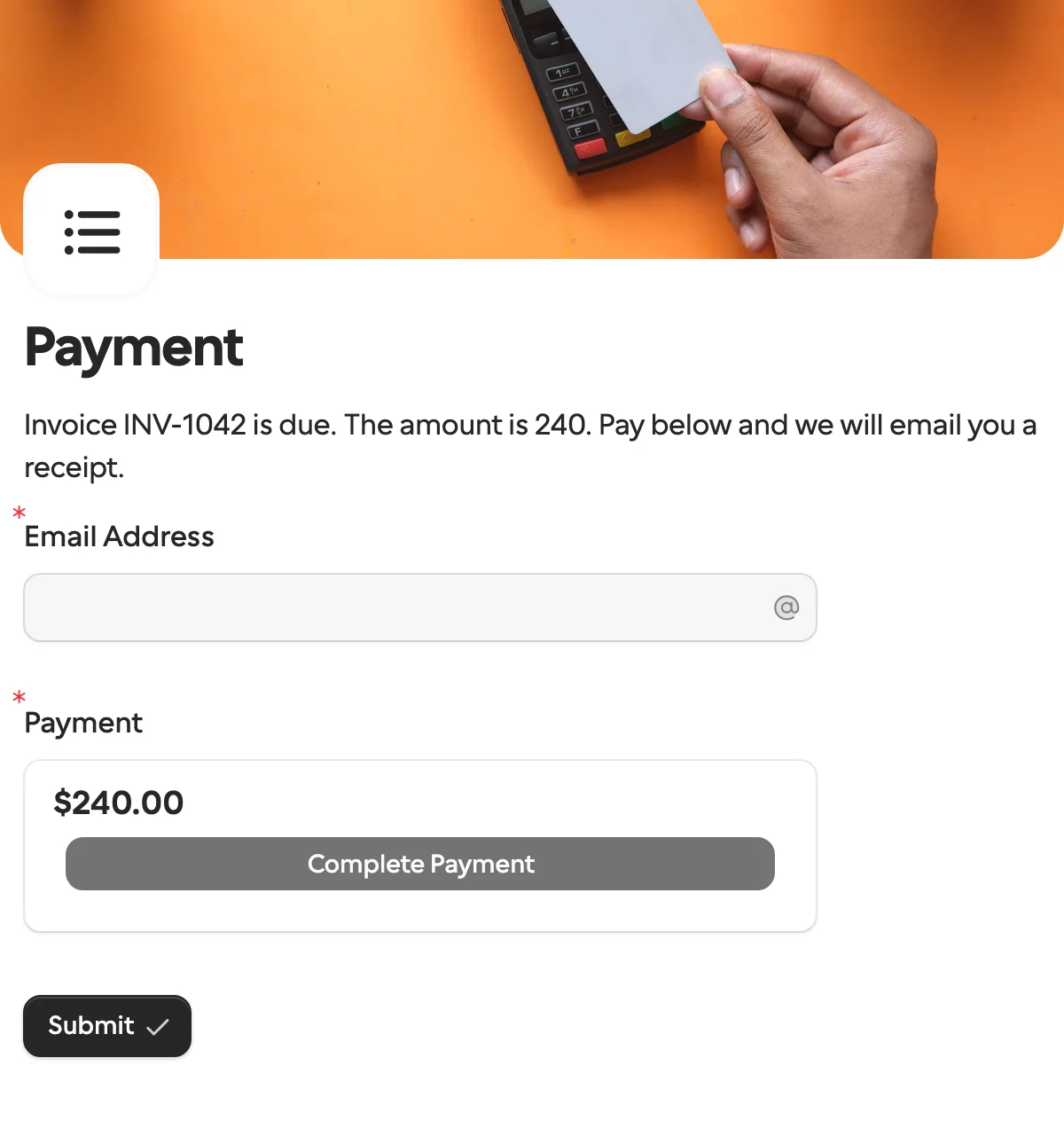
What it asks
| Question | Field key |
|---|---|
| Email Address | email |
| Payment (charges the amount you send) |
How the amount gets there
Two hidden fields, invoice_number and amount, are set on the request and cannot be changed by the recipient. A logic rule charges the amount you sent, so one form works for every invoice.
What the recipient sees
Their invoice number and the amount, written into the intro from the two hidden fields, an email question for the receipt, and the card form. The page carries your logo and cover photo, and the charge goes through your own Stripe account. There is no account to make and nothing to type except a card.
How to use it
- Select Use this template, then connect your Stripe account.
- Publish it, and create a request with the invoice number and amount as request context.
- Send the link. When they pay, the request completes and your workflow can mark the invoice as paid.
What to change
- Currency. The payment question starts in US dollars. Change it on the question; Stripe payments work in 15 currencies on every plan.
- What it is for. Add a line of text, or a Documents question with the invoice PDF attached per request, so the person sees what they are paying for before they pay.
- The receipt address.
emailis there so you have an address for the receipt. Prefill it and lock it when you already know it. - More than one amount. The rule charges whatever
amountholds, so one form covers every invoice. For a choice between fixed amounts, replace the hidden field with a dropdown and a rule per option.
Send it from a workflow
The invoice number and the amount travel as request context, which the recipient sees but cannot change. The email is prefilled so the receipt goes to the right place.
{
  "method": "requests.create",
  "params": {
    "formId": "j57...",
    "recipient": { "email": "ada@acme.example", "name": "Ada Lovelace" },
    "context": { "invoice_number": "INV-2041", "amount": 240 },
    "prefill": { "email": "ada@acme.example" },
    "readonly": ["email"],
    "delivery": "email",
    "externalId": "INV-2041",
    "callbackUrl": "https://automation.example/webhook/INV-2041"
  }
}
The request completes when the payment goes through, and the callback returns context.invoice_number and context.amount unchanged, which is what your accounting step marks as paid. answers.payment carries the Stripe side: status: "paid", the amount, the currency and a receipt URL. The amount is in the currency’s main unit: 240 is $240.00. An unpaid request expires after 30 days unless you set expiresAt, and sends request.expired, so you can chase it another way.
When another template fits
- Invoice verification when the supplier should confirm the figures before anyone pays.
- Client intake and onboarding with a payment question added, to take a deposit along with the details and the signature.
- Approval when the amount needs a yes before it is charged.
More templates
- Vendor onboardingCompany, tax and bank details, a registration document and a signature.
- Client intake and onboardingContact and billing details, terms and a signature from a new client.
- Document collectionAsk one person for files, with your own paperwork attached.
- ApprovalApprove, decline or request changes, signed on approval.
- Invoice verificationHave a supplier check what your AI read from their invoice.
- Employee onboardingPersonal details, emergency contact and preferences from a new hire.
- Job applicationCandidate details, experience, resume and availability.
- Contact formName, email and a message, from anyone on your site.
- Lead generationA demo request with company details, straight into your CRM.
- Appointment bookingPick a service and a time from your live calendar, in one form.
- Support requestA ticket with category, priority, description and a file.
- Event registrationAttendee details and dietary requirements, from anyone with the link.
- RSVPA yes or a no, with a meal choice for every guest they bring.
- Quick feedbackA five-star rating and an optional comment, done in ten seconds.
- NPS surveyThe 0 to 10 question, the reason, and what could be better.
Questions about this template
Something else on your mind? The docs cover every setting, and we answer email.
No. Payments go to your own Stripe account, and Formstep takes no cut. Stripe’s own fees still apply.
No. Formstep collects one-time payments only.
Stripe payments are on every plan, including Free, in 15 currencies. The template starts in US dollars, and you change the currency on the question.
The invoice or reference number, the amount, an email address for the receipt, and the payment itself. The invoice number and amount are set on the request, so the person paying cannot change them.
