

Support request form template
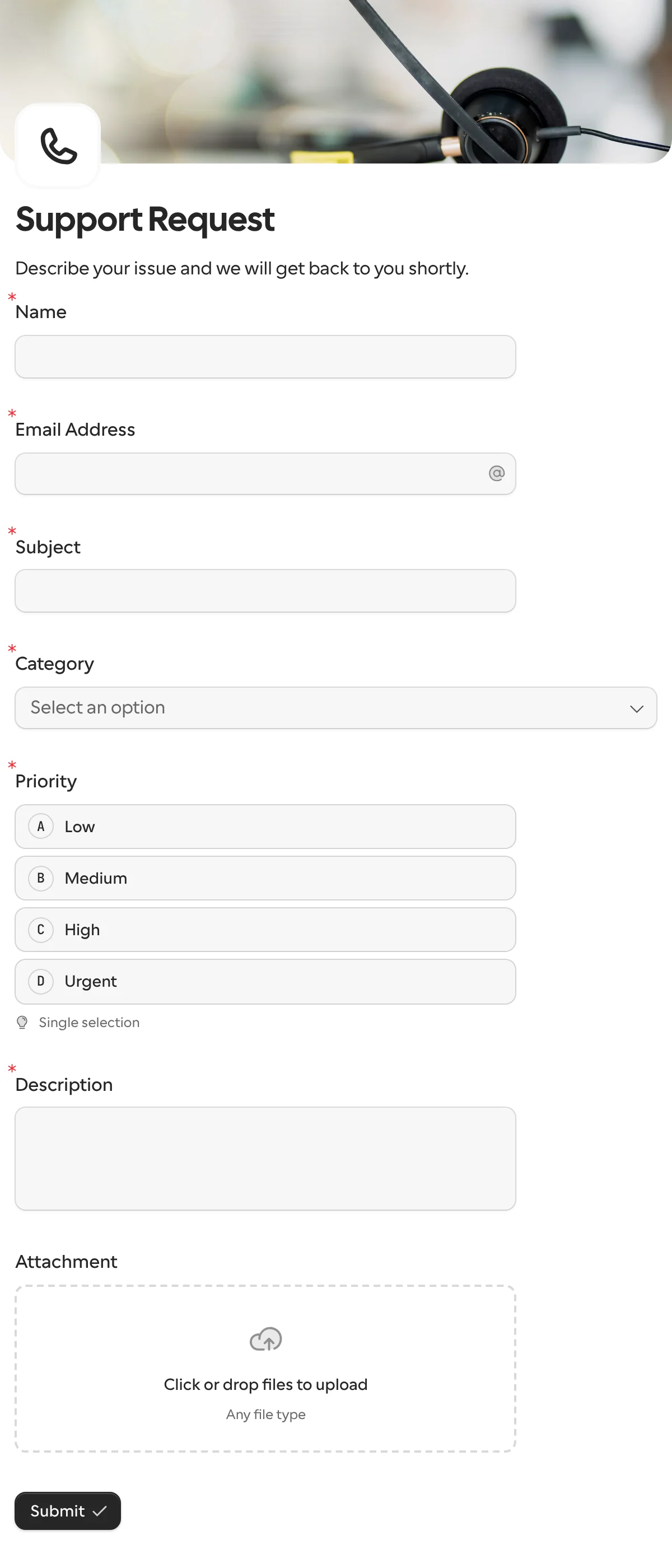
A support request form, or support ticket form, asks what is wrong, how urgent it is and for a screenshot, so the first reply can be an answer instead of a question. Each ticket can open an issue in your tracker the moment it is sent.
Updated
Opens in the editor. No account needed to try it.
What it asks
| Question |
|---|
| Name |
| Email Address |
| Subject |
| Category (technical issue, billing, account access, feature request or general) |
| Priority (low, medium, high or urgent) |
| Description |
| Attachment (file upload, optional) |
This one is a public form
The request templates here go to one known person. A support form is the opposite: any customer opens it from your help page, so you share its link or embed it instead of sending a request. When you need one more thing from one customer later, that is a request.
How to use it
- Select Use this template, and rename the categories to how your team sorts work.
- Publish it, and link it from your help page or embed it there.
- Connect Linear or GitHub Issues, so each ticket is an issue with the description and the file in it, or Slack for a channel.
What to change
- The categories. Technical Issue, Billing, Account Access, Feature Request and General are a starting point. Match them to your tracker’s labels, and the issue is sorted on arrival.
- Priority. Keep it if customers choose sensibly where you work; drop it if everything arrives as Urgent, and set it in the tracker instead.
- The account. Add an order number or account email if the team needs it before they can look. A hidden field can carry a logged-in customer’s id when you embed the form in your app.
- The reply. Edit the thank-you page to state a response time, and turn on the confirmation email so the customer has a copy of what they sent.
Where the tickets go
Each ticket comes back under keys derived from the titles, such as subject, category, priority and description, with the attachment as a file. A choice answer arrives as the option’s key, so a webhook or an n8n workflow can branch on urgent without reading a label. For the record, Google Sheets or Airtable keep every ticket in a table.
When another template fits
- Contact form when a name, an email and a message are enough.
- Document collection when you need files from one specific customer to solve their case, with reminders until they arrive.
More templates
- Vendor onboardingCompany, tax and bank details, a registration document and a signature.
- Client intake and onboardingContact and billing details, terms and a signature from a new client.
- Document collectionAsk one person for files, with your own paperwork attached.
- ApprovalApprove, decline or request changes, signed on approval.
- Payment requestShow an invoice number and amount, then take the payment.
- Invoice verificationHave a supplier check what your AI read from their invoice.
- Employee onboardingPersonal details, emergency contact and preferences from a new hire.
- Job applicationCandidate details, experience, resume and availability.
- Contact formName, email and a message, from anyone on your site.
- Lead generationA demo request with company details, straight into your CRM.
- Appointment bookingPick a service and a time from your live calendar, in one form.
- Event registrationAttendee details and dietary requirements, from anyone with the link.
- RSVPA yes or a no, with a meal choice for every guest they bring.
- Quick feedbackA five-star rating and an optional comment, done in ten seconds.
- NPS surveyThe 0 to 10 question, the reason, and what could be better.
Questions about this template
Something else on your mind? The docs cover every setting, and we answer email.
Yes. The Linear and GitHub Issues integrations open one issue per submission, with a title and body you write and the answers inserted, including the file as a download link. Slack and Discord post it to a channel instead.
Yes. The attachment question takes files up to 1 GB each, and you choose which types and how many. It is optional in this template.
Yes. In Slack, mention a different person per category with logic on the form, or send urgent tickets to a second channel. A webhook or Zap can branch on the answer, which comes back as the option’s key.
A way to reach the person, what it is about, how urgent it is, a description and a place for a screenshot. Ask for the account or order number only if your team needs it to start.
