

ChatGPT Business Agents: what happens after the chat
A ChatGPT Business Agent answers questions, but OpenAI does not share the chat with you. How to hand the customer to an intake form. Checked 10 November 2026.
By Onur Hakbilen, founder of Formstep · Published · Updated
On 10 November 2026 OpenAI launched Businesses in ChatGPT in beta. A business can claim its profile, and an eligible one can publish a Business Agent: a chat inside ChatGPT that answers a customer’s questions about what the business offers.
That covers the questions. Then the customer says “fine, I want this”, and someone still has to get their details, a document, a signature or a deposit. The agent’s chat does not do that for you, because OpenAI does not share it with the business.
Business Agents are open to businesses in the United States only, and Formstep is made in Norway, so I have not published one. Everything below about ChatGPT comes from OpenAI’s announcement and its policy pages as they read on 10 November 2026.
In short: A Business Agent answers questions and may give the customer a link. What the customer tells it stays in ChatGPT. Put a form behind that link, and the customer gives you their details, files and signature themselves.
What a Business Agent is
A business starts in Business Hub, where it claims its profile. Once OpenAI has verified it, the business can update its details and add a product feed, and its profile in ChatGPT shows a blue check. OpenAI’s page for businesses says claiming does not guarantee higher placement or more sales.
After that, an eligible business can build, test and publish an agent. When the business appears in a ChatGPT answer, a person can open its profile and start a conversation with the agent. That conversation is labeled, and it is separate from the person’s own ChatGPT conversation.
On the day of the announcement, agents were open to eligible ecommerce and online service businesses in the United States. The Business Agents policy adds that OpenAI looks at the business category and the agent’s intended use, and that verification alone does not guarantee an agent.
What the agent does not hand you
Four things, all from the announcement and the policy.
- The chat. OpenAI says it does not share users’ conversations or Business Agent chats with businesses. Business Hub shows aggregated insights: mentions, website clicks and the topics where your website is cited, and only above certain thresholds.
- More than contact details. An agent may offer an optional follow-up and collect the contact details it needs, through a feature OpenAI approves, when the user chooses to give them.
- An action taken for the customer. An agent may not pass a user’s information to the business, or submit a form, a booking or a purchase for them, without explicit authorization through an approved feature.
- High-risk information. An agent may not ask for health details, protected traits, government IDs, or financial or login credentials.
So a good conversation leaves you with a customer who is ready, and at most their contact details.
The next step is a link
The same policy says an agent may give a relevant link that the user chooses to visit, as long as the agent does not misrepresent where it leads.
For a shop, that link is easy: the product page and the checkout. For a service business there is often no such page. The next step is an intake: who the customer is, what they need, a file, a time, a signature, sometimes a deposit. Most businesses handle that with an email thread.
A form does it in one visit. The customer fills it in and sends it to you themselves, so the agent never passes their information on, which the policy allows only through an approved feature.
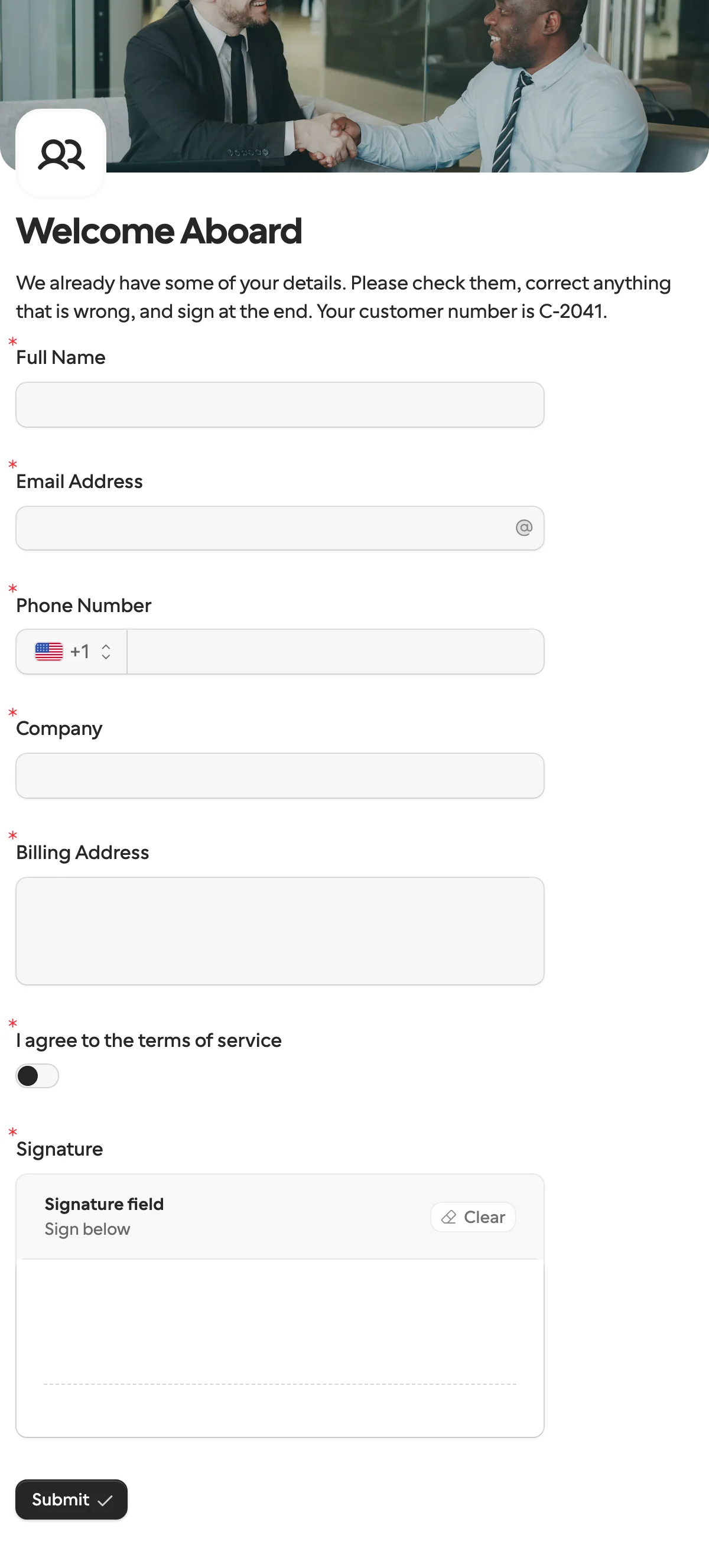
What a customer could open from the agent’s link: a form in a browser, with no account. This is the client intake template.
What the chat does and what the form does
The ChatGPT column comes from OpenAI’s pages, and Formstep’s from our pricing and docs, all checked on 10 November 2026.
| What you are comparing | Business Agent chat | Formstep form behind the link |
|---|---|---|
| Who gets the answers | Only what the user agrees to share; never the chat itself | You, as a submission in your inbox |
| What it can collect | Contact details, through a feature OpenAI approves | More than 20 question types, with files, signatures, payments and scheduling |
| Whose brand | A labeled conversation inside ChatGPT | Your logo, cover and theme; your own domain on Pro |
| What happens next | The customer decides whether to follow a link | The submission goes to Slack, HubSpot, a sheet or a workflow the moment it arrives |
| What you can measure | Aggregated mentions, clicks and topics, above a threshold | Which submissions came from the agent; views and starts per share link on Pro |
| What it costs | Not stated in the announcement | One unit of the monthly allowance per submission; Free includes 1,000 a month |
How to set it up
1. Build the form, or start from a template. The client intake template asks for contact and billing details, your terms and a signature. There are also templates for lead generation, appointment booking, document collection and a payment request.
2. Give ChatGPT its own share link. Publish the form, open Public link and click Create new link. Name it ChatGPT. The public link guide has the steps.
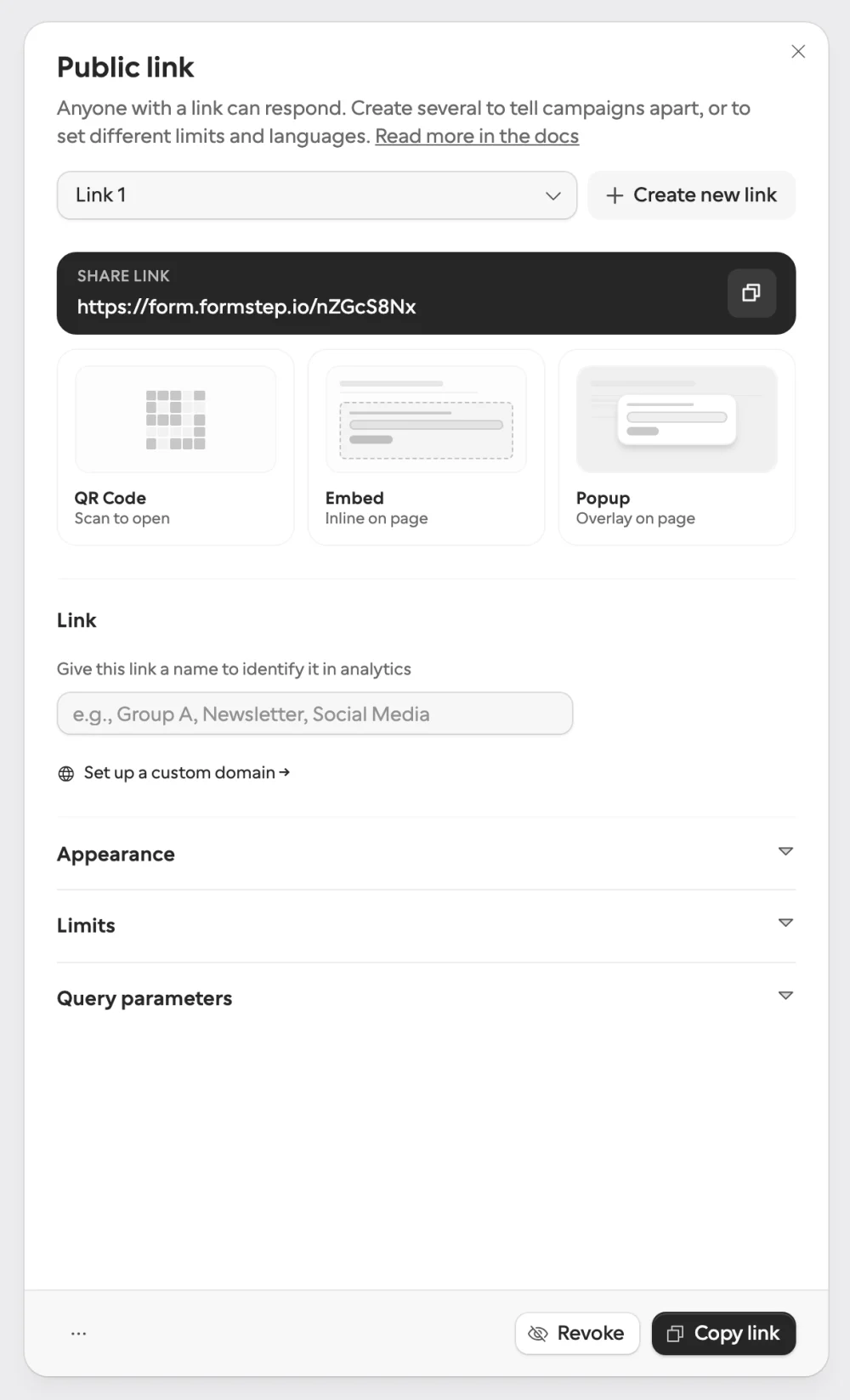
The Public link panel. Create new link gives the agent a link of its own, and the name tells it apart in analytics.
To see which submissions came from the agent, add a hidden field named utm_source to the form and set this query parameter on the link:
utm_source=chatgptThe value is saved with each submission, on every plan. On Pro and Business, analytics also shows views and starts for each share link, so you can see how many people opened the form from the agent and left.
3. Give the agent the link. The policy lists links among the things a business provides to its agent. I have not seen that screen in Business Hub, so I cannot tell you which field it goes in. Describe the link as what it is: your intake form, and roughly how long it takes.
4. Send the answers where you work. Connect Slack, HubSpot or Google Sheets, or post each submission to a webhook that starts a workflow.
5. Follow up with a request. After the first submission you know who the customer is. When you need a second thing from that one person, such as a signed contract or a missing document, send a request: a link for them alone, with what they already told you filled in. A workflow in n8n or Zapier can send it when the submission arrives. On Pro and Business, Formstep emails the invitation and the reminders.
What not to put behind the link
The policy says an agent’s link must not be used to get around the rules on collecting personal information. I read that as: do not have the agent steer people to a form that asks for what the agent itself may not ask for. That means no health details, no government IDs, no bank or login credentials as a step in a sale.
Two habits keep you clear of it. Ask only for what the next step needs, and make the agent’s description of the link match the form.
Formstep draws a similar line. Our terms rule out regulated sensitive data such as health records, and card details go through the Payment question, where Stripe collects them and Formstep receives only a reference such as the last four digits. I am not a lawyer. Read OpenAI’s policy before you publish an agent.
Where you do not need Formstep
- You sell products. A product feed and your checkout are the next step. Shopify merchants can connect their store from Business Hub, and their products reach ChatGPT through Shopify’s catalog.
- You only want to call the customer back. A name and an email address are contact details, and OpenAI has its own feature for those.
- You are outside the United States, or outside the eligible categories. There is no agent to link from yet. Claiming the profile is open more widely, to eligible businesses with a website, wherever ChatGPT is offered.
I could not check whether an agent can call a service of yours. OpenAI’s terms for businesses define an Action as an API, website or service enabled to interact with a Business Agent, and they put custom apps and connectors built for an agent under OpenAI’s terms for app developers. If an agent can call an Action, it could create a request itself, as other AI agents do through Formstep’s MCP server. I have not seen where Business Hub offers that, so I do not know that an agent can do it today.
How we checked
We read OpenAI’s announcement, its page for businesses, its Business Agents policy and its terms for businesses on the date above. We did not build or test an agent, and we did not see the agent builder in Business Hub. The product is in beta and OpenAI says more markets and categories will follow, so details will change. If something here is out of date, tell us through Contact support in the footer.
The client intake template is the quickest form to put behind the link, and the other templates cover booking, documents and payments.